
What's new

how do I pull node wireless data from main router in a script

JB_1366

Occasional Visitor
Im running this script manually on my node, and manually uploading node_upload.txt to my main router. is there a way to automate the process, so i can just run my script on router to use node_upload.txt and apply results? A direct pull of variables would be great, if possible.
 
Last edited:
If you're running Merlin on the node couldn't you write a script that you execute on the router that would SSH into the node, run the script you pasted above, and have the output piped to a local file?
 
If you're running Merlin on the node couldn't you write a script that you execute on the router that would SSH into the node, run the script you pasted above, and have the output piped to a local file?
If you have a way, I'm listening. Gemini-AI tried for me for hours, would not ssh-authenticate between routers, and I tried with ssh-key and password. if router could ssh into node, I could bypass script and just pull wireless variables. ASUS might have it locked down.
 
Last edited:
If you have a way, I'm listening. Gemini-AI tried for me for hours, would not ssh-authenticate between routers, and I tried with ssh-key and password. if router could ssh into node, I could bypass script and just pull wireless variables. ASUS might have it locked down.

Edit: FYI I just used Putty to SSH into my main router and then did command-line SSH to go from there into one of my nodes (main router is Merlin, node is Asus stock firmware), so it does work.
 
Last edited:
I can ssh into router, then from there to node, both running Merlin.

Make sure allow password login is enabled in the SSH config on the router.
 
@r80xcore is using SSH in his VLAN AddOn to pull data from nodes (I believe he's connecting using SSH keys pairs) so I'd suggest sending him a message, he can probably give you guidance on how to do it.
 
GROK gave me a ssh program called EXPECT, worked perfectly. i can now extract wireless data on node automatically.
 
Last edited:
GROK gave me a ssh program called EXPECT, worked perfectly. i can now extract wireless data on node automatically.

*** THREAD CLOSED ***
I'd suggest you lay out how you installed expect in case anyone runs across this thread in the future and wants to duplicate what you're doing.
 
EDIT: Heres my hard fought AI coding result thanks to GROK(ECPECT) & GEMINI(CODING) - all automated. mac address below randomised for your pleasure

Screenshot 2026-02-26 130640.png

Screenshot 2026-02-26 222230.png

click wired button on top to toggle wired list, ip/mac toggle, all columns sortable
Screenshot 2026-02-26 222852.png
 
Last edited:
I can ssh into router, then from there to node, both running Merlin.

Make sure allow password login is enabled in the SSH config on the router.

Note passwordless ssh login of the nodes is possible but it takes some extra steps such as creating a ssh key pair and then putting the public key in the "Authorized Keys" field in the UI. This info is then distributed to the nodes.
 
Note passwordless ssh login of the nodes is possible but it takes some extra steps such as creating a ssh key pair and then putting the public key in the "Authorized Keys" field in the UI. This info is then distributed to the nodes.
Are there any simple steps written down anywhere for this already (I could use AI I guess).

I looked at doing it at one stage and saw it wanted to use an opkg package which I was a bit wary of as I didn’t want to stuff up my entware install, so I never got around to it. The need for it actually passed.
 
Are there any simple steps written down anywhere for this already (I could use AI I guess).

I looked at doing it at one stage and saw it wanted to use an opkg package which I was a bit wary of as I didn’t want to stuff up my entware install, so I never got around to it. The need for it actually passed.
I just spent 2hrs with AI, couldnt get it to work.
 
Sorry, I can't find reference right now - I created them a while back. But from memory it was something like:
Code:
dropbearkey -t rsa
-f ~/.ssh/id_rsa -s 3072

Note you have to save and restore the ~/.ssh directory after reboot since the home directory is in tmp.
 
I just spent 2hrs with AI, couldnt get it to work.

OK ta. I asked my AI, might test it later.
Seems relatively straightforward.
 
Looks like it does want the private key as id_dropbear though. So need this too:
Code:
cp ~/.ssh/id_rsa ~/.ssh/id_dropbear
 
I just spent 2hrs with AI, couldnt get it to work.
Try this. Maybe my AI is better than your AI... :-). Comamnds below for ease of copy paste.
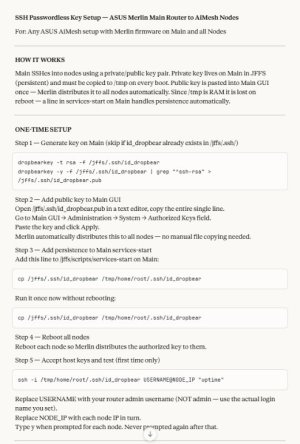
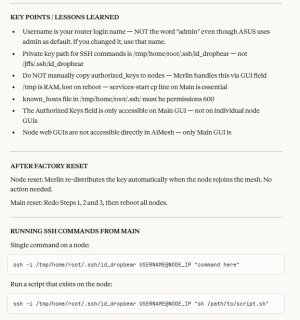
As regards getting the RSSI values, I have a script which does that by leveraging the individual scripts (which do that) on each node.
You can DM for a copy but you can probably get your AI to write it for your system, using vibe-coding.

Step 1
Code:
dropbearkey -t rsa -f /jffs/.ssh/id_dropbear
dropbearkey -y -f /jffs/.ssh/id_dropbear | grep "^ssh-rsa" > /jffs/.ssh/id_dropbear.pub

Step 3
Code:
cp /jffs/.ssh/id_dropbear /tmp/home/root/.ssh/id_dropbear

Step 5 (one at a time; answer y as a one-off)
Code:
ssh -i /tmp/home/root/.ssh/id_dropbear [email protected] "uptime"

HTH

k.
 

Attachments

  • SSH_KeySetup_HowTo_Gen.jpg
    SSH_KeySetup_HowTo_Gen.jpg
    76 KB · Views: 5
  • SSH_KeySetup_HowTo_Gen_Commentary.jpg
    SSH_KeySetup_HowTo_Gen_Commentary.jpg
    70.8 KB · Views: 5

Similar threads

Latest threads

Support SNBForums w/ Amazon

If you'd like to support SNBForums, just use this link and buy anything on Amazon. Thanks!

Sign Up For SNBForums Daily Digest

Get an update of what's new every day delivered to your mailbox. Sign up here!

Members online

Back
Top