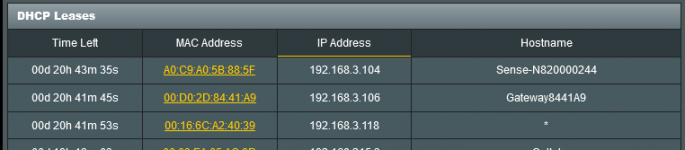
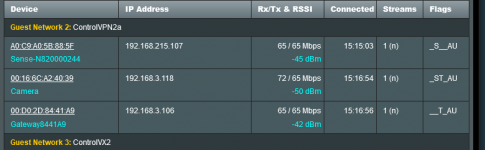
The IP address table set in Yazfi for the wireless network i.e. 192.168.5.0 . when i client connects it is issued an ip
of 192.168.102.* . which is what it would get under the stock asus firmware . Using ASUS RT-AC86U , ASUSWRT-Merlin
386.2_4 , YazFi v4.2.0
First, stupid question time. Is the client connecting to the Guest Wifi or the main LAN WiFi? Couldn't hurt to double check to ensure that the WiFi client is connecting to the correct Guest WiFi.
How is your Guest WiFi set up? Are you using Guest #1 or additional Guest's networks. Which one is the problematic wifi client connecting too?
Are there any additional devices on the same Guest WiFi network and do they exhibit the same problem?
What does the SSH YazFi CLI interface show for connected devices? Is it showing the correct devices connected?
Does running
cat /var/lib/misc/dnsmasq.leases via SSH on the router show the correct IP address assignments for Guest WiFi devices?
Are any other addon scripts being run on the router?
As a troubleshooting step have you tried forgetting the WiFi connection entirely on the problematic WiFi client. Then creating a new connection to the Guest YazFi WiFi.
Another troubleshooting step, if you haven't tried it already, is to uninstall YazFi, reboot the router, then reinstall YazFi and see if the issue persists with the one Guest WiFi client.
And as others have pointed out or alluded to. Don't use the Network Map page to view YazFi Guest client IP addresses. Use either the System Log > WiFi Log page, or use the YazFi CLI (option #2) via SSH, or use
cat /var/lib/misc/dnsmasq.leases via SSH to the router.