
What's new

Intermittent net dropout RT-AX86U Pro

SteevieWeevie

Occasional Visitor
Hi all,

This problem began in March and previous to this had never happened in the 3 years of using this router. First time it happened I was away on holiday and noticed my home security cameras were showing offline. When I got back all the lights on the router were normal, same with ONT, wifi networks were up but there was no internet. I power cycled the ONT and this resolved the issue. It's happened twice again since, but the last time instead of power cycling I just removed the ethernet cable from the ONT and re-inserted it and it fixed the issue. The time between the occurrences so far seems to be around 2 weeks.

I can't see anything in the router log when it occurs but don't know what to look for. Any ideas?
 
Which port are you using for WAN? The 1 GB or the 2.5 GB? Check the WAN cable and make sure it is not CCA and maybe replace it with a new CAT 5e.
 
If that doesn't do it, call the ISP and ask them to replace the ONT. But call them when the issue is present so they can try troubleshooting online first as they will usually require it.

It could also be the port used for the WAN cable on the ASUS. There have been other threads about similar issue.
 
Which port are you using for WAN? The 1 GB or the 2.5 GB? Check the WAN cable and make sure it is not CCA and maybe replace it with a new CAT 5e.
Hi. I was using the standard WAN port but have switched to the 2.5gb port on your and degrub’s suggestion. I will wait and see if it happens again. If not I’ll assume it’s a failing port.

The cat5 cable I’m using is copper according to the packaging. That will be the next change I apply if it happens again.

Thank you both.
 
I was using the standard WAN port but have switched to the 2.5gb port on your and degrub’s suggestion.
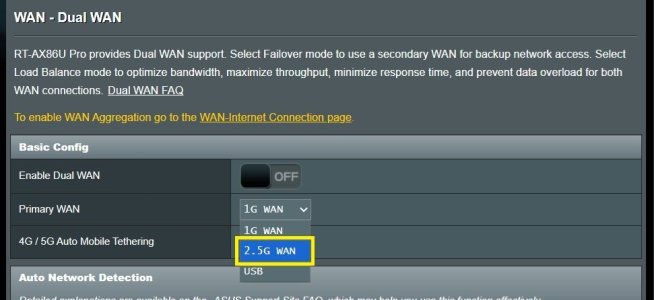
Dumb question time. When you changed the WAN from the 1GB WAN port to the 2.5GB LAN/WAN port, did you also change the Primary WAN setting in the router GUI > WAN > Dual WAN to match? Did you inadvertently enable Dual WAN?

Example from stock Asus firmware on a RT-AX86U Pro, should be the same/similar for Asus-Merlin firmware.

dualwan.jpg
 
Dumb question time. When you changed the WAN from the 1GB WAN port to the 2.5GB LAN/WAN port, did you also change the Primary WAN setting in the router GUI > WAN > Dual WAN to match? Did you inadvertently enable Dual WAN?

Example from stock Asus firmware on a RT-AX86U Pro, should be the same/similar for Asus-Merlin firmware.

View attachment 71272
No. As per your screenshot I changed the primary WAN to 2.5G. The “enable dual WAN switch is still OFF. The router rebooted to apply the settings and I’m connected again and typing this message via the wifi connection.
 
Hi. I was using the standard WAN port but have switched to the 2.5gb port on your and degrub’s suggestion. I will wait and see if it happens again. If not I’ll assume it’s a failing port.

The cat5 cable I’m using is copper according to the packaging. That will be the next change I apply if it happens again.

Thank you both.
No, I didn't recommend the 2.5 GB port. Just asked which you were using. In fact I recommend not using it!
Do not rely on the packaging. Look at the markings on the cable in the lay line. I am using CAT 5 between my ONT and router. There is about 50 ft of cable which I made up. Yes, CAT 5 is still good for a 1 GB connection in spite of what the web experts say!
 
No, I didn't recommend the 2.5 GB port. Just asked which you were using. In fact I recommend not using it!
Do not rely on the packaging. Look at the markings on the cable in the lay line. I am using CAT 5 between my ONT and router. There is about 50 ft of cable which I made up. Yes, CAT 5 is still good for a 1 GB connection in spite of what the web experts say!
Oops! Is there a reason you don't recommend the 2.5gb port? It was previously unused.

The ONT has recognised the 2.5gb connection as the data indicator has changed from green (1gb) to amber (2.5gb). I've yet to speed test from the router but anecdotally it feels as fast / responsive as when using the other port.

When I get home from work I'll check the cable itself for copper / CCA. Out of interest what's the big difference? I'm using flat cable which I've pushed between the carpet edge and skirting board. It isn't subject to any force and is untouched in it's run from the ONT to the router which is only about 8m at a guess.
 
Oops! Is there a reason you don't recommend the 2.5gb port? It was previously unused.

The ONT has recognised the 2.5gb connection as the data indicator has changed from green (1gb) to amber (2.5gb). I've yet to speed test from the router but anecdotally it feels as fast / responsive as when using the other port.

When I get home from work I'll check the cable itself for copper / CCA. Out of interest what's the big difference? I'm using flat cable which I've pushed between the carpet edge and skirting board. It isn't subject to any force and is untouched in it's run from the ONT to the router which is only about 8m at a guess.
I have had issues with the 2.5 GB port on my two AX86U Pro. I have tried to use ir for backhaul and it works sometimes. I have used CAT5e and CAT6 cable with no long term success. All the other router ports are rock solid. The flat cable could be an issue and while makes for clean cosmetics it may not perform as well as standard UTP cable. Copper Clad Aluminum cable also does not perform well and the wires will break with bending and flexing faster than copper.
 
I had a similar issue with the same router. You wouldn't happen to be running the NextDNS cli would you? If so update it to the latest. There was a bug that caused the resolver to drop and not know where to send packets and was only fixed by restarting nextdns
 

Similar threads

Support SNBForums w/ Amazon

If you'd like to support SNBForums, just use this link and buy anything on Amazon. Thanks!

Sign Up For SNBForums Daily Digest

Get an update of what's new every day delivered to your mailbox. Sign up here!
Back
Top