What's new

LED control - LEDs won't stay off after a reboot

Ubimo

Very Senior Member
Hello
I want the LEDs to stay off, but after a reboot the LEDs are back on.
How can I assure the LEDs stay off, even after a reboot?
Please help.
 
What router? What firmware? How are you turning them off?
 
AC68U, latest Merlin, with LED control script, I manually turn off the LED. Until a reboot, all LED light up again.
 
What is the latest RMerlin (many flavors out right now) for you?

What control script are you using? When you say manually, is that with a hardware button or using the script?

More details are required here. :)
 
Hello
I want the LEDs to stay off, but after a reboot the LEDs are back on.
How can I assure the LEDs stay off, even after a reboot?
Please help.
Are you disabling it manually in amtm? Then it will tell you the setting is volatile, meaning it will not survive a reboot.
 
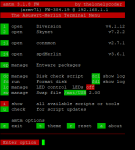
I installed the LED control script, see attachment.
I disabled the LEDs in "lc" manually to "off".
After a reboot the LEDs are on again. How do they stay off?
 

Attachments

  • router.PNG
    router.PNG
    19.1 KB · Views: 198
In that case, amtm sets it in the routers NVRAM, you can check the setting in Administration/System/Disable LEDs, it will be set to YES and will survive a reboot.
 
I installed the LED control script, see attachment.
I disabled the LEDs in "lc" manually to "off".
After a reboot the LEDs are on again. How do they stay off?
What router model? The field is blank or redacted in the amtm header.
 
@dave14305 he responded above that it is an RT-AC68U.
 
Black electrical tape? :)
 
Thanks for you responses, LEDs are/stay off now.
I don't know why though. :)
 

Similar threads

Latest threads

Support SNBForums w/ Amazon

If you'd like to support SNBForums, just use this link and buy anything on Amazon. Thanks!

Sign Up For SNBForums Daily Digest

Get an update of what's new every day delivered to your mailbox. Sign up here!
Back
Top