Use non-standard ports, so bot traffic will not constantly hit it.
Also if your router supports it, set up your port forward to only allow traffic from your work's IP address. This is possible with Asus routers, don't know about other manufacturers.
I use these two methods here to secure remote access to my own NAS (to which I have a VPS dropping weekly backups over FTP).
Not sure about Synology specifically,but in general, the vpn implementation in the NAS units I've seen sucks, is old, and full of vulnerabilities, degrades performance, few options. I stick with running it on the router (best placed to protect your network) or move it to its own hardware such as the RPi4.
Hi all. I'm new here, so apologies if this is posted in the wrong place. I recently added a Synology NAS to my home network. It has a dedicated IP that is entirely detached from all my other network hardware. The NAS is used as a backup server for an identical unit at my business address and...
Thanks again for your input. You may be correct about the aggregation on my home unit. The aggregation on the business unit is necessary though for sufficient bandwidth to serve video to multiple edit machines at once.
TBH I'm not too bothered about the transfer speed between units currently, my focus is ensuring my home unit is secure.
number 4 below might be a winner. just posting some changes I made on my NAS that I can see.
1 Merlin mentioned non standard ports.
2 disable the default admin user and create a new admin. You can use 64 characters for user if you'd like
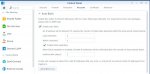
3 enable the auto block.
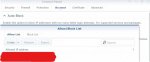
4 allow/block IPs.