What's new
  • SNBForums Code of Conduct

    SNBForums is a community for everyone, no matter what their level of experience.

    Please be tolerant and patient of others, especially newcomers. We are all here to share and learn!

    The rules are simple: Be patient, be nice, be helpful or be gone!

ProtonVPN Wireguard connecting but no change to external IP

lcalamar

Occasional Visitor
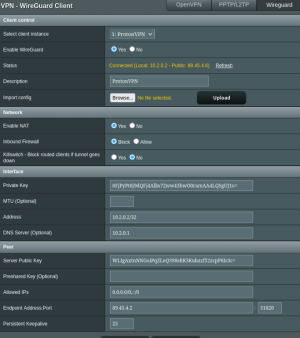
I am followed instructions to add ProtonVPN to my Asus RT-AX86U pro.... (downloaded a config file from ProtonVPN - uploaded it into VPN Director... enabled...

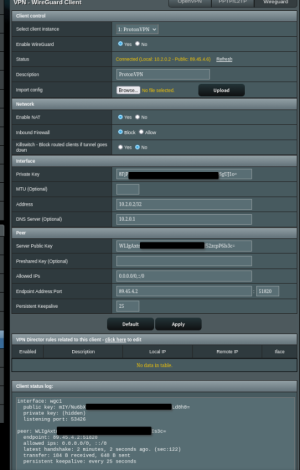
It looks as if I'm connected ok - but my external IP never changes... (log below). I tried removing my DNS entries also but that didn't help.

Not sure what else to try?
 

Attachments

  • VPN Director - Wireguard ProtonVPN.png
    VPN Director - Wireguard ProtonVPN.png
    118.6 KB · Views: 48
  • VPN client - Wireguard ProtonVPN.png
    VPN client - Wireguard ProtonVPN.png
    104.2 KB · Views: 52
Not sure what else to try?
Post your VPN Director configuration. It is likely that you have not configured (or misconfigured) VPN Director rule(s) to route either the client or entire network through the ProtonVPN tunnel.
 
You need to create a VPN Director rule to tell it which local IP addresses are to go through the VPN client.
 
Do you need to remove the private key in the first pic?

And how are you testing for the external IP address?
 
Post your VPN Director configuration. It is likely that you have not configured (or misconfigured) VPN Director rule(s) to route either the client or entire network through the ProtonVPN tunnel.
I see - I need to add a rule to direct my network through ProtonVPN tunnel...

... assume this is done in the client drop down? also - how can I route my entire network?
 
Do you need to remove the private key in the first pic?

And how are you testing for the external IP addrt
Do you need to remove the private key in the first pic?

And how are you testing for the external IP address?
The Private key came in the config file from protonvpn I uploaded... it looks to me as if I'm 'connecting' just nothing routing through the tunnel... I need to spend some time trying to figure out how to add my vpn director 'rules' to route either specific clients and/or all my traffic through the VPN tunnel
 
I see - I need to add a rule to direct my network through ProtonVPN tunnel...

... assume this is done in the client drop down? also - how can I route my entire network?
The VPN Director page's Add a Rule dialog box gives the user an example of how to route an entire network to the VPN tunnel:
* IP addresses can be entered in CIDR format (for example, 192.168.1.0/24).

Attached are some examples of how my VPN Director is configured to use the free version of ProtonVPN WireGuard. In my examples the router is 192.168.2.1 and set to WAN, and because I'm using 2 Pi-Holes on Raspberry Pi's, I have those routed to WAN and not through the ProtonVPN tunnel. These work for my use case. One will have to configure the rules for their own individual use case.

The VPN Director settings example:
VPN Director.jpg


ProtonVPN WireGuard Client page showing it connected with the public IP address the tunnel is using.
WireGuard Client.jpg


Web browser showing what my IP is with the ProtonVPN WireGuard tunnel active:
what is my IP.jpg
 
The VPN Director page's Add a Rule dialog box gives the user an example of how to route an entire network to the VPN tunnel:
* IP addresses can be entered in CIDR format (for example, 192.168.1.0/24).

Attached are some examples of how my VPN Director is configured to use the free version of ProtonVPN WireGuard. In my examples the router is 192.168.2.1 and set to WAN, and because I'm using 2 Pi-Holes on Raspberry Pi's, I have those routed to WAN and not through the ProtonVPN tunnel. These work for my use case. One will have to configure the rules for their own individual use case.

The VPN Director settings example:
View attachment 69126

ProtonVPN WireGuard Client page showing it connected with the public IP address the tunnel is using.
View attachment 69127

Web browser showing what my IP is with the ProtonVPN WireGuard tunnel active:
View attachment 69128
This is very helpful - thanks so much! Here are my use-case questions:

- Assume:
-- Router is at 192.168.1.100
-- server is at 192.168.1.201
-- TV is at 192.168.1.202
-- PC is at 192.168.1.202
WGC1: 80.64.50.10
Ext: ISP IP: 136.26.101.45

If I want my PC alone to use the vpn tunnel - then I'd create a rule that 'assigns' 192.168.1.202/24 to WGC1 (assuming WGC1 is my VPN tunnel client)
For my Server and TV I would assign 192.168.1.202/24 and 192.168.1.201/24 to WAN

If that is my only rule then all my traffic on my PC is using - 86.64.50.10 (vpn tunnel)
My TV, Server and Router are all using: 136.26.101.45

Sound right?
Why would I need/want to have a rule for my router to use WAN? what happens if I don't...

... basically what VPN director is doing (when enabled and connected) - is I now have 2 WAN ports... where WAN is my external ISP IP and WGC1 is my VPN Tunnel... if that assumption is correct then it sounds like I have to put a rule in for ALL my clients?
Is there a way to add a single rule so ALL clients are using the VPN tunnel? If I do that is there then a hierarchy to the rules? (meaning if my first rule is ALL clients > WGC1 but I add a 2nd rule where PC > WAN... does the 2nd rule still work (is it even allowed?)

 
If I want my PC alone to use the vpn tunnel - then I'd create a rule that 'assigns' 192.168.1.202/24 to WGC1 (assuming WGC1 is my VPN tunnel client)
For my Server and TV I would assign 192.168.1.202/24 and 192.168.1.201/24 to WAN
No. The /24 suffix routes everything in 192.168.1.* for a single device simply use its address, e.g. 192.168.1.202

There is a mistake in your post. You said your TV and PC have the same address.

Is there a way to add a single rule so ALL clients are using the VPN tunnel?
Yes, use 192.168.1.0/24

If I do that is there then a hierarchy to the rules? (meaning if my first rule is ALL clients > WGC1 but I add a 2nd rule where PC > WAN... does the 2nd rule still work (is it even allowed?)
See the documentation here: https://github.com/RMerl/asuswrt-merlin.ng/wiki/VPN-Director#rules-configuration
 
Last edited:
Is there a way to add a single rule so ALL clients are using the VPN tunnel?
As my post above indicates you would, in your case, use: 192.168.1.0/24 as the VPN Director rule Local IP field to route all LAN clients (192.168.1.x) through the WGC1 VPN tunnel.
 
As my post above indicates you would, in your case, use: 192.168.1.0/24 as the VPN Director rule Local IP field to route all LAN clients (192.168.1.x) through the WGC1 VPN tunnel.
Thanks all very very helpful - can't thank you enough.

I do have one (hopefully last) question.

My DHCP range is 192.168.1.2-192.168.1.254

My RT-AX68U is at 192.168.1.1... but my AI Mesh node is at 192.168.1.100 (I checked these forums and didn't see an easy way to change that...)

So if I put in a VPN Director Rule that includes my entire local network (192.168.1.2/24)... that would also include my AI Mesh node.

Based on the rules configuration I'd want to put a rule for 192.168.1.100 > WAN and then also likely 192.168.1.1 > WAN so my router and AI Mesh node are using WAN... Then I can add the 192.168.1.2/24 > WGC1

Sound like I have it?

The more I learn about this the more I like it! the control I have to route devices over VPN or not!

... though it doesn't look as if I can do the same at the application level if the PC the are running on is using WGC1.
 
but my AI Mesh node is at 192.168.1.100 (I checked these forums and didn't see an easy way to change that...)
You could create a DHCP reservation on the main router for the node's MAC address. But that's really here nor there.

So if I put in a VPN Director Rule that includes my entire local network (192.168.1.2/24)... that would also include my AI Mesh node.
Correct. Although strictly speaking the correct way of addressing an entire network is 192.168.1.0/24 as previously stated, not 192.168.1.2/24. But in practice they are the same.

Based on the rules configuration I'd want to put a rule for 192.168.1.100 > WAN
Maybe. What is your reason for having the node go through the WAN? The node itself generates almost no internet traffic.
 
The VPN Director page's Add a Rule dialog box gives the user an example of how to route an entire network to the VPN tunnel:
* IP addresses can be entered in CIDR format (for example, 192.168.1.0/24).

Attached are some examples of how my VPN Director is configured to use the free version of ProtonVPN WireGuard. In my examples the router is 192.168.2.1 and set to WAN, and because I'm using 2 Pi-Holes on Raspberry Pi's, I have those routed to WAN and not through the ProtonVPN tunnel. These work for my use case. One will have to configure the rules for their own individual use case.
Same story as for @lcalamar this time at RT-AX68U.
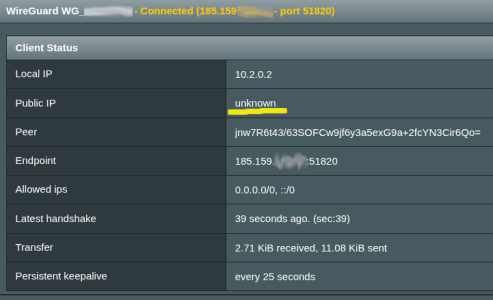
Could not make it get 'Public IP' in WG mode only.
OpenVPN runs for a few servers just fine.

Any hint on how to make it run?

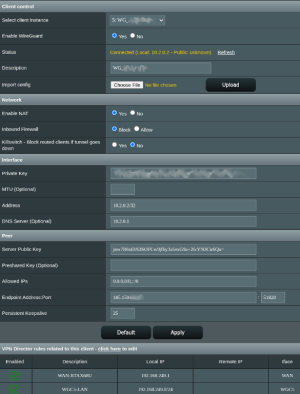
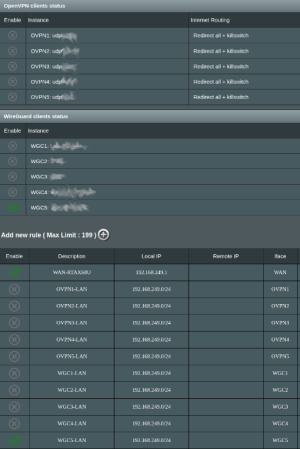
My configuration details:
 

Attachments

  • Screenshot From 2025-11-25 15-09-42.png
    Screenshot From 2025-11-25 15-09-42.png
    117.6 KB · Views: 21
  • Screenshot From 2025-11-25 15-09-09.png
    Screenshot From 2025-11-25 15-09-09.png
    115.3 KB · Views: 16
  • Screenshot From 2025-11-25 15-08-46.png
    Screenshot From 2025-11-25 15-08-46.png
    50.4 KB · Views: 24
Last edited:
Same story as for @lcalamar this time at RT-AX68U.
Could not get it get 'Public IP' in WG mode only.
OpenVPN runs for a few servers just fine.

Any hint on how to make it run?

My configuration details:
This doesn't sound anything like @lcalamar 's issue.

Despite the "unknown" message is the VPN tunnel working? If you go to www.whatsmyip.org does it show your real IP address of that of the VPN provider?
 
@user_20240830, lcalamar's issue is different. They are getting a public IP in their WireGuard configuration, but it appears their problem was their network clients were not being routed through the VPN tunnel due to either not having VPN Director rule(s) or a misconfiguration of the VPN Director rules.

For your no public IP issue in the WIreGuard client; are your LAN clients, when routed through the VPN WireGuard client via VPN Director rules, getting a public IP address other than the one your ISP is providing?

A basic troubleshooting step would be to delete all the VPN client configurations and delete all VPN Director rules. Start by adding a single WireGuard client configuration file from your VPN provider, then setup the rules for that one single client, then test. Seems that some are adding many VPN client configuration files and many VPN Director rules, then testing and finding they have issues. Simplify things and use just one single VPN client and only have rules for that one single client. In other cases the problem could be with the VPN client itself just not working at the time one is trying to use it.
 
@user_20240830, lcalamar's issue is different. They are getting a public IP in their WireGuard configuration, but it appears their problem was their network clients were not being routed through the VPN tunnel due to either not having VPN Director rule(s) or a misconfiguration of the VPN Director rules.

For your no public IP issue in the WIreGuard client; are your LAN clients, when routed through the VPN WireGuard client via VPN Director rules, getting a public IP address other than the one your ISP is providing?
Clients do receive ISP IP without VPN tunnel while WG use only.
OVPN connects properly with OVPN IP visible by all clients.
A basic troubleshooting step would be to delete all the VPN client configurations and delete all VPN Director rules. Start by adding a single WireGuard client configuration file from your VPN provider, then setup the rules for that one single client, then test. Seems that some are adding many VPN client configuration files and many VPN Director rules, then testing and finding they have issues. Simplify things and use just one single VPN client and only have rules for that one single client. In other cases the problem could be with the VPN client itself just not working at the time one is trying to use it.
I did it so many times!
I removed all the 'Rules' completely. I did assign WG clients one by one. I managed the rules all at once and one by one. Thought that 'check marks' on the left side in VPN-Director can properly disable/enable the whole Rules table...
 

Latest threads

Support SNBForums w/ Amazon

If you'd like to support SNBForums, just use this link and buy anything on Amazon. Thanks!

Sign Up For SNBForums Daily Digest

Get an update of what's new every day delivered to your mailbox. Sign up here!
Back
Top