
What's new

Replacing router in MoCA network

jshapir1

New Around Here
Hi there,
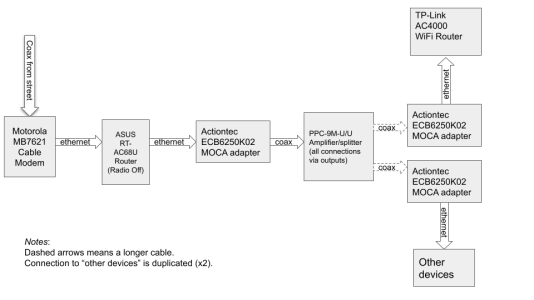
I have a home MoCA network. A wiring diagram is attached.
The ASUS RT-AC68U Router that I'm using is getting pretty old. Recently the network went down and we had to powercycle the router to bring the network back up, which makes me think maybe it is time for a replacement.
I am thinking about the TP-Link Archer BE3600 as a possible replacement. From the docs it looks like I can turn off the WiFi so that it functions similarly to how the ASUS RT-AC68U functions now.
Does anyone see an issue with the plan of replacing the ASUS RT-AC68U with the TP-Link Archer BE3600?
Thanks for your help!
 

Attachments

  • Home Internet Wiring Diagram.png
    Home Internet Wiring Diagram.png
    57.3 KB · Views: 24
Router choice seems to leave room for upgrades, having two 2.5 GbE network ports, so 👍

My only curiosity is unrelated to the router swap … wondering why a “designed for MoCA 2.x” amp is being used (no amp appears required based on depicted connections.), and whether all MoCA node connections to the amp (including from the main MoCA adapter) *are* through the amp’s output ports.
 
Router choice seems to leave room for upgrades, having two 2.5 GbE network ports, so 👍

My only curiosity is unrelated to the router swap … wondering why a “designed for MoCA 2.x” amp is being used (no amp appears required based on depicted connections.), and whether all MoCA node connections to the amp (including from the main MoCA adapter) *are* through the amp’s output ports.
@krkaufman thanks! Fair question. To be more precise, the input to that amp (coming from the left in the diagram) is going into the OUTPUT / RF + DC PWR IN connection on the amp. The outputs from the amp (going to the right in the diagram) are all coming from the OUTPUT connections on the amp.

It was a while ago, but I think the reason I set it up this way is that using a splitter allowed me to have just one MoCA adapter at the source, and using an amp allowed me to do that without losing signal strength (those dashed coax arrows are going a long way).

Curious to know what you think though!
 
think the reason I set it up this way is that using a splitter allowed me to have just one MoCA adapter at the source, and using an amp allowed me to do that without losing signal strength (those dashed coax arrows are going a long way).
So what is connected to the input port of the amp?

If nothing, and you don’t have cable TV or OTA antenna signals fed into the amp needing amplification, then the amp provides no benefit to your MoCA-only setup that couldn’t be better-delivered using a passive component configuration. (>see here< for more info)

edit: p.s. That said, the amp could probably be unpowered and achieve the same result, acceptable MoCA connectivity without the extra power consumed by the amp. (If MoCA is only passing between the amp output ports, MoCA communication shouldn’t be affected by the amp being powered off, right?)
 
Last edited:
@degrub @krkaufman thanks!

There is nothing connected to the INPUT connection on the amp. There is no TV signal attached to the output, and also I do not think (?) the cable runs more than 1000 feet.

Am I understanding correctly that you expect that the behavior of the network will be the same if I power down the amp? If so I can give that a try!
 
There is about 40 dB of power in the MOCA modem. Usually, that is enough. We have seen some cases where there were either old RG59 being used or many connections that reduced the power budget enough to affect making a connection between modems.
i was not able find the spec sheet for that amplified splitter showing the unpowered state port to port losses.
With 9 ports, going through that splittler/combiner the losses may be significant without the amp powered up. You may have to use, based on your sketch , a MOCA 2 certified splitter/combiner that has only two output ports to bring the signal losses down to something reasonable.
 
You can get any configuration you want. What you must have is MOCA 2.0 certified, not a "works with MOCA" marketed splitter if the coax plant is marginal. If your adapters have a diagnostic page you can get to, they may display the used power value which you can compare with the potential new splitter values and see if marginal. You will need to check all of the signal paths between each modem and the others.

There are two kinds of 3 output splitters - balanced and unbalanced. The first has all 3 signal path losses the same - e.g. 6.7, 6.7, 6.7 dB . The unbalanced can have 1 output with a high value and the other 2 much lower. This allows you to put the shortest/lowest loss cable on the high loss port and the other ports on cables paths that can accept the higher loss at the splitter. i would try a balanced splitter/combiner first.

Holland is one good brand that sells MOCA 2 certified splitters.

But try your existing splitter unpowered first. it may be fine.
 
Am I understanding correctly that you expect that the behavior of the network will be the same if I power down the amp? If so I can give that a try!
Speaking 100% theoretically, yes, I believe your MoCA network efficiency and performance should be the same with the amp powered or not, given all MoCA communication is occurring between the output ports and with MoCA signals (frequencies) isolated from the amp circuitry.

That said, I recommend performing the test only when Internet and LAN connectivity can be sacrificed, if I’m wrong.

The above suggestions Re: tweaking the central splitter configuration can be disregarded, of course, keeping things as-is, but should ideally offer improved MoCA network efficiency, even if not performance. (The less power used to effect equivalent or better MoCA performance is better efficiency, whether that’s being able to power down an unnecessary amplifier or the MoCA adapters using less power because the central connecting components have been optimized to lower path loss at MoCA frequencies.)

In my view, switching to a 3-way MoCA-compatible splitter with a MoCA filter and 75-ohm terminator on its input port would offer optimal efficiency; but just powering-off the amplifier would be a simple bump-up in efficiency if the hypothesis is correct. (Just powering off the amp also keeps you positioned for throwing OTA antenna signals onto the coax, should that be something that interests you.)

Why making changes to something that works?
Why turn off a light bulb located in a closet that is never opened?
 
Thanks all!
It sounds to me like the options are something like:
  • Leave as is. Some efficiency loss.
  • Power down amp. If it works, this improves efficiency.
  • Replace amp with 3-way MOCA-compatible splitter with a MoCA filter and 75-ohm terminator on its input port. Further improves efficiency by reducing signal loss.
I will try to have a look at this when I am touching the network to replace the router.
 
p.s. To my understanding, there is no such thing as a splitter “certified” for MoCA; just splitters with published specs docs demonstrating MoCA-optimized characteristics. (i.e. lower insertion loss b/w input and outputs and lower output port isolation, as measured at MoCA frequencies)

The MoCA group lists products certified with the various MoCA specs — adapters, gateways & routers, and wireless extenders — but doesn’t appear to offer the same for any connecting components, passive splitters or amps.

Related:
 

Similar threads

Latest threads

Support SNBForums w/ Amazon

If you'd like to support SNBForums, just use this link and buy anything on Amazon. Thanks!

Sign Up For SNBForums Daily Digest

Get an update of what's new every day delivered to your mailbox. Sign up here!

Members online

Back
Top