What's new

RT-BE88U: IPv6 routing fails for LAN clients

Please show the full output of this test.
I see Dave referenced as firmware contributor....


Looks like your ISP Telekom Austria provides Native IPv6.
 

Attachments

  • 1772117117703.png
    1772117117703.png
    63 KB · Views: 52
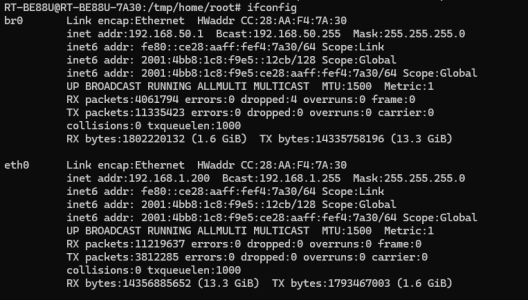
Hier is my result of ifconfig just br0 and eth0. Yes "Enable Router Advertisement" is enabled.
Thank you. It's clear you are receiving public IPv6 addresses on the correct interfaces from your ISP, and it's very clear there is traffic on those IPs.
Something external to your home network is blocking site access over IPv6. Have you looked at those DNS settings I posted? Tried them? If you still have the same issue with those, or the default ISP DNS, then we have to go back to this being an ISP connectivity issue with certain sites.
Not a router issue.
 
Thank you. It's clear you are receiving public IPv6 addresses on the correct interfaces from your ISP, and it's very clear there is traffic on those IPs.
Something external to your home network is blocking site access over IPv6. Have you looked at those DNS settings I posted? Tried them? If you still have the same issue with those, or the default ISP DNS, then we have to go back to this being an ISP connectivity issue with certain sites.
Not a router issue.
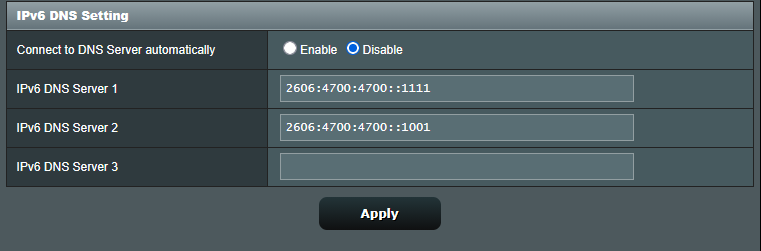
Yes I tried them, but one question do you have here DNS Server for IPv6?
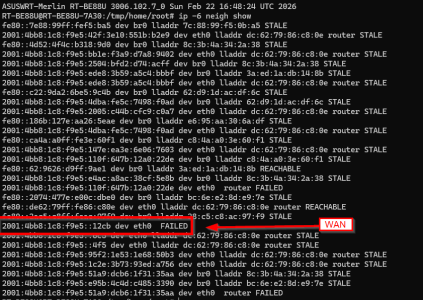
But my WAN IP fails, but this "ip -6 neigh" looks better than before.
 

Attachments

  • 1772120697477.png
    1772120697477.png
    17.3 KB · Views: 57
  • 1772120708975.png
    1772120708975.png
    114.2 KB · Views: 50
I did trip up and used eth0 instead of ppp0 with that post, which I clarified later. I guess I better go back and edit that for future readers.

*edit* Indeed I did post that. My old age got me mixed up between this and a thread elsewhere regarding DDNS. You're also participating with that thread I believe.
 
Yes I tried them, but one question do you have here DNS Server for IPv6?
Remove these settings and set DNS under WAN settings as in the image I posted. Once you select DNS over TLS the drop down selection box for DNS servers becomes available. Select both of the quad9 1 and both of the quad9 2 servers. You must use the + to add the your selected server.
Adding an image for clarity
1000050370.png

In the DNS setting at the top it doesn't matter what you select there as the DoT overrides it.
 
Last edited:
I'm confused (because I don't use IPv6). You previously said:

Isn't this exactly what his output doesn't show? br0 and eth0 appear to have the same public IPv6 address.
May be set to Passthrough.

@JaneuX Easiest way I found to get IPv6 to work was to hard reset the router (tried on GT-BE98 Pro and GT-BE19000Ai) and set up with minimal changes:

IPv4 I ran Google/unsecured 8.8.8.8, 8.8.4.4. (This seems customizable)

IPv6 Toggle ON. DO NOT touch DNS settings. Set to Native.

I suspect the DNS and DHCP servers are tied together, meaning the IPv6 DHCP server does not recognize/provide an IP IF you do not use the ISP DNS.
 
Yes I tried them, but one question do you have here DNS Server for IPv6?
But my WAN IP fails, but this "ip -6 neigh" looks better than before.
Can you share:
Code:
ip -6 route
Also a current screenshot of the IPv6 settings would clarify how it’s setup right now (Native, pass through, Prefix, etc.).
 
Last edited:
Watching. I have the exact same problem with my Asus BE-92U (running latest stock asuswrt 3.0.0.6.102_38980): I could ping ipv6.google.com from the route's network tool, but not from my computer on LAN. My local computer on LAN only got a local ipv6 address (fe80) and not a global addr (2600). The router got a global ipv6 of (2600) with prefix len of 64.

I already followed & set the posted recommended settings but no luck.
 
Last edited:
Anyone try factory reset and just toggling IPv6 and Native or Passthrough as appropriate? (Worked on two models for me, not this one admittedly).
 
See if your settings match. I erase IP and Prefix:
3417.jpg
 
I have the same settings as showed. Not working on my BE92U. I could ping ipv6 from the router but not from local computer.
It might be helpful if the ISP and service type is shared...

Mine's AT&T fiber (1 Gbps service) gateway BGW320-500. (There are settings for IPv6 on the gateway that need set, but there are only about 4 of them).
 
Scared to touch it as it has a tendency to knock down all internet connectivity if messed up on ASUS routers, on my TP-Link Deco BE95 any tinkering with IPv6 DNS addresses (may immediately follow with no IPv6 address assigned to the router) but everything internet still worked...
IPv6_test_results.jpg


Microsoft Windows [Version 10.0.26200.8037]
(c) Microsoft Corporation. All rights reserved.

C:\Users\jzche>ping 2001:4860:4860::8888

Pinging 2001:4860:4860::8888 with 32 bytes of data:
Reply from 2001:4860:4860::8888: time=3ms
Reply from 2001:4860:4860::8888: time=4ms
Reply from 2001:4860:4860::8888: time=2ms
Reply from 2001:4860:4860::8888: time=3ms

Ping statistics for 2001:4860:4860::8888:
Packets: Sent = 4, Received = 4, Lost = 0 (0% loss),
Approximate round trip times in milli-seconds:
Minimum = 2ms, Maximum = 4ms, Average = 3ms

C:\Users\jzche>

 
I have the same settings as showed. Not working on my BE92U. I could ping ipv6 from the router but not from local computer.
There are only so many combinations of settings to set, and I tried setting almost all of them.
1772120697477.png

(From @JaneuX). Unfortunately I found that changing these DNS settings breaks IPv6 service.
Also strangely factory reset and just toggling on IPv6 and Native worked, as I get 9/10 on the IPv6 test site....
 
Last edited:
It might be helpful if the ISP and service type is shared...

Mine's AT&T fiber (1 Gbps service) gateway BGW320-500. (There are settings for IPv6 on the gateway that need set, but there are only about 4 of them).
Thanks. Mine is Spectrum in Calif. running coax to a modem (modem only) then to the Asus router (Cat6) with 1 Gbps down service. All devices/computers are on wifi serving by Asus router.
 
Last edited:

Latest threads

Support SNBForums w/ Amazon

If you'd like to support SNBForums, just use this link and buy anything on Amazon. Thanks!

Sign Up For SNBForums Daily Digest

Get an update of what's new every day delivered to your mailbox. Sign up here!
Back
Top