What's new

VPN Director Bug?

JohnD5000

Very Senior Member
I recently upgraded from cable to fiber optic (Verizon Fios). I have a 500 DL / 500 UL plan. I was having a upload issue. I found it, it was QoS. Once I turned QoS off and removed the FlexQoS addin, the issue went away. However, when I was investigating for it, I might have found a VPN Director bug.
I am running a GT-AX6000 on merlin 3006.102.6.

The issue, when I use VPN Director, upload speed does not behave as expected. I have two rules, one for all devices, and one for my laptop (LG Gram). All testing is done through WIFI. The WGC5 rule is a Wireguard VPN

1.png


Here I have the two VPN Director rules turned off. A speedtest is done and I receive DL 510 and 574 UL speeds. These speeds are expected.

2.png


Here I have the two VPN Director rules set to WAN. A speedtest is done and I receive DL 515 and 571 UL speeds. These speeds are expected.

3.png


Here I have the VPN Director ALL rule set to WAN and Laptop rule set to VPN. A speedtest is done and I receive DL 500 and 503 UL speeds. I expect VPN to take a small hit. These speeds are expected.

4.png


Here I have the VPN Director ALL rule set to VPN and Laptop rule set off. A speedtest is done and I receive DL 486 and 391 UL speeds. The VPN should be engaged through the ALL rule. The DL speed seems reasonable, but I would expect the UL speed should be around 500, not 391


Can not enter more images, will finish in next reply
 

Attachments

  • 5.png
    5.png
    47.1 KB · Views: 31
Last edited:
5.png


Here I have the VPN Director ALL rule set to VPN and Laptop rule set WAN. A speedtest is done and I receive DL 515 and 444 UL speeds. The VPN should NOT be engaged since the laptop rule should override the ALL rule. The DL speed seems reasonable, but I would expect the UL speed should be around 570, not 444

6.png


Here I have the VPN Director ALL rule set to VPN and Laptop rule set VPN. A speedtest is done and I receive DL 478 and 370 UL speeds. The VPN should be engaged since the laptop rule should override the ALL rule. The DL speed seems reasonable, but I would expect the UL speed should be around 500, not 370

End result, the VPN Director seems to work as expected for DL speeds, but whenever the VPN is set on the All rule, it slows down the UL speed significantly more than expected.
 
Last edited:
Use traceroute to evaluate routing. Speedtests are not a proper way to do so, as depending on your router model, some of that traffic might be forced to bypass HW acceleration.
 
Sorry, that is above me. I'm sure that I have something setup incorrectly. I'm not sure what I would be looking for. And I certainly, don't understand how a VPN Director rule would affect UL speeds.

BTW, I have a GT-AX6000 on merlin 3006.102.6. if it matters.
 
I have a GT-AX6000 on merlin 3006.102.6. if it matters.

You have to accept the fact your AIO router can't consistently perform the way you want. It's a power efficiency optimized embedded device similar to RPi. You also have to re-evaluate your add-ons on this hardware platform and 3006 firmware. Running FlexQoS on it wasn't great idea for example.
 
You have to accept the fact your AIO router can't consistently perform the way you want. It's a power efficiency optimized embedded device similar to RPi. You also have to re-evaluate your add-ons on this hardware platform and 3006 firmware. Running FlexQoS on it wasn't great idea for example.
But, what does your reply have to do with VPN Director? I showed that VPN Director behaves as expected when the VPN rule is just on the specific device. But the results are not as expected when the rule is on a larger group that includes that specific device, even if there is a specific rule that overrides that rule. I thought VPN Director just directs when and where a rule is used.
 
As explained by RMerlin above speed test is not a tool for routing evaluation. The fact VPN is involved already suggests performance impact. To what extent - it depends. Your FlexQoS for example had quite significant negative impact because on this platform since it requires Flow Cache disabled. What else is running on your router and in what configuration - unknown. Ignoring Speed Test - what else makes you think VPN Director in particular has a bug?
 
Sorry, that is above me. I'm sure that I have something setup incorrectly. I'm not sure what I would be looking for. And I certainly, don't understand how a VPN Director rule would affect UL speeds.

BTW, I have a GT-AX6000 on merlin 3006.102.6. if it matters.

You can do a traceroute by opening a command prompt and running tracert <IP or dcomain>
1771453391102.png

Here is a tracert to google with no VPN. Your first few hops should be your router and ISP.

1771453500620.png

Here is a tracert to google.com with a client side VPN loaded. This is expected behavior. If you are using VPN director you should see the first hop to your router.

Your new ISP speeds are right at that threshold for limits that are generally expected from traffic going through a router and using no hardware acceleration. (300-500Mbps.) VPN traffic can bypass a router's hardware acceleration (router CPU is encypting/decrypting traffic); resulting in more speed reductions beyond the 5-20% overhead loss expected for VPN.

Other factors to consider: VPN plan speeds, VPN server utilization, optimal VPN configuration files.

Things to try: running speedtest with client side VPN loaded not using VPN director. (client side VPN uses your desktop CPU for encryption/decryption, not the router's CPU.)

Hope this helps. 🙂
 
As explained by RMerlin above speed test is not a tool for routing evaluation. The fact VPN is involved already suggests performance impact. To what extent - it depends. Your FlexQoS for example had quite significant negative impact because on this platform since it requires Flow Cache disabled. What else is running on your router and in what configuration - unknown. Ignoring Speed Test - what else makes you think VPN Director in particular has a bug?
The way I understand VPN Director, it is just an Off/On decision maker--a rule hierarchy. First, all my tests were done on the same laptop. And, I repeated the examples many time (although I only showed 1 in each case). I only have 1 rule (1 VPN). So it is essentially a YES = VPN, a NO = Wan for my laptop.

Situation 1 = No (No VPN)
Situation 2 = No (No VPN)
Situation 3 = Yes (VPN)
Situation 4 = Yes (VPN)
Situation 5 = No (No VPN)
Situation 6 = Yes (VPN)


Download speed = What I would expect
Upload speed = Varies depending on whether or not VPN rule is ON for all devices, even if it is overridden by the device hierarchy.

The way I see it, the VPN rule should act the same depending on if it is off or on. Since DL speed makes sense to me, I believe the rule is working. Since upload speed varies depending on where the rule is turn on, it seems like a bug to me. Basically, I don't understand why UL speed varies depending on where VPN Configurator has the rule on while DL speed does not vary.
 
The way I understand VPN Director, it is just an Off/On decision maker--a rule hierarchy. First, all my tests were done on the same laptop. And, I repeated the examples many time (although I only showed 1 in each case). I only have 1 rule (1 VPN). So it is essentially a YES = VPN, a NO = Wan for my laptop.

Situation 1 = No (No VPN)
Situation 2 = No (No VPN)
Situation 3 = Yes (VPN)
Situation 4 = Yes (VPN)
Situation 5 = No (No VPN)
Situation 6 = Yes (VPN)


Download speed = What I would expect
Upload speed = Varies depending on whether or not VPN rule is ON for all devices, even if it is overridden by the device hierarchy.

The way I see it, the VPN rule should act the same depending on if it is off or on. Since DL speed makes sense to me, I believe the rule is working. Since upload speed varies depending on where the rule is turn on, it seems like a bug to me. Basically, I don't understand why UL speed varies depending on where VPN Configurator has the rule on while DL speed does not vary.
This does look like a VPN Director bug. You are getting a 25% speed decrease on upload speed whenever you have the "WGC5" Wireguard interface selected in your "All Devices" rule (the lowest rule hierarchy for that network even if the rule in not engaged by a higher rule.

Based on your description, this sounds like you had a existing Merlin setup. It has probably has been a while since you have done a clean install. A dirty upgrade may have introduced something that you never noticed. I would suggest trying the following:

1) Delete your Wireguard #5 settings and recreate them. Retest.

2) There are 5 (five) Wireguard settings. Try recreating your Wireguard setting in interface WGC1, WGC2, WGC3, or WGC4. Try one all all of these in the "All Devices" rule. Retest

3) There is a beta Merlin version that has recently been released. Try that. Retest.

4) Do a clean install. Retest.
 
I have been playing with this for a few hours. This is what I found.

All testing done on my laptop and I had the VPN Director setup with a rule for my device set to WAN. So, I should never be going through the VPN!

All testing was done to the "All Devices" rule, i.e. 192.168.81.0/24. Again, this would be overrided by the above device rule.

I rewrote all the Wireguard VPN Client settings (WGC1-5), to get rid of any old (dirty upgrade) settings. And rebooted the router.

I then change the above "All Devices" rule.

All download speed results, no matter the settings, results were full speed as expected when a non-Wireguard Client was used.

When ""All Devices" rule was:

Off - Full Upload Speed -- OK
WAN - Full upload speed -- OK
OVPN# - Full upload speed -- OK (i.e. when a OpenVPN client was used, everything was fine)

WCG1-5 - Upload Speed DECREASE -- NOT Expected.

Rebuilding the Wireguard VPN Client settings for 1-5 seemed to help a little. But, when a Wireguard (either 1,2,3,4,or 5) client was selected in the interface for the "All Devices" rule. There was a ALWAYS a decrease in Upload speed. This decrease in upload speed varied by 10% to 25% on every test I made. It didn't matter the client number (WGC1, WGC2, WGC3, WGC4, or WGC5). When ever a Wireguard client was set in this rule, there was a drop in upload speed. Again, it should have been defaulting to WAN. So there should have been no drop in speed. And, again, there was NEVER a drop in upload speed when the rule was off, or WAN, or a non-Wireguard (OpenVPN - I didn't test PPTP/L2TP) was used.
 
Not running AICloud. What does withdrawn mean?
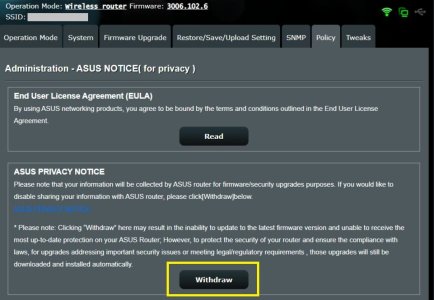
It means selecting the Withdraw button on the Administration > Privacy (or Policy) page for the specific feature like AiProtection or AiCloud.

Example of the Withdraw button on the 3006.102.6 firmware:

Policy.jpg
 
Isn’t all this a known side-effect of the Wireguard BLOG bypass implemented in the firmware since Wireguard traffic is incompatible with hardware acceleration? Perhaps it’s more relevant for upload hitting a CPU limit without acceleration?

I rarely used Wireguard, but I remember when the blog bypass was discussed in the 388.2 threads.
 
Isn’t all this a known side-effect of the Wireguard BLOG bypass implemented in the firmware since Wireguard traffic is incompatible with hardware acceleration? Perhaps it’s more relevant for upload hitting a CPU limit without acceleration?

I rarely used Wireguard, but I remember when the blog bypass was discussed in the 388.2 threads.
1771637020060.png


I don't think so. Take a look at this image. The VPN Director rules state that Wireguard should not be used. The 192.168.81.154 rule overrides the "All Devices" rule. Therefore, nothing should be going through Wireguard for the device at 192.168.81.154.

If any other interface is set for "All Devices", ie. WAN, or a OpenVPN (OVPN1-5) or the "All Devices" rule is checked OFF, everything is fine. Uploads speeds are at full speed.

If wgc1-5 is set at this rule, then there is a 10%-25% slowdown. Wireguard should have nothing to do with anything since the higher weighted rule states to use WAN for the device. The "All Devices" rule should be ignored!. Therefore, VPN Director is not working as intended.
 
View attachment 70430

I don't think so. Take a look at this image. The VPN Director rules state that Wireguard should not be used. The 192.168.81.154 rule overrides the "All Devices" rule. Therefore, nothing should be going through Wireguard for the device at 192.168.81.154.

If any other interface is set for "All Devices", ie. WAN, or a OpenVPN (OVPN1-5) or the "All Devices" rule is checked OFF, everything is fine. Uploads speeds are at full speed.

If wgc1-5 is set at this rule, then there is a 10%-25% slowdown. Wireguard should have nothing to do with anything since the higher weighted rule states to use WAN for the device. The "All Devices" rule should be ignored!. Therefore, VPN Director is not working as intended.
As a temporary test, change the “All Devices” rule to be 192.168.81.0/25 and see if the performance changes for LG Gram. The goal is to avoid overlapping rules.
 

Support SNBForums w/ Amazon

If you'd like to support SNBForums, just use this link and buy anything on Amazon. Thanks!

Sign Up For SNBForums Daily Digest

Get an update of what's new every day delivered to your mailbox. Sign up here!
Back
Top