What's new

VPNMON VPNMON-R3 v1.8.3 -Jan 17, 2026- Monitor OpenVPN/Wireguard WAN/Dual-WAN Health & Random Reset Multiple Connections (Available in AMTM!)

One final beta of VPNMON-R3 1.8.3b3 before the end of the year... mostly addressing timer tracking, which has been bugging me for a while now. This should hopefully provide some more Tx/Rx accuracy if you venture off the main UI into the config menus, and then come back.

What's new?
- PATCH: Improved the tracking of the timer
, plus any time spent in other menus outside of the regular timer, to provide a more accurate view of the Tx/Rx stats.

Download link:
Code:
curl --retry 3 "https://raw.githubusercontent.com/ViktorJp/VPNMON-R3/develop/vpnmon-r3.sh" -o "/jffs/scripts/vpnmon-r3.sh" && chmod 755 "/jffs/scripts/vpnmon-r3.sh"

Significant Screenshots:
None today!
 
Last edited:
One final beta of VPNMON-R3 1.8.3b3 before the end of the year... mostly addressing timer tracking, which has been bugging me for a while now. This should hopefully provide some more Tx/Rx accuracy if you venture off the main UI into the config menus, and then come back.

What's new?
- PATCH: Improved the tracking of the timer
, plus any time spent in other menus outside of the regular timer, to provide a more accurate view of the Tx/Rx stats.

Download link:
Code:
curl --retry 3 "https://raw.githubusercontent.com/ViktorJp/VPNMON-R3/develop/vpnmon-r3.sh" -o "/jffs/scripts/vpnmon-r3.sh" && chmod 755 "/jffs/scripts/vpnmon-r3.sh

Significant Screenshots:
None today!
You missed a " at the end
 
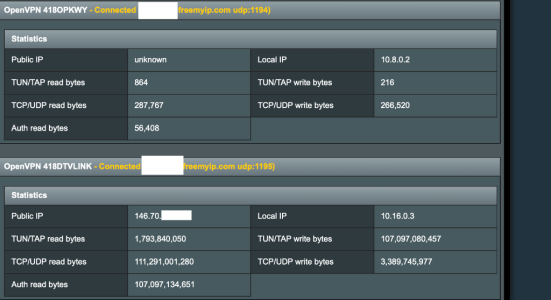
@Viktor Jaep I love this add-on & thanks for all the work on it !!.. However I'm having a problem with something - I am doing a two type vpn thing meaning I have 2 servers running on my home router and then on my remote router I'm connecting to these two servers. The issue I'm having is one of my servers isn't showing a public IP or it says unknown but it connects and is working.. Your add-on seems to get stuck meaning the add-on just stops doing anything in SSH I can't even press C to show configuration -- eventually I see retry or something -- is there a way you can have an option to ignore the public IP -- I'm just using your add-on to reconnect the server with port UDP 1194 if the vpn ever stops.
 

Attachments

  • Screenshot 2025-12-28 at 11.03.51 AM.png
    Screenshot 2025-12-28 at 11.03.51 AM.png
    119.3 KB · Views: 27
@Viktor Jaep I love this add-on & thanks for all the work on it !!.. However I'm having a problem with something - I am doing a two type vpn thing meaning I have 2 servers running on my home router and then on my remote router I'm connecting to these two servers. The issue I'm having is one of my servers isn't showing a public IP or it says unknown but it connects and is working.. Your add-on seems to get stuck meaning the add-on just stops doing anything in SSH I can't even press C to show configuration -- eventually I see retry or something -- is there a way you can have an option to ignore the public IP -- I'm just using your add-on to reconnect the server with port UDP 1194 if the vpn ever stops.
Could you show me where things get stuck in VPNMON? Could you send a screenshot of that please? I'll see what can be done...

Another troubleshooting step... try "unmonitoring" that particular troublesome VPN slot in VPNMON. Make sure the green X is not active.
 
Last edited:
Could you show me where things get stuck in VPNMON? Could you send a screenshot of that please? I'll see what can be done...

Another troubleshooting step... try "unmonitoring" that particular troublesome VPN slot in VPNMON. Make sure the green X is not active.
I have sent you a direct message !
 
So it looks like @ComputerSteve was able to come up with a workaround for anyone else using this particular DDNS setup that he's using through freemyip.com. Apparently each VPN connection points to the same host, but uses different ports, and believe that one or more tunnels somehow get bonded, preventing one or more of them from being able to pass traffic, or report on a public WAN IP. Looks like this keeps VPNMON fully functional, and is somehow able to get the problem tunnel to report a legit WAN IP.

Here's his fix:

Add this to your firewall-startfile (using the correct 10.x network for your problem tunnel):
Code:
# NAT OpenVPN Server 1 subnet (dual-WAN safe)
iptables -t nat -C POSTROUTING -s 10.20.0.0/24 -j MASQUERADE 2>/dev/null \
|| iptables -t nat -A POSTROUTING -s 10.20.0.0/24 -j MASQUERADE
 
Beta 4 is out based on a small improvement brought up by @ComputerSteve's issue he was experiencing today. Let's see if this helps improve performance on those occasions the tunnel experiences connectivity issues!

What's new?
- PATCH:
Based on some feedback that @ComputerSteve was experiencing, I've optimized both the VPN and WG connectivity tests to fail the curl test if the ping test fails. It seems the ping test will fail pretty quickly, while the curl test could hang in there for quite some time before indicating a fail. This should help resolve some of the sluggishness you would see if any of your tunnels are misbehaving.

Download link:
Code:
curl --retry 3 "https://raw.githubusercontent.com/ViktorJp/VPNMON-R3/develop/vpnmon-r3.sh" -o "/jffs/scripts/vpnmon-r3.sh" && chmod 755 "/jffs/scripts/vpnmon-r3.sh"

Significant Screenshots:
None today!
 
Skipping beta 5 right to v1.8.3 beta 6... added capabilities for a secondary PING host to cut down on resets and provide some more redundancy should one DNS have an issue pinging.

What's new!?
- PATCH:
Built in the capability to now use redundant Pinghosts under the configuration menu, using option #2 "Custom Ping Hosts for Connectivity Checks". By default, Pinghost 1 uses 8.8.8.8 and Pinghost 2 uses 1.1.1.1. Pinging these hosts through the VPN/WG tunnel is used to determine if the tunnel is healthy. This now also provides some redundancy, should Pinghost 1 not respond, but Pinghost 2 does, then the tunnel will not get reset, and should help with those dealing with more frequent resets.

Download Link:
Code:
curl --retry 3 "https://raw.githubusercontent.com/ViktorJp/VPNMON-R3/develop/vpnmon-r3.sh" -o "/jffs/scripts/vpnmon-r3.sh" && chmod 755 "/jffs/scripts/vpnmon-r3.sh"

Significant Screenshots:

Showing Primary and Secondary PING hosts:
1768270856990.png
 
Skipping beta 5 right to v1.8.3 beta 6... added capabilities for a secondary PING host to cut down on resets and provide some more redundancy should one DNS have an issue pinging.

What's new!?
- PATCH:
Built in the capability to now use redundant Pinghosts under the configuration menu, using option #2 "Custom Ping Hosts for Connectivity Checks". By default, Pinghost 1 uses 8.8.8.8 and Pinghost 2 uses 1.1.1.1. Pinging these hosts through the VPN/WG tunnel is used to determine if the tunnel is healthy. This now also provides some redundancy, should Pinghost 1 not respond, but Pinghost 2 does, then the tunnel will not get reset, and should help with those dealing with more frequent resets.

Download Link:
Code:
curl --retry 3 "https://raw.githubusercontent.com/ViktorJp/VPNMON-R3/develop/vpnmon-r3.sh" -o "/jffs/scripts/vpnmon-r3.sh" && chmod 755 "/jffs/scripts/vpnmon-r3.sh"

Significant Screenshots:

Showing Primary and Secondary PING hosts:
View attachment 69925
Woo Hoo..

Got a question. Wondering why I seem to be seeing only 1 connection attempt?
Here are the log entries from the last two incidents.

Jan 06 2026 10:25:40 rt-be88u VPNMON-R3[1354] - WARNING: VPN2 received invalid PING information. Contents: Null
743 Jan 06 2026 10:48:10 rt-be88u VPNMON-R3[1354] - WARNING: VPN2 failed to respond
744 Jan 06 2026 10:48:10 rt-be88u VPNMON-R3[1354] - WARNING: VPN2 attempt 1 of 4 to allow connection to recover
745 Jan 06 2026 10:52:10 rt-be88u VPNMON-R3[1354] - WARNING: VPN2 is in an error state and being reconnected
746 Jan 06 2026 10:52:26 rt-be88u VPNMON-R3[1354] - INFO: VPN2 Connection Restarted [SEQ] - New Server: yyy.yyy.yyy.yyy
747 Jan 06 2026 10:52:42 rt-be88u VPNMON-R3[1354] - INFO: Email notification was sent successfully [FAILURE: VPN Slot 2 in Error State]
748 Jan 06 2026 10:52:47 rt-be88u VPNMON-R3[1354] - INFO: VPN Director Routing Service Restarted
749 Jan 06 2026 10:52:53 rt-be88u VPNMON-R3[1354] - INFO: spdMerlin Interfaces Reset

Jan 12 2026 10:19:35 rt-be88u VPNMON-R3[1354] - WARNING: VPN1 failed to respond
792 Jan 12 2026 10:19:35 rt-be88u VPNMON-R3[1354] - WARNING: VPN1 attempt 1 of 4 to allow connection to recover
793 Jan 12 2026 10:23:34 rt-be88u VPNMON-R3[1354] - WARNING: VPN1 is in an error state and being reconnected
794 Jan 12 2026 10:23:50 rt-be88u VPNMON-R3[1354] - INFO: VPN1 Connection Restarted [SEQ] - New Server: xxx.xxx.xxx.xxx
795 Jan 12 2026 10:24:06 rt-be88u VPNMON-R3[1354] - INFO: Email notification was sent successfully [FAILURE: VPN Slot 1 in Error State]
796 Jan 12 2026 10:24:11 rt-be88u VPNMON-R3[1354] - INFO: VPN Director Routing Service Restarted
797 Jan 12 2026 10:24:17 rt-be88u VPNMON-R3[1354] - INFO: spdMerlin Interfaces Reset
 
Got a question. Wondering why I seem to be seeing only 1 connection attempt?
If you don't see anything after "1 of 4" then it recovered... if it continues seeing a problem on the next cycle, you would see "2 of 4". But personally, I'm seeing a long of "1 of..." throughout the day.

1768305796045.png


Occasionally it escalates as you can see below:
1768306137675.png

Here are the log entries from the last two incidents.

Jan 06 2026 10:25:40 rt-be88u VPNMON-R3[1354] - WARNING: VPN2 received invalid PING information. Contents: Null
743 Jan 06 2026 10:48:10 rt-be88u VPNMON-R3[1354] - WARNING: VPN2 failed to respond
744 Jan 06 2026 10:48:10 rt-be88u VPNMON-R3[1354] - WARNING: VPN2 attempt 1 of 4 to allow connection to recover
745 Jan 06 2026 10:52:10 rt-be88u VPNMON-R3[1354] - WARNING: VPN2 is in an error state and being reconnected
746 Jan 06 2026 10:52:26 rt-be88u VPNMON-R3[1354] - INFO: VPN2 Connection Restarted [SEQ] - New Server: yyy.yyy.yyy.yyy
747 Jan 06 2026 10:52:42 rt-be88u VPNMON-R3[1354] - INFO: Email notification was sent successfully [FAILURE: VPN Slot 2 in Error State]
748 Jan 06 2026 10:52:47 rt-be88u VPNMON-R3[1354] - INFO: VPN Director Routing Service Restarted
749 Jan 06 2026 10:52:53 rt-be88u VPNMON-R3[1354] - INFO: spdMerlin Interfaces Reset

Jan 12 2026 10:19:35 rt-be88u VPNMON-R3[1354] - WARNING: VPN1 failed to respond
792 Jan 12 2026 10:19:35 rt-be88u VPNMON-R3[1354] - WARNING: VPN1 attempt 1 of 4 to allow connection to recover
793 Jan 12 2026 10:23:34 rt-be88u VPNMON-R3[1354] - WARNING: VPN1 is in an error state and being reconnected
794 Jan 12 2026 10:23:50 rt-be88u VPNMON-R3[1354] - INFO: VPN1 Connection Restarted [SEQ] - New Server: xxx.xxx.xxx.xxx
795 Jan 12 2026 10:24:06 rt-be88u VPNMON-R3[1354] - INFO: Email notification was sent successfully [FAILURE: VPN Slot 1 in Error State]
796 Jan 12 2026 10:24:11 rt-be88u VPNMON-R3[1354] - INFO: VPN Director Routing Service Restarted
797 Jan 12 2026 10:24:17 rt-be88u VPNMON-R3[1354] - INFO: spdMerlin Interfaces Reset
This is showing something different. Your actual VPN connection is coming back in an error state, with its vpnstate variable coming back as a "-1" (error) instead of a normal "2" which means 'connected'. That usually means that something happened with your connection and it wasn't able to reconnect by itself, so VPNMON had to force a reconnection. How often are you seeing this? Which VPN provider do you use?
 
If you don't see anything after "1 of 4" then it recovered... if it continues seeing a problem on the next cycle, you would see "2 of 4". But personally, I'm seeing a long of "1 of..." throughout the day.

View attachment 69927

Occasionally it escalates as you can see below:
View attachment 69928

This is showing something different. Your actual VPN connection is coming back in an error state, with its vpnstate variable coming back as a "-1" (error) instead of a normal "2" which means 'connected'. That usually means that something happened with your connection and it wasn't able to reconnect by itself, so VPNMON had to force a reconnection. How often are you seeing this? Which VPN provider do you use?
I have seen this reset 6 times in the same manner of only 1 connection attempt before a reset since the first of the year.
Looking back to mid December I do not see any VPN reset where there was more than 1 attempt.
Currently using Express VPN.
 
I have seen this reset 6 times in the same manner of only 1 connection attempt before a reset since the first of the year.
Looking back to mid December I do not see any VPN reset where there was more than 1 attempt.
Currently using Express VPN.
I will need to watch this to see if it is the only culprit.
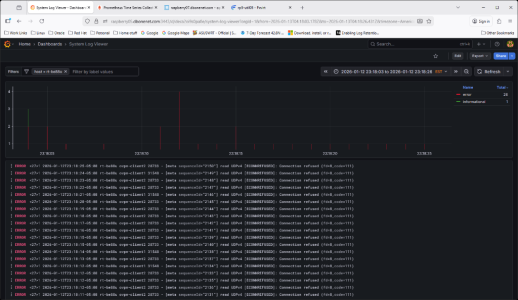
Info in the router log from last night that match vpnmon resets.
 

Attachments

  • Screenshot 2026-01-13 083418.png
    Screenshot 2026-01-13 083418.png
    256.8 KB · Views: 10
I will need to watch this to see if it is the only culprit.
Info in the router log from last night that match vpnmon resets.
Anything else in your syslogs around this time that might give more hints? Definitely strange.
 
I will need to watch this to see if it is the only culprit.
Info in the router log from last night that match vpnmon resets.
No, there was no indication of trouble.
Here a little wider timeframe.

2026-01-12T23:03:04.000000-05:00 rt-be88u connmon_[32490]: 30 second ping test to 1.1.1.1 starting...
2026-01-12T23:06:04.000000-05:00 rt-be88u connmon_[26819]: 30 second ping test to 1.1.1.1 starting...
2026-01-12T23:09:04.000000-05:00 rt-be88u connmon_[17563]: 30 second ping test to 1.1.1.1 starting...
2026-01-12T23:12:04.000000-05:00 rt-be88u connmon_[12550]: 30 second ping test to 1.1.1.1 starting...
2026-01-12T23:14:59.000000-05:00 rt-be88u ovpn-client1[31548]: VERIFY OK: depth=1, C=VG, ST=BVI, O=ExpressVPN, OU=ExpressVPN, CN=ExpressVPN CA, emailAddress=support@expres
2026-01-12T23:14:59.000000-05:00 rt-be88u ovpn-client1[31548]: VERIFY OK: nsCertType=SERVER
2026-01-12T23:14:59.000000-05:00 rt-be88u ovpn-client1[31548]: VERIFY X509NAME OK: C=VG, ST=BVI, O=ExpressVPN, OU=ExpressVPN, CN=Server-12229-1a, emailAddress=support@expr
2026-01-12T23:14:59.000000-05:00 rt-be88u ovpn-client1[31548]: VERIFY OK: depth=0, C=VG, ST=BVI, O=ExpressVPN, OU=ExpressVPN, CN=Server-12229-1a, emailAddress=support@expr
2026-01-12T23:14:59.000000-05:00 rt-be88u ovpn-client1[31548]: Control Channel: TLSv1.3, cipher TLSv1.3 TLS_AES_256_GCM_SHA384, peer certificate: 2048 bits RSA, signature:
2026-01-12T23:15:00.000000-05:00 rt-be88u agagne[-]: Checking for external IP change
2026-01-12T23:15:04.000000-05:00 rt-be88u connmon_[5672]: 30 second ping test to 1.1.1.1 starting...
2026-01-12T23:18:04.000000-05:00 rt-be88u connmon_[32263]: 30 second ping test to 1.1.1.1 starting...
2026-01-12T23:18:04.000000-05:00 rt-be88u ovpn-client2[28733]: read UDPv4 [ECONNREFUSED]: Connection refused (fd=8,code=111)
2026-01-12T23:18:05.000000-05:00 rt-be88u ovpn-client2[28733]: read UDPv4 [ECONNREFUSED]: Connection refused (fd=8,code=111)
2026-01-12T23:18:06.000000-05:00 rt-be88u ovpn-client2[28733]: read UDPv4 [ECONNREFUSED]: Connection refused (fd=8,code=111)
2026-01-12T23:18:08.000000-05:00 rt-be88u ovpn-client2[28733]: read UDPv4 [ECONNREFUSED]: Connection refused (fd=8,code=111)
2026-01-12T23:18:11.000000-05:00 rt-be88u ovpn-client2[28733]: read UDPv4 [ECONNREFUSED]: Connection refused (fd=8,code=111)
2026-01-12T23:18:12.000000-05:00 rt-be88u ovpn-client2[28733]: read UDPv4 [ECONNREFUSED]: Connection refused (fd=8,code=111)
2026-01-12T23:18:12.000000-05:00 rt-be88u ovpn-client1[31548]: read UDPv4 [ECONNREFUSED]: Connection refused (fd=8,code=111)
2026-01-12T23:18:12.000000-05:00 rt-be88u ovpn-client2[28733]: read UDPv4 [ECONNREFUSED]: Connection refused (fd=8,code=111)
2026-01-12T23:18:13.000000-05:00 rt-be88u ovpn-client2[28733]: read UDPv4 [ECONNREFUSED]: Connection refused (fd=8,code=111)
2026-01-12T23:18:14.000000-05:00 rt-be88u ovpn-client1[31548]: read UDPv4 [ECONNREFUSED]: Connection refused (fd=8,code=111)
2026-01-12T23:18:15.000000-05:00 rt-be88u ovpn-client2[28733]: read UDPv4 [ECONNREFUSED]: Connection refused (fd=8,code=111)
2026-01-12T23:18:16.000000-05:00 rt-be88u ovpn-client2[28733]: read UDPv4 [ECONNREFUSED]: Connection refused (fd=8,code=111)
2026-01-12T23:18:17.000000-05:00 rt-be88u ovpn-client2[28733]: read UDPv4 [ECONNREFUSED]: Connection refused (fd=8,code=111)
2026-01-12T23:18:18.000000-05:00 rt-be88u ovpn-client2[28733]: read UDPv4 [ECONNREFUSED]: Connection refused (fd=8,code=111)
2026-01-12T23:18:19.000000-05:00 rt-be88u ovpn-client2[28733]: read UDPv4 [ECONNREFUSED]: Connection refused (fd=8,code=111)
2026-01-12T23:18:20.000000-05:00 rt-be88u ovpn-client2[28733]: read UDPv4 [ECONNREFUSED]: Connection refused (fd=8,code=111)
2026-01-12T23:18:21.000000-05:00 rt-be88u ovpn-client1[31548]: read UDPv4 [ECONNREFUSED]: Connection refused (fd=8,code=111)
2026-01-12T23:18:22.000000-05:00 rt-be88u ovpn-client2[28733]: read UDPv4 [ECONNREFUSED]: Connection refused (fd=8,code=111)
2026-01-12T23:18:23.000000-05:00 rt-be88u ovpn-client2[28733]: read UDPv4 [ECONNREFUSED]: Connection refused (fd=8,code=111)
2026-01-12T23:18:24.000000-05:00 rt-be88u ovpn-client1[31548]: read UDPv4 [ECONNREFUSED]: Connection refused (fd=8,code=111)
2026-01-12T23:18:25.000000-05:00 rt-be88u ovpn-client2[28733]: read UDPv4 [ECONNREFUSED]: Connection refused (fd=8,code=111)
2026-01-12T23:18:51.000000-05:00 rt-be88u dnsmasq-dhcp[31645]: DHCPREQUEST(br0) 10.215.101.253 4c:24:98:fd:6e:54
2026-01-12T23:18:51.000000-05:00 rt-be88u dnsmasq-dhcp[31645]: DHCPACK(br0) 10.215.101.253 4c:24:98:fd:6e:54 ring-doorbell
2026-01-12T23:18:52.000000-05:00 rt-be88u ovpn-client1[31548]: [Server-12229-1a] Inactivity timeout (--ping-restart), restarting
2026-01-12T23:18:52.000000-05:00 rt-be88u ovpn-client1[31548]: SIGUSR1[soft,ping-restart] received, process restarting
2026-01-12T23:18:52.000000-05:00 rt-be88u ovpn-client1[31548]: Restart pause, 1 second(s)
2026-01-12T23:18:53.000000-05:00 rt-be88u ovpn-client1[31548]: WARNING: --ns-cert-type is DEPRECATED. Use --remote-cert-tls instead.
2026-01-12T23:18:53.000000-05:00 rt-be88u ovpn-client1[31548]: NOTE: the current --script-security setting may allow this configuration to call user-defined scripts
2026-01-12T23:18:53.000000-05:00 rt-be88u ovpn-client1[31548]: TCP/UDP: Preserving recently used remote address: [AF_INET]151.240.45.237:1195
2026-01-12T23:18:53.000000-05:00 rt-be88u ovpn-client1[31548]: Socket Buffers: R=[524288->1048576] S=[524288->1048576]
2026-01-12T23:18:53.000000-05:00 rt-be88u ovpn-client1[31548]: UDPv4 link local: (not bound)
2026-01-12T23:18:53.000000-05:00 rt-be88u ovpn-client1[31548]: UDPv4 link remote: [AF_INET]151.240.45.237:1195
2026-01-12T23:18:56.000000-05:00 rt-be88u ovpn-client2[28733]: [Server-12229-1a] Inactivity timeout (--ping-restart), restarting
2026-01-12T23:18:56.000000-05:00 rt-be88u ovpn-client2[28733]: SIGUSR1[soft,ping-restart] received, process restarting
2026-01-12T23:18:56.000000-05:00 rt-be88u ovpn-client2[28733]: Restart pause, 1 second(s)
2026-01-12T23:18:57.000000-05:00 rt-be88u ovpn-client2[28733]: WARNING: --ns-cert-type is DEPRECATED. Use --remote-cert-tls instead.
2026-01-12T23:18:57.000000-05:00 rt-be88u ovpn-client2[28733]: NOTE: the current --script-security setting may allow this configuration to call user-defined scripts
2026-01-12T23:18:57.000000-05:00 rt-be88u ovpn-client2[28733]: TCP/UDP: Preserving recently used remote address: [AF_INET]151.240.45.237:1195
2026-01-12T23:18:57.000000-05:00 rt-be88u ovpn-client2[28733]: Socket Buffers: R=[524288->1048576] S=[524288->1048576]
2026-01-12T23:18:57.000000-05:00 rt-be88u ovpn-client2[28733]: UDPv4 link local: (not bound)
2026-01-12T23:18:57.000000-05:00 rt-be88u ovpn-client2[28733]: UDPv4 link remote: [AF_INET]151.240.45.237:1195
2026-01-12T23:19:44.000000-05:00 rt-be88u dnsmasq-dhcp[31645]: DHCPREQUEST(br0) 10.215.101.253 4c:24:98:fd:6e:54

 
No, there was no indication of trouble.
Here a little wider timeframe.

2026-01-12T23:03:04.000000-05:00 rt-be88u connmon_[32490]: 30 second ping test to 1.1.1.1 starting...
2026-01-12T23:06:04.000000-05:00 rt-be88u connmon_[26819]: 30 second ping test to 1.1.1.1 starting...
2026-01-12T23:09:04.000000-05:00 rt-be88u connmon_[17563]: 30 second ping test to 1.1.1.1 starting...
2026-01-12T23:12:04.000000-05:00 rt-be88u connmon_[12550]: 30 second ping test to 1.1.1.1 starting...
2026-01-12T23:14:59.000000-05:00 rt-be88u ovpn-client1[31548]: VERIFY OK: depth=1, C=VG, ST=BVI, O=ExpressVPN, OU=ExpressVPN, CN=ExpressVPN CA, emailAddress=support@expres
2026-01-12T23:14:59.000000-05:00 rt-be88u ovpn-client1[31548]: VERIFY OK: nsCertType=SERVER
2026-01-12T23:14:59.000000-05:00 rt-be88u ovpn-client1[31548]: VERIFY X509NAME OK: C=VG, ST=BVI, O=ExpressVPN, OU=ExpressVPN, CN=Server-12229-1a, emailAddress=support@expr
2026-01-12T23:14:59.000000-05:00 rt-be88u ovpn-client1[31548]: VERIFY OK: depth=0, C=VG, ST=BVI, O=ExpressVPN, OU=ExpressVPN, CN=Server-12229-1a, emailAddress=support@expr
2026-01-12T23:14:59.000000-05:00 rt-be88u ovpn-client1[31548]: Control Channel: TLSv1.3, cipher TLSv1.3 TLS_AES_256_GCM_SHA384, peer certificate: 2048 bits RSA, signature:
2026-01-12T23:15:00.000000-05:00 rt-be88u agagne[-]: Checking for external IP change
2026-01-12T23:15:04.000000-05:00 rt-be88u connmon_[5672]: 30 second ping test to 1.1.1.1 starting...
2026-01-12T23:18:04.000000-05:00 rt-be88u connmon_[32263]: 30 second ping test to 1.1.1.1 starting...
2026-01-12T23:18:04.000000-05:00 rt-be88u ovpn-client2[28733]: read UDPv4 [ECONNREFUSED]: Connection refused (fd=8,code=111)
2026-01-12T23:18:05.000000-05:00 rt-be88u ovpn-client2[28733]: read UDPv4 [ECONNREFUSED]: Connection refused (fd=8,code=111)
2026-01-12T23:18:06.000000-05:00 rt-be88u ovpn-client2[28733]: read UDPv4 [ECONNREFUSED]: Connection refused (fd=8,code=111)
2026-01-12T23:18:08.000000-05:00 rt-be88u ovpn-client2[28733]: read UDPv4 [ECONNREFUSED]: Connection refused (fd=8,code=111)
2026-01-12T23:18:11.000000-05:00 rt-be88u ovpn-client2[28733]: read UDPv4 [ECONNREFUSED]: Connection refused (fd=8,code=111)
2026-01-12T23:18:12.000000-05:00 rt-be88u ovpn-client2[28733]: read UDPv4 [ECONNREFUSED]: Connection refused (fd=8,code=111)
2026-01-12T23:18:12.000000-05:00 rt-be88u ovpn-client1[31548]: read UDPv4 [ECONNREFUSED]: Connection refused (fd=8,code=111)
2026-01-12T23:18:12.000000-05:00 rt-be88u ovpn-client2[28733]: read UDPv4 [ECONNREFUSED]: Connection refused (fd=8,code=111)
2026-01-12T23:18:13.000000-05:00 rt-be88u ovpn-client2[28733]: read UDPv4 [ECONNREFUSED]: Connection refused (fd=8,code=111)
2026-01-12T23:18:14.000000-05:00 rt-be88u ovpn-client1[31548]: read UDPv4 [ECONNREFUSED]: Connection refused (fd=8,code=111)
2026-01-12T23:18:15.000000-05:00 rt-be88u ovpn-client2[28733]: read UDPv4 [ECONNREFUSED]: Connection refused (fd=8,code=111)
2026-01-12T23:18:16.000000-05:00 rt-be88u ovpn-client2[28733]: read UDPv4 [ECONNREFUSED]: Connection refused (fd=8,code=111)
2026-01-12T23:18:17.000000-05:00 rt-be88u ovpn-client2[28733]: read UDPv4 [ECONNREFUSED]: Connection refused (fd=8,code=111)
2026-01-12T23:18:18.000000-05:00 rt-be88u ovpn-client2[28733]: read UDPv4 [ECONNREFUSED]: Connection refused (fd=8,code=111)
2026-01-12T23:18:19.000000-05:00 rt-be88u ovpn-client2[28733]: read UDPv4 [ECONNREFUSED]: Connection refused (fd=8,code=111)
2026-01-12T23:18:20.000000-05:00 rt-be88u ovpn-client2[28733]: read UDPv4 [ECONNREFUSED]: Connection refused (fd=8,code=111)
2026-01-12T23:18:21.000000-05:00 rt-be88u ovpn-client1[31548]: read UDPv4 [ECONNREFUSED]: Connection refused (fd=8,code=111)
2026-01-12T23:18:22.000000-05:00 rt-be88u ovpn-client2[28733]: read UDPv4 [ECONNREFUSED]: Connection refused (fd=8,code=111)
2026-01-12T23:18:23.000000-05:00 rt-be88u ovpn-client2[28733]: read UDPv4 [ECONNREFUSED]: Connection refused (fd=8,code=111)
2026-01-12T23:18:24.000000-05:00 rt-be88u ovpn-client1[31548]: read UDPv4 [ECONNREFUSED]: Connection refused (fd=8,code=111)
2026-01-12T23:18:25.000000-05:00 rt-be88u ovpn-client2[28733]: read UDPv4 [ECONNREFUSED]: Connection refused (fd=8,code=111)
2026-01-12T23:18:51.000000-05:00 rt-be88u dnsmasq-dhcp[31645]: DHCPREQUEST(br0) 10.215.101.253 4c:24:98:fd:6e:54
2026-01-12T23:18:51.000000-05:00 rt-be88u dnsmasq-dhcp[31645]: DHCPACK(br0) 10.215.101.253 4c:24:98:fd:6e:54 ring-doorbell
2026-01-12T23:18:52.000000-05:00 rt-be88u ovpn-client1[31548]: [Server-12229-1a] Inactivity timeout (--ping-restart), restarting
2026-01-12T23:18:52.000000-05:00 rt-be88u ovpn-client1[31548]: SIGUSR1[soft,ping-restart] received, process restarting
2026-01-12T23:18:52.000000-05:00 rt-be88u ovpn-client1[31548]: Restart pause, 1 second(s)
2026-01-12T23:18:53.000000-05:00 rt-be88u ovpn-client1[31548]: WARNING: --ns-cert-type is DEPRECATED. Use --remote-cert-tls instead.
2026-01-12T23:18:53.000000-05:00 rt-be88u ovpn-client1[31548]: NOTE: the current --script-security setting may allow this configuration to call user-defined scripts
2026-01-12T23:18:53.000000-05:00 rt-be88u ovpn-client1[31548]: TCP/UDP: Preserving recently used remote address: [AF_INET]151.240.45.237:1195
2026-01-12T23:18:53.000000-05:00 rt-be88u ovpn-client1[31548]: Socket Buffers: R=[524288->1048576] S=[524288->1048576]
2026-01-12T23:18:53.000000-05:00 rt-be88u ovpn-client1[31548]: UDPv4 link local: (not bound)
2026-01-12T23:18:53.000000-05:00 rt-be88u ovpn-client1[31548]: UDPv4 link remote: [AF_INET]151.240.45.237:1195
2026-01-12T23:18:56.000000-05:00 rt-be88u ovpn-client2[28733]: [Server-12229-1a] Inactivity timeout (--ping-restart), restarting
2026-01-12T23:18:56.000000-05:00 rt-be88u ovpn-client2[28733]: SIGUSR1[soft,ping-restart] received, process restarting
2026-01-12T23:18:56.000000-05:00 rt-be88u ovpn-client2[28733]: Restart pause, 1 second(s)
2026-01-12T23:18:57.000000-05:00 rt-be88u ovpn-client2[28733]: WARNING: --ns-cert-type is DEPRECATED. Use --remote-cert-tls instead.
2026-01-12T23:18:57.000000-05:00 rt-be88u ovpn-client2[28733]: NOTE: the current --script-security setting may allow this configuration to call user-defined scripts
2026-01-12T23:18:57.000000-05:00 rt-be88u ovpn-client2[28733]: TCP/UDP: Preserving recently used remote address: [AF_INET]151.240.45.237:1195
2026-01-12T23:18:57.000000-05:00 rt-be88u ovpn-client2[28733]: Socket Buffers: R=[524288->1048576] S=[524288->1048576]
2026-01-12T23:18:57.000000-05:00 rt-be88u ovpn-client2[28733]: UDPv4 link local: (not bound)
2026-01-12T23:18:57.000000-05:00 rt-be88u ovpn-client2[28733]: UDPv4 link remote: [AF_INET]151.240.45.237:1195
2026-01-12T23:19:44.000000-05:00 rt-be88u dnsmasq-dhcp[31645]: DHCPREQUEST(br0) 10.215.101.253 4c:24:98:fd:6e:54
You sure this is the same event? It seems the VPNMON logs were looking at January 12 around 10:23 in the morning? This looks like 23:18 at night on that same day?
 
You sure this is the same event? It seems the VPNMON logs were looking at January 12 around 10:23 in the morning? This looks like 23:18 at night on that same day?
Sorry for creating some confusion. Originally I was just posting a question based on what a was seeing in the vpnmon log.
I then responded to your response with logs from later that same night. Here are the vpnmon log info from the same time frame.
Same issue.

Jan 12 2026 23:18:34 rt-be88u VPNMON-R3[17612] - WARNING: VPN1 failed to respond
Jan 12 2026 23:18:34 rt-be88u VPNMON-R3[17612] - WARNING: VPN1 attempt 1 of 4 to allow connection to recover
Jan 12 2026 23:20:43 rt-be88u VPNMON-R3[17612] - WARNING: VPN2 is in an error state and being reconnected
Jan 12 2026 23:20:59 rt-be88u VPNMON-R3[17612] - INFO: VPN2 Connection Restarted [SEQ] - New Server: 151.240.45.179
Jan 12 2026 23:21:15 rt-be88u VPNMON-R3[17612] - INFO: Email notification was sent successfully [FAILURE: VPN Slot 2 in Error State]
Jan 12 2026 23:21:20 rt-be88u VPNMON-R3[17612] - INFO: VPN Director Routing Service Restarted
Jan 12 2026 23:21:26 rt-be88u VPNMON-R3[17612] - INFO: spdMerlin Interfaces Reset
Jan 12 2026 23:21:49 rt-be88u VPNMON-R3[17612] - WARNING: VPN1 is in an error state and being reconnected
Jan 12 2026 23:22:05 rt-be88u VPNMON-R3[17612] - INFO: VPN1 Connection Restarted [SEQ] - New Server: 45.85.91.71
Jan 12 2026 23:22:20 rt-be88u VPNMON-R3[17612] - INFO: Email notification was sent successfully [FAILURE: VPN Slot 1 in Error State]
Jan 12 2026 23:22:25 rt-be88u VPNMON-R3[17612] - INFO: VPN Director Routing Service Restarted
Jan 12 2026 23:22:31 rt-be88u VPNMON-R3[17612] - INFO: spdMerlin Interfaces Reset
 
Sorry for creating some confusion. Originally I was just posting a question based on what a was seeing in the vpnmon log.
I then responded to your response with logs from later that same night. Here are the vpnmon log info from the same time frame.
Same issue.

Jan 12 2026 23:18:34 rt-be88u VPNMON-R3[17612] - WARNING: VPN1 failed to respond
Jan 12 2026 23:18:34 rt-be88u VPNMON-R3[17612] - WARNING: VPN1 attempt 1 of 4 to allow connection to recover
Jan 12 2026 23:20:43 rt-be88u VPNMON-R3[17612] - WARNING: VPN2 is in an error state and being reconnected
Jan 12 2026 23:20:59 rt-be88u VPNMON-R3[17612] - INFO: VPN2 Connection Restarted [SEQ] - New Server: 151.240.45.179
Jan 12 2026 23:21:15 rt-be88u VPNMON-R3[17612] - INFO: Email notification was sent successfully [FAILURE: VPN Slot 2 in Error State]
Jan 12 2026 23:21:20 rt-be88u VPNMON-R3[17612] - INFO: VPN Director Routing Service Restarted
Jan 12 2026 23:21:26 rt-be88u VPNMON-R3[17612] - INFO: spdMerlin Interfaces Reset
Jan 12 2026 23:21:49 rt-be88u VPNMON-R3[17612] - WARNING: VPN1 is in an error state and being reconnected
Jan 12 2026 23:22:05 rt-be88u VPNMON-R3[17612] - INFO: VPN1 Connection Restarted [SEQ] - New Server: 45.85.91.71
Jan 12 2026 23:22:20 rt-be88u VPNMON-R3[17612] - INFO: Email notification was sent successfully [FAILURE: VPN Slot 1 in Error State]
Jan 12 2026 23:22:25 rt-be88u VPNMON-R3[17612] - INFO: VPN Director Routing Service Restarted
Jan 12 2026 23:22:31 rt-be88u VPNMON-R3[17612] - INFO: spdMerlin Interfaces Reset
It seems both your VPN1 and VPN2 tunnels came back with being in an error state one after another. That typically means it tried to reconnect, but failed, and gave up. Based on your other logs, it seems like it was trying to reconnect on it's own, as it was doing a auto reconnect after experiencing all those "connection refused" errors... but perhaps it never connected successfully. Seemed like it got an IP, but that's not always a guarantee that the tunnel came up healthy.

You noticing any other issues with your internet connection or router in general? Definitely hard to pinpoint what might be going wrong.
 
It seems both your VPN1 and VPN2 tunnels came back with being in an error state one after another. That typically means it tried to reconnect, but failed, and gave up. Based on your other logs, it seems like it was trying to reconnect on it's own, as it was doing a auto reconnect after experiencing all those "connection refused" errors... but perhaps it never connected successfully. Seemed like it got an IP, but that's not always a guarantee that the tunnel came up healthy.

You noticing any other issues with your internet connection or router in general? Definitely hard to pinpoint what might be going wrong.
Unfortunately no, the one's I have been on for everything seems fine until it's not. Every time I have seen the only 1 connection
attempt has been associated with the connection refused in the router log. It was a little odd to see it hit both vpn slots.
Usually it is only one or the other. I just have to keep an eye on this. It's not happening at a high enough frequency to warrant
immediate action.

Thanks for your input.
 
Latest version of VPNMON-R3 is ready to go... lots of adds and reliability fixes in this one!

What's new!?
v1.8.3 - (January 17, 2026)
- PATCH:
The Recovery Timeout should be defaulting to 1x, but it was inadvertently set to 3x. Thank you to @Tarek Yag for reporting this. Fixed!
- PATCH: Changed the wording for the custom PING host to "Custom PING host for connectivity checks" to bring more clarity that it wasn't just for VPN checks, but WAN and WG as well. Thanks to @scootertramp for reporting.
- PATCH: Changed the date/time to include the offset alongside the timezone. This is to give more visibility for those who aren't assigned a standard timezone name, and in some cases would fall back to using "GMT". Thanks to @Tarek Yag for reporting this, and for @EmeraldDeer providing a deep dive into the date command options.
- PATCH: Fixed some hardcoded instances where the recovery timeouts were set to 3, instead of using user-selected values.
- PATCH: Fixed some instances where PINGHOST was hardcoded to 8.8.8.8, instead of using user-selected values.
- PATCH: Recovery timeouts (if configured) will apply to the WAN as well. Should the WAN have issues establishing an SSL connection with the user-selected PINGHOST, it will attempt to try the number of times that is user-specified.
- PATCH: Cut down all VPN/WG connection and reset times by half. Will continue to monitor closely for misbehavior. Done in response to @scootertramp noting the long time it takes to reconnect all VPN/WG connections after a WAN DOWN event.
- PATCH: Removed the functionality that would reset the Rx/Tx indicators to [UNKN] each time you went into a different menu item. It will now just show live stats no matter what. For consistent and more accurate results, wait your full 60 seconds (or whatever you've set your timer value to).
- PATCH: Added Config Menu option #16: "WAN Recovery, Down, Reconnect Timers", giving you more control over the amount of time the various stages of dealing with a WAN DOWN situation, from the amount of time your WAN can try to recover on its own, to how long between checking to see if the WAN has become available again, to the amount of time given to let the router recover after the WAN has come back up again before reconnecting all tunnels.
- PATCH: Improved the tracking of the timer, plus any time spent in other menus outside of the regular timer, to provide a more accurate view of the Tx/Rx stats.
- PATCH: Based on some feedback that @ComputerSteve was experiencing, I've optimized both the VPN and WG connectivity tests to fail the curl test if the ping test fails. It seems the ping test will fail pretty quickly, while the curl test could hang in there for quite some time before indicating a fail. This should help resolve some of the sluggishness you would see if any of your tunnels are misbehaving.
- PATCH: Built in the capability to now use redundant Pinghosts under the configuration menu, using option #2 "Custom Ping Hosts for Connectivity Checks". By default, Pinghost 1 uses 8.8.8.8 and Pinghost 2 uses 1.1.1.1. Pinging these hosts through the VPN/WG tunnel is used to determine if the tunnel is healthy. This now also provides some redundancy, should Pinghost 1 not respond, but Pinghost 2 does, then the tunnel will not get reset, and should help with those dealing with more frequent resets.

Download link (or update directly within VPNMON-R3 or AMTM):
Code:
curl --retry 3 "https://raw.githubusercontent.com/ViktorJp/VPNMON-R3/main/vpnmon-r3.sh" -o "/jffs/scripts/vpnmon-r3.sh" && chmod 755 "/jffs/scripts/vpnmon-r3.sh"

Significant Screenshots:

TZ Offset now being displayed... and many more enhancements in the background. :)
1764994599289.png


Giving you some more flexibility in being able to choose what timer values you're more comfortable with... new option #16 in the config!
1766104750332.png


Showing Primary and Secondary PING hosts:
1768270856990.png
 

Latest threads

Support SNBForums w/ Amazon

If you'd like to support SNBForums, just use this link and buy anything on Amazon. Thanks!

Sign Up For SNBForums Daily Digest

Get an update of what's new every day delivered to your mailbox. Sign up here!
Back
Top