Hello.
I've been getting weird issues with internet on my GT-BE19000 router.
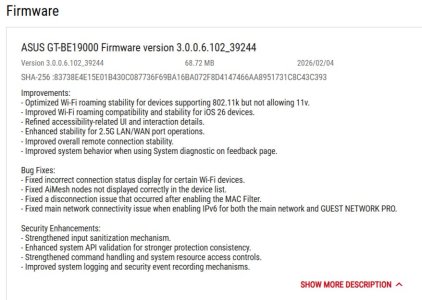
Firmware Version: 3.0.0.6.102_39244
I have a 2,5 Gbit/s connection coming from ONU.
From time to time (usually once a day/couple of days) internet stops working on all devices.
In the router logs it always looks the same:
Mar 7 08:52:30 udhcpc_wan[7738]: hnd_get_phy_status: Temporarily Router cannot get the PHY() status...
Mar 7 08:52:30 wan: finish adding multi routes
Mar 7 08:52:31 miniupnpd[8463]: shutting down MiniUPnPd
Mar 7 06:52:31 wan_up: Restart DDNS
Mar 7 06:52:31 dhcp client: renew {my IP}/255.255.255.128 via {similar to my IP} for 600 seconds.
Mar 7 08:52:32 WAN Connection: WAN was restored.
Even though it says that WAN was restored - nothing works until I restart the router.
When Internet's not working, I tried:
C:\Users\user>tracert -4 8.8.8.8
Tracing route to dns.google [8.8.8.8]
over a maximum of 30 hops:
1 2 ms 2 ms 2 ms GT-BE19000 [local IP]
2 * * * Request timed out.
3 * * * Request timed out.
At the same time router says:
Internet status: Connected
WAN IP: {my IP}
ISP said that the issue might be in connection between ONU and router, or ports on either of the devices.
I use the cable that came with the router, which seems quite good.
Before writing to the ISP again, I want to make sure that it's not router's fault.
Is there anything I can check to verify what side is the issue on?
I've been getting weird issues with internet on my GT-BE19000 router.
Firmware Version: 3.0.0.6.102_39244
I have a 2,5 Gbit/s connection coming from ONU.
From time to time (usually once a day/couple of days) internet stops working on all devices.
In the router logs it always looks the same:
Mar 7 08:52:30 udhcpc_wan[7738]: hnd_get_phy_status: Temporarily Router cannot get the PHY() status...
Mar 7 08:52:30 wan: finish adding multi routes
Mar 7 08:52:31 miniupnpd[8463]: shutting down MiniUPnPd
Mar 7 06:52:31 wan_up: Restart DDNS
Mar 7 06:52:31 dhcp client: renew {my IP}/255.255.255.128 via {similar to my IP} for 600 seconds.
Mar 7 08:52:32 WAN Connection: WAN was restored.
Even though it says that WAN was restored - nothing works until I restart the router.
When Internet's not working, I tried:
C:\Users\user>tracert -4 8.8.8.8
Tracing route to dns.google [8.8.8.8]
over a maximum of 30 hops:
1 2 ms 2 ms 2 ms GT-BE19000 [local IP]
2 * * * Request timed out.
3 * * * Request timed out.
At the same time router says:
Internet status: Connected
WAN IP: {my IP}
ISP said that the issue might be in connection between ONU and router, or ports on either of the devices.
I use the cable that came with the router, which seems quite good.
Before writing to the ISP again, I want to make sure that it's not router's fault.
Is there anything I can check to verify what side is the issue on?