What's new

XT12 ethernet port 3 yellow?

I can probably get around this then. What type of switch should I look for? A managed switch?
I would recommend a managed switch. Which there is an array of them. But get one that has two uplink ports. I recommend getting one with SPF+ ports so if you ever upgrade in speed, all you would have to do is change modules and don't have to replace the switch.
 
What type of switch should I look for?

You don't need any switches. Most likely bug in firmware.

And definitely don't put a managed switch between Main and Nodes in AiMesh. ⚠️
 
no other devices on other lan ports or wifi are not impacted
One would think that would be the case, however, It mainly causes congestion. Since the router is not a network segmenting type, but a spanning switch, all ports will see the 100M packets which will switch the mode of the Ethernet interface into promiscuous mode. When this happens, it will have to look at all packets sent on the network, not just packets sent to it. The end result is more load on the CPU and speed is still limited by the slower part of your connection path even though it is connected on a different router port.
 
Holy reviving of a thread Batman! It's been over a year, but I have not had the time to looking into this anymore until now.

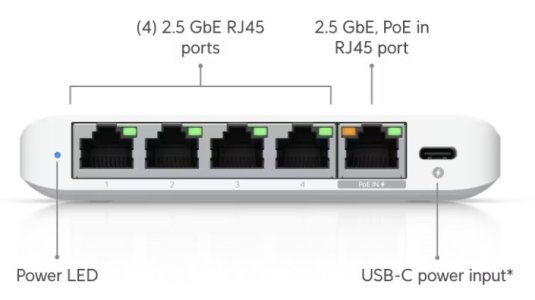
I got a couple of Flex Mini 2.5G from UniFi and went ahead to connect them kind of based on post 9 in this thread.

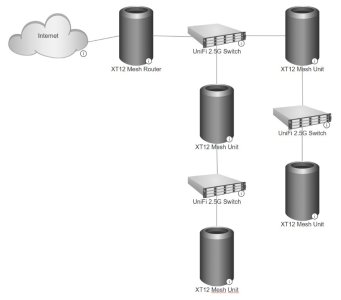
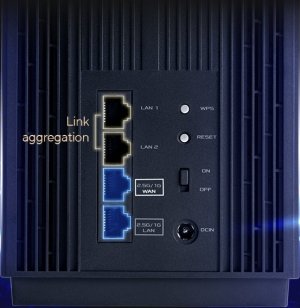
I went as the attached picture shows. Internet goes into 2.5G/1G WAN in all XT12s. From the XT12s out to UniFi via 2.5G/1G LAN. From UniFi to the next XT12 WAN etc. Is this right? I can not get it to work properly, and I guess the problem lies somewhat that I have two lines out from the first switch. The switches are supposed to be managed, but I have never had a managed switch, so I guess that's also a mess up from me.

Any thoughts on this please?
 

Attachments

  • Muyfa666-Network-Map.jpg
    Muyfa666-Network-Map.jpg
    36 KB · Views: 18
  • UniFi.2.5G.Switch.Ports.jpg
    UniFi.2.5G.Switch.Ports.jpg
    24.1 KB · Views: 18
  • XT12.Ports.jpg
    XT12.Ports.jpg
    56.2 KB · Views: 18
The switches are supposed to be managed

All UniFi switches are managed, but you've got wrong switches for your application. UniFi switches require Network application, the Controller software. The minimum version required is written in specifications.


In short - they don't have stand-alone mode or own web UI for configuration. They are part of UniFi ecosystem. Without Network application they'll perhaps work in default unconfigured dumb switch mode.
 
Last edited:
See what they do with just power unconfigured. I believe they'll just pass the traffic on all ports as unmanaged switch. The little status LED will stay White. If good enough for your use case - don't do anything.

There is one "UniFi Network Application 10.1.85 for Windows" download form Feb 11 2026, this is the current version. I personally never run the controller on 3rd party device, I also don't know what it will do with no Gateway. Technically there will be no WAN and LAN side, no VLAN information, no Firewall... Otherwise when the switches are Adopted in UniFi system and operating normally the little status LED will turn Blue.

 
Any thoughts on this please?

If you really have 5x XT12 units in AiMesh... all units work on the same channels, they see each other and wait for airtime. They support Guest Network Pro, but no VLAN to LAN port. AiMesh doesn't have Tx power adjustment per node and tuning this system for roaming is virtually impossible. AiMesh in general doesn't scale well, it's relying on luck the units are in correct places. XT12 doesn't have USB port and running Asuswrt-Merlin on it with Custom Scripts is quite limited. Managed switches between AiMesh nodes is an issue, they have to pass correct VLANs for Guest Network Pro with manual configuration. Requires AiMesh inner workings knowledge. In general you have heavily invested in expensive hardware with serious limitations. 🤷‍♂️
 
Well... if someone wants VLAN to LAN port on a managed switch they have to know the Guest Network VLAN. There is a way to find it. In @Muyfa666 case ASUS devices don't offer this feature and it may have to be done manually on the switches. The switches need to have one LAN port passing all VLANs to the next node. It will be messy and the required additional software for UniFi switches is not helping.

This entire overpriced AiMesh system could be done with one UCG-Max Gateway and the needed number of U6-Mesh APs and USW-Flex-2.5G-5 Switches. Cheaper, smaller size, much better looking, full VLAN support per LAN/WLAN, all 2.5GbE ports for LAN and quite possibly similar about 1.6Gbps aggregate throughput on WLAN on common 80MHz non-DFS channels... plus more clients support per radio.
 
Being as I'm not an experienced network person, my thought was that if there were more 2.5G ports on the XT12 units, this would not be a problem at all, therefore I thought a 2.5G switch (unmanaged) would solve it. Clearly I was wrong.

The XT12's work well enough without switches, but only in 1G as the ports are limited.
 
I can not get it to work properly

You never mentioned what exactly isn't working properly. All I can see is switches you can't control between your nodes. The switches you have are managed, but not configured. I guess, your purchase decision was based on low price. The price is low because the management is done on a different device you don't have.
 
Last edited:
Only the first two switches "work", after that, the wired signal is lost to the other units. Not a cable issue.
 
Well... You have 3x switches on your diagram. I don't know what "first two" means and I don't know which ones are "a couple of Flex Mini". If the nodes connected to each other directly work as expected - you need unmanaged switches passing VLANs to all ports. Folks around report success with TP-Link, but I don't know if all their models work the same way. ASUS have now this 2.5GbE switch and it has to work with AiMesh.
 
I think I made several errors in connecting all this.

As of today, I pretty much used the switches in default unmanaged mode, and then connecting tthe XT12's to the switches.

I forced the XT12's to 2.5G WAN backhaul only, and that made everything work like inteded.

Now I have 2.5G to all compatible units (computers, NAS) and have tested the transfers that are indeed full 2.5g.

Not sure this is the correct way thou, but working it is.
 

Latest threads

Support SNBForums w/ Amazon

If you'd like to support SNBForums, just use this link and buy anything on Amazon. Thanks!

Sign Up For SNBForums Daily Digest

Get an update of what's new every day delivered to your mailbox. Sign up here!

Members online

Back
Top