
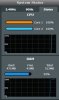
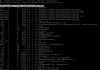
AC86U - Both Cores ar 100% and RAM at 92%
- Thread starter wizin
- Start date




Similar threads


Similar threads

Similar threads
-
-
AC-BE86U AIMesh poor performance back-haul link to RT-AC86U
- Started by Matt Storr
- Replies: 7
-

-
-
Need Help Setting Up 3 VLANs (Home, Guest, IoT) on ASUSWRT-Merlin (RT-AC86U)
- Started by utte
- Replies: 17
-
-
My ASUS router RT-AC86U is a very old device, so, I need your guys help!
- Started by luca
- Replies: 17
-
-
386.14_2 - RT-AC86U - Web UI Inaccessible After Upgrading
- Started by cousinit99
- Replies: 5
-
Using both 10g ports on AXE-16000, labored 10g connection after reboot
- Started by Wayne Hutchinson
- Replies: 15
Latest threads
-
-
BE-92U how to set up LAN ports into different VLAN?
- Started by marsman
- Replies: 1
-
Significance of Quad9 DNS Resolver Errors using https://dnscheck.tools/
- Started by GoldWing
- Replies: 7
-
 ASUS GT-BE19000AI Firmware version 3.0.0.6.102_40456. (2026/03/13)
- Started by Lax
- Replies: 1
-
Support SNBForums w/ Amazon
If you'd like to support SNBForums, just use this link and buy anything on Amazon. Thanks!
Sign Up For SNBForums Daily Digest
Get an update of what's new every day delivered to your mailbox. Sign up here!