What's new
  • SNBForums Code of Conduct

    SNBForums is a community for everyone, no matter what their level of experience.

    Please be tolerant and patient of others, especially newcomers. We are all here to share and learn!

    The rules are simple: Be patient, be nice, be helpful or be gone!

AFC now available for BE19000AI

Richard1864

Regular Contributor
ASUS today released an update for the BE19000AI which enables AFC, version 3.0.0.6.102_40272. it can be downloaded from the BE19000AI product page, and also includes some bug fixes.
 
Posted a release thread for it to the ASUSWRT - Official subforum: Asus GT-BE19000AI Firmware version 3.0.0.6.102_40272 (2025/12/01)

New features:
- Support AFC feature to unlock the high power usage of the 6GHz band, improving transmission distance and mid-to-long-range transmission speeds.
FAQ: https://www.asus.com/support/faq/1054880/
[Note 1] AFC feature is currently supported only in North America.
[Note 2] Incompatible OS versions or devices may have 6GHz connectivity issues. Please ensure your client device's operating system is up to the supported version.

Bug Fixes and Enhancements:
- Fixed no data showing on WiFi Traffic Monitor.
- Resolved abnormal client list page switching with many connected devices.
- Eliminated browser cache issues when switching from other ASUS routers.
 
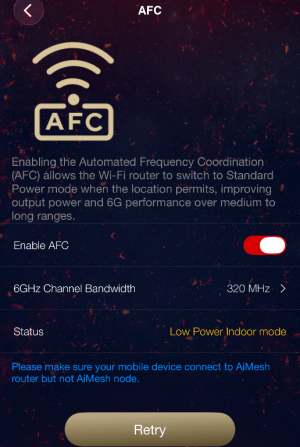
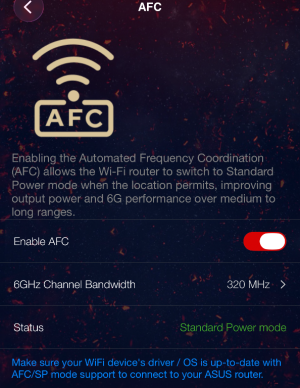
Yes, I tried it’s working very well. It switched from low power indoor mode to standard power.
I get ~2800mbps on my S24Ultra which is 600mbps more than without AFC. :)
 

Attachments

  • IMG_9150.png
    IMG_9150.png
    694.6 KB · Views: 131
  • IMG_9149.png
    IMG_9149.png
    803.8 KB · Views: 134
Last edited:
I am having issues with my AFC not going into standard power mode do to a control channel conflict. I am on the 320Mhz width and have tried several different channels including 182 which has been a good channel to use for non interference. I have changed the router to auto on the control channel to see if this helps. Once I get home from work I will have my phone on the net to see if this changes things. If so then auto will be something I guess I will need to use. Would anyone like to share what control channels they have tried and got AFC to work?
 
Disabling/Unchecking PSC should make more channels available. (Turn it back on if devices can't see/connect to 6 GHz).
 
Try it from your cellphone using Asus router app. I had the same issue, but after toggling few times from my iPhone it started working.
I'm using auto and width 320Mhz, which sets to channel 37.
 
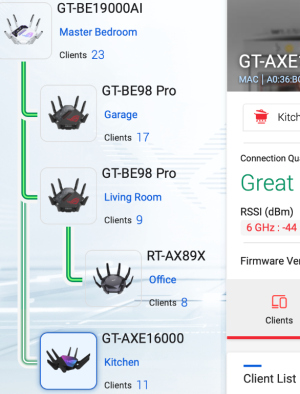
The wifi signal strength also increased by 18dBm with AFC, standard power mode, when connected to wireless mesh node.
 

Attachments

  • Screenshot 2025-12-03 at 5.53.09 PM.png
    Screenshot 2025-12-03 at 5.53.09 PM.png
    438 KB · Views: 79
Did it help with the wifi signal on the be98 pro? Mine would be in a wired mesh. I guess afc would only work on the main router and not on any of the be98 pro nodes unless I misread. I have two be98 pro right now.
 
No, I don't have another wireless mesh node. All other nodes are 10GBE wired, except this GT-AXE16000.
The reason for not having BE98PRO as wireless mesh node were indeed due to random disconnects every few days. So I moved BE98PRO to wired and using old AXE16000 as wireless mesh. This is probably a bug in BE98PRO firmware.
 
Last edited:
The wifi signal strength also increased by 18dBm with AFC, standard power mode, when connected to wireless mesh node.
Thank you for sharing your AiMesh setup. You can control 5 GHz-2 on the GT-AXE16000 and 6 GHz-2 on the GT-BE98 Pros?
 
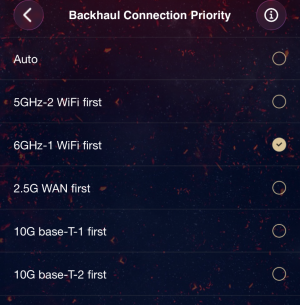
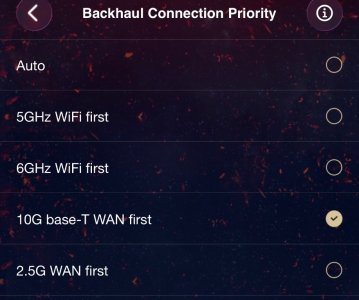
On AXE16000, I can choose either 5GHz-2 or 6GHz-1 for back haul. So if the 5GHz-2 is used for backhaul then the 5GHz-1 will be used for clients.
I’m using 6GHz-1 for backhaul as in the snap shot.
 

Attachments

  • IMG_9155.png
    IMG_9155.png
    947 KB · Views: 64
Last edited:
On BE98PRO, you can only choose either 5GHz or 6GHz as backhaul. You can’t specifically choose 1 out of the two 6GHz radios. See the second snapshot.
BE98PRO
 

Attachments

  • GT98PRO.jpg
    GT98PRO.jpg
    153 KB · Views: 55
Last edited:
@Lax Thanks for taking time to share those.

I have had my GT-BE98 Pro and GT-AXE16000 as AiMesh with Ethernet backhaul mode. I was not able to utilize the AXE16000 5 GHz-2. I assume if you have selected 5 GHz-2 as preferred backhaul then everything would be okay as you can set the SSID of AXE16000 5 GHz-1 for clients. With 6 GHz as priority are you able to use 5 GHz-2 for clients? I eventually set the AXE16000 as an AP with AiMesh, then had two AiMeshes: one WiFi 7 and the other WiFi 6/6e. Finally I found a way to combine them again with an ExpertWiFi EBG15 although it seems underpowered, (especially with a 4 TB USB HDD connected).

I'm also curious how the BE98 Pro works as a node. Are both 6 GHz-1 and 6 GHz-2 manageable? I suspect you can control 6 GHz-1 since the BE19000Ai has 6 GHz but how about 6 GHz-2?

My apologies to everyone as this is off-topic!

 
Just note "AFC works great" means absolutely nothing singe the service is geolocation based. It can increase the power up to 36dBm, but also can limit it below 15dBm based in GPS coordinates and what else is using 6GHz spectrum around. And this may change on day-to-day basis since the AP has to report every 24h. This service is not only limited to US/Canada at the moment, but also less guaranteed to work than DFS.
 
Try it from your cellphone using Asus router app. I had the same issue, but after toggling few times from my iPhone it started working.
I'm using auto and width 320Mhz, which sets to channel 37.
Much Appreciated Lax, Got home and went straight to the ASUS app on my phone. Toggled it off and on and after a 1 minute wait period all things started working as intended. I picked up another 20dbm of signal strength right away. -37dbm currently.
 
@Lax Thanks for taking time to share those.

I have had my GT-BE98 Pro and GT-AXE16000 as AiMesh with Ethernet backhaul mode. I was not able to utilize the AXE16000 5 GHz-2. I assume if you have selected 5 GHz-2 as preferred backhaul then everything would be okay as you can set the SSID of AXE16000 5 GHz-1 for clients. With 6 GHz as priority are you able to use 5 GHz-2 for clients? I eventually set the AXE16000 as an AP with AiMesh, then had two AiMeshes: one WiFi 7 and the other WiFi 6/6e. Finally I found a way to combine them again with an ExpertWiFi EBG15 although it seems underpowered, (especially with a 4 TB USB HDD connected).

I'm also curious how the BE98 Pro works as a node. Are both 6 GHz-1 and 6 GHz-2 manageable? I suspect you can control 6 GHz-1 since the BE19000Ai has 6 GHz but how about 6 GHz-2?

My apologies to everyone as this is off-topic!
I know what you are referring to... We used to have that issue while ago on the AXE16000 as mesh node with the 5Ghz-2 radio SSID don't get initialized properly and arbitrarily sets-up with some random SSID name which can't be controlled. Now it still not controllable on th mesh nodes, but I don't see the rogue random SSIDs anymore, means it's correctly setting up the SSID.

Similar thing with the BE98PRO, the 6Ghz-2 is not controllable, but no random SSIDs either. I used netspot scanner to check for any rogue SSIDs but couldn't see any. All MACs are assigned with proper SSIDs.
 

Latest threads

Support SNBForums w/ Amazon

If you'd like to support SNBForums, just use this link and buy anything on Amazon. Thanks!

Sign Up For SNBForums Daily Digest

Get an update of what's new every day delivered to your mailbox. Sign up here!
Back
Top