What's new

AiProtection Signature Version # Divergence?

jzchen

Very Senior Member
My GT-BE98 Pro AiProtection signature was updated to (EDIT typo, the correct version is 2.50) on "2026/03/24". But the GT-AXE11000 on Merlin 3004.388.11_0_rog shows up to date, last update 2026/03/06, (EDIT missed noting that it is version 2.498). First time I've been able to update one, and not the other. Is this something to be concerned about?
 
Last edited:
Are the signature versions the same? The date is when that unit last updated, not the date of the signatures file.
 
Are the signature versions the same? The date is when that unit last updated, not the date of the signatures file.
Thank you for the response. (I should have said thanks in advance). The signature versions are not the same. The GT-BE98 Pro on stock firmware has 2.50 and the GT-AXE11000 on Merlin says up to date with 2.498. (I was just about to remotely flash stock firmware to see if it updates)...

I was having a serious time discrepancy issue after a tech came and restored Internet service to my gateway. The time on the GT-BE98 Pro was December 15, 2023, and every time I'd check for update it would say downloading and updated, to the same 2.498. It took me the whole weekend to sort through that to Monday morning. After which there was an update to 2.50. So I went to check on the GT-AXE11000 and it keeps saying up to date.
 
There should be a sig update log in /tmp to show what is or isn’t happening during an update check.
 
Are Trend Micro components in 3006.102 firmware the same as in 3004.388 firmware and using the same signature files?
 
Are Trend Micro components in 3006.102 firmware the same as in 3004.388 firmware and using the same signature files?
Thank you for your response.

The version #s have always been the same, including the GT-BE19000Ai which has Ad blocking and tracking blocking. I flashed latest stock and it still says up to date. Strangely it also reverted my login password to the password prior!
 
The version #s have always been the same
Look on both routers in the /jffs/wglst* logs to see if the actual URLs used by the sig update are different. Do a sig check on both first so the wget commands will be near the end of the log.
 
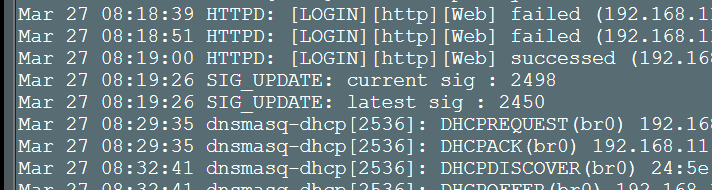
lsame on my gt-ax11000 pro something is amis
 

Attachments

  • Screenshot 2026-03-27 083702.png
    Screenshot 2026-03-27 083702.png
    32.3 KB · Views: 24
Look on both routers in the /jffs/wglst* logs to see if the actual URLs used by the sig update are different. Do a sig check on both first so the wget commands will be near the end of the log.
Thank you!

I was trying to Google how to do this to no avail, then factory reset it using Method 2 (WPS button). Someone was asking me for the port mapping so I installed the Ai router in its place and got that for him. (He had to walk me through it to be honest)...
 
There are 2 possible update URLs for new versions. That's why I asked for someone to look at /tmp/sig_upgrade.log to see what it's doing.
Code:
$ curl https://dlcdnets.asus.com/pub/ASUS/LiveUpdate/Release/Wireless/sig2nd_update.zip
WW_FULL#2.450
WW_PART#2.350
WW_WRS#2.450
WW_HNS#1.155
$ curl https://dlcdnets.asus.com/pub/ASUS/LiveUpdate/Release/Wireless_SQ/sig2nd_update.zip
WW_FULL#2.500
WW_PART#2.350
WW_WRS#2.500
WW_HNS#1.155
Which one depends on nvram get apps_sq
 
There are 2 possible update URLs for new versions. That's why I asked for someone to look at /tmp/sig_upgrade.log to see what it's doing.
Code:
$ curl https://dlcdnets.asus.com/pub/ASUS/LiveUpdate/Release/Wireless/sig2nd_update.zip
WW_FULL#2.450
WW_PART#2.350
WW_WRS#2.450
WW_HNS#1.155
$ curl https://dlcdnets.asus.com/pub/ASUS/LiveUpdate/Release/Wireless_SQ/sig2nd_update.zip
WW_FULL#2.500
WW_PART#2.350
WW_WRS#2.500
WW_HNS#1.155
Which one depends on nvram get apps_sq
SQ is for test purposes (Software Qualification or something like that).
 
That's why I asked for someone to look at /tmp/sig_upgrade.log
Here you go
Code:
# cat /tmp/sig_upgrade.log
---- sig update start: ----
---- sig update real normal----
---- sig wget exit : 0 ----
Download sig info OK
WW_FULL
2.450
---- current sig : 2498 ----
---- latest sig : 2450 ----
---- sig update end ----
No URL

To follow up and confirm:
Code:
# curl https://dlcdnets.asus.com/pub/ASUS/LiveUpdate/Release/Wireless/sig2nd_update.zip
WW_FULL#2.450
WW_PART#2.350
WW_WRS#2.450
WW_HNS#1.155

# curl https://dlcdnets.asus.com/pub/ASUS/LiveUpdate/Release/Wireless_SQ/sig2nd_update.zip
WW_FULL#2.500
WW_PART#2.350
WW_WRS#2.500
WW_HNS#1.155
 
Last edited:
Here you go
Code:
# cat /tmp/sig_upgrade.log
---- sig update start: ----
---- sig update real normal----
---- sig wget exit : 0 ----
Download sig info OK
WW_FULL
2.450
---- current sig : 2498 ----
---- latest sig : 2450 ----
---- sig update end ----
No URL
current is newer than latest, which is weird, and different from OP who was referring to 2.50 version.
 
current is newer than latest, which is weird, and different from OP who was referring to 2.50 version.
You see that too. Thought I was going daft. Looks like the logic may be broken.
Dates on the asd files would seem to indicate 11th November 2025
 
There are 2 possible update URLs for new versions. That's why I asked for someone to look at /tmp/sig_upgrade.log to see what it's doing.
Code:
$ curl https://dlcdnets.asus.com/pub/ASUS/LiveUpdate/Release/Wireless/sig2nd_update.zip
WW_FULL#2.450
WW_PART#2.350
WW_WRS#2.450
WW_HNS#1.155
$ curl https://dlcdnets.asus.com/pub/ASUS/LiveUpdate/Release/Wireless_SQ/sig2nd_update.zip
WW_FULL#2.500
WW_PART#2.350
WW_WRS#2.500
WW_HNS#1.155
Which one depends on nvram get apps_sq


ASUSWRT-Merlin GT-AX11000_PRO 3006.102.7_2 Tue Mar 24 20:26:48 UTC 2026
@portal:/tmp/home/root# cat /tmp/sig_upgrade.log
---- sig update start: ----
---- sig update real normal----
---- sig wget exit : 0 ----
Download sig info OK
WW_FULL
2.450
---- current sig : 2498 ----
---- latest sig : 2450 ----
---- sig update end ----
admin@portal:/tmp/home/root#
 
You see that too. Thought I was going daft. Looks like the logic may be broken.
Dates on the asd files would seem to indicate 11th November 2025
If you want to trick it into "downgrading", you can probably set the nvram variable manually.
Code:
nvram set bwdpi_sig_ver=2.449
Then run the sig check again.

asd has its own separate update mechanism from the Trend Micro signatures.
 
asd has its own separate update mechanism from the Trend Micro signatures.
You're right, bit of a dumb moment.
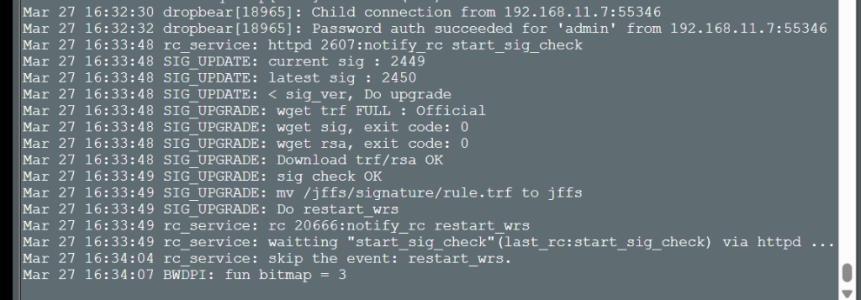
That helped
Selection_030.png
Code:
---- sig upgrade start: ----
WW_FULL_2450_un.zip
WW_FULL_2450_rsa.zip
---- wget trf FULL : Official ----
---- wget sig, exit code: 0 ----
---- wget rsa, exit code: 0 ----
---- Download trf/rsa OK ----
---- sig check OK ----
---- rm original /jffs/signature/rule.trf ----
---- mv /jffs/signature/rule.trf to jffs ----
Do restart_wrs
---- sig upgrade end ----

Code:
# curl https://dlcdnets.asus.com/pub/ASUS/LiveUpdate
/Release/Wireless/sig2nd_update.zip
WW_FULL#2.450
WW_PART#2.350
WW_WRS#2.450
WW_HNS#1.155

# curl https://dlcdnets.asus.com/pub/ASUS/LiveUpdate
/Release/Wireless_SQ/sig2nd_update.zip
WW_FULL#2.500
WW_PART#2.350
WW_WRS#2.500
WW_HNS#1.155
 
If you want to trick it into "downgrading", you can probably set the nvram variable manually.
Code:
nvram set bwdpi_sig_ver=2.449
Then run the sig check again.

asd has its own separate update mechanism from the Trend Micro signatures.
that worked thankyou..
my gt-axe16000s dont have the log .. assume they are not running the trendmicro security
 

Attachments

  • Screenshot 2026-03-27 163453.png
    Screenshot 2026-03-27 163453.png
    197.8 KB · Views: 5

Support SNBForums w/ Amazon

If you'd like to support SNBForums, just use this link and buy anything on Amazon. Thanks!

Sign Up For SNBForums Daily Digest

Get an update of what's new every day delivered to your mailbox. Sign up here!

Staff online

Back
Top