
What's new

AiProtection Signature Version # Divergence?

There are 2 possible update URLs for new versions. That's why I asked for someone to look at /tmp/sig_upgrade.log to see what it's doing.
Code:
$ curl https://dlcdnets.asus.com/pub/ASUS/LiveUpdate/Release/Wireless/sig2nd_update.zip
WW_FULL#2.450
WW_PART#2.350
WW_WRS#2.450
WW_HNS#1.155
$ curl https://dlcdnets.asus.com/pub/ASUS/LiveUpdate/Release/Wireless_SQ/sig2nd_update.zip
WW_FULL#2.500
WW_PART#2.350
WW_WRS#2.500
WW_HNS#1.155
Which one depends on nvram get apps_sq
I have the BE98 Pro up as router (behind a double NAT), but it lost the latest signature, so I updated it, to 2.450. The Ai router has 2.498:
BE98_2_450.jpg
AI_2_498.jpg

Happy to check but have no idea how. Just copy and paste the curl code? (Did that this morning)...
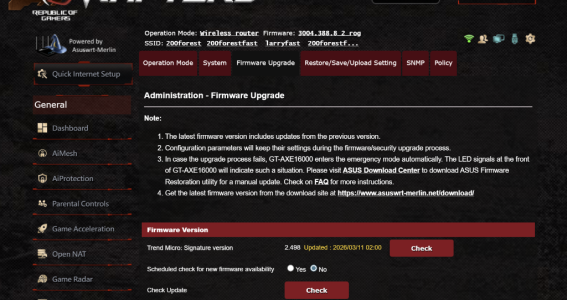
 
current is newer than latest, which is weird, and different from OP who was referring to 2.50 version.
Maybe I was seeing things? I didn't get a good night's sleep....
 
admin@GT-BE98_Pro-63F8:/tmp/home/root# cat /tmp/sig_upgrade.log
---- sig update start: ----
---- sig update real normal----
---- sig wget exit : 0 ----
Download sig info OK
WW_FULL
2.450
---- current sig : 2450 ----
---- latest sig : 2450 ----
---- sig update end ----

admin@GT-BE19000AI-6A10:/tmp/home/root# cat /tmp/sig_upgrade.log
---- sig update start: ----
---- sig update real normal----
---- sig wget exit : 0 ----
Download sig info OK
WW_FULL
2.450
---- current sig : 2498 ----
---- latest sig : 2450 ----
---- sig update end ----
 
did some reasearch and answer my own question on my gt-ax16000s asd doesnt run as they are in ap mode.
Yes there's no option to run AiProtection in AP mode I'm afraid...
 
Look on both routers in the /jffs/wglst* logs to see if the actual URLs used by the sig update are different. Do a sig check on both first so the wget commands will be near the end of the log.
Sorry, but how can I do this please?
 
I bought the GT-AXE11000 but the BE98 Pro and Ai router were sent to me from ASUS. Right now the BE98 Pro has 2.450, and the other two 2.498. May have something to do with the system date when last updated. Ai router says 2023 and AXE11000 says 2025?
 
i belive based on the image below that at some point someone screwed up and posted a version 2.498 thinking it was 2.4.98 ie just before 2.5 and that screwed the pooch.. it is the same on my older gt-axe16000 still running 3004 versions .and an gt-11000 pro also running 3004

i just forced upgrade/downgrade on both so they are now on 2.50
 

Attachments

  • Screenshot 2026-03-27 181904.png
    Screenshot 2026-03-27 181904.png
    825.4 KB · Views: 10
Last edited:
You got the illusive "2.50"? I seem to have lost it through factory resetting...
 
You got the illusive "2.50"? I seem to have lost it through factory resetting...
I ran the ssh cmd then update check on a GT-AX6000 and a RT-AX88U Pro and both of those updated to 2.450; not 2.50… maybe a typo.
[EDITED - 2.50 attributed to OP].

Mine were both at 2.498 to start with.
 
Last edited:
I hear ran the ssh cmd then update check on a GT-AX6000 and a RT-AX88U Pro and both of those updated to 2.450; not 2.50… maybe a typo by @lgkahn?

Mine were both at 2.498 to start with.
Thank you.

I barely knew how to log into ssh so all I could do was click Check.

So thinking it over I got an update to 2.498 but since the system clock off, the date noted was 2023. Then when I tethered my cell phone the clock/date resolved, I plugged Ethernet back in and eventually the 24th it updated. Since it has to be tricked to "update" to a lower version, it has to be 2.50 that I was seeing, (the only way is up with the Check button right)?
 
Last edited:
it has to be 2.50 that I was seeing, (the only way is up with the Check button right)?
Honestly I have no idea what you were seeing, however given the latest version in all the screenshots folks are posting says 2.450, on the balance of probabilities the latest is probably 2.450.

I’m not too fussed to be honest, @dave14305 trick worked as it always does, it did an update, I got the latest sig as reported.
 
@lgkahn my apologies, that should have just read "maybe a typo". The OP was indeed @jzchen.
I will amend the original post.
 

Latest threads

Support SNBForums w/ Amazon

If you'd like to support SNBForums, just use this link and buy anything on Amazon. Thanks!

Sign Up For SNBForums Daily Digest

Get an update of what's new every day delivered to your mailbox. Sign up here!

Members online

Back
Top