
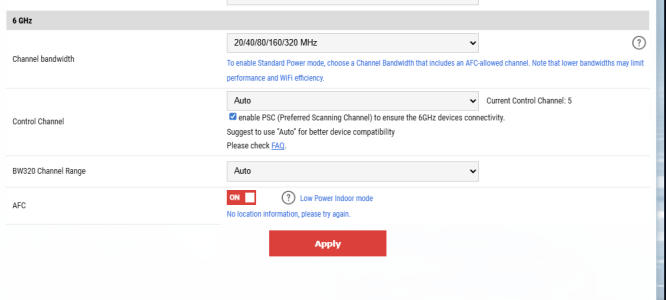
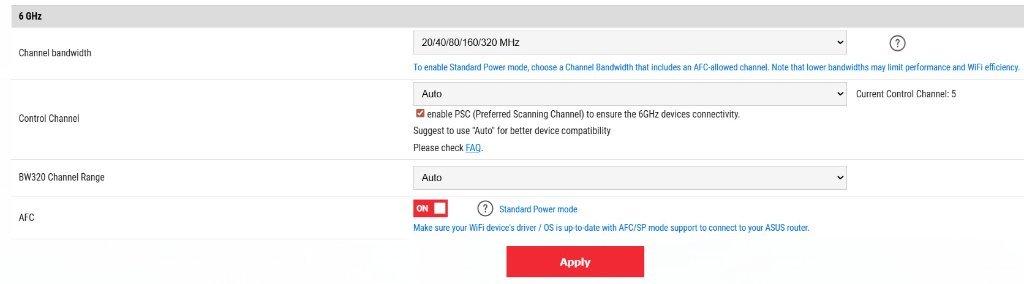
ASUS BE19000AI: AFC: No location information, please try again
- Thread starter jpiszcz
- Start date
-
- Tags
- afc gt-be19000ai rog
Similar threads


Similar threads

Similar threads
-
ASUS ROG Rapture GT-BE19000AI VS Asus ROG Rapture GT-BE98 PRO BE30000/BE25000/-BE19000
- Started by Redskins16
- Replies: 52
-
Asus ZenWiFi BT10s. VLAN segregation?
- Started by sjw
- Replies: 6
-
Asus router - meaning of 'control channel' and 'extension channel'
- Started by chrisisbd
- Replies: 6
-
 ASUS GT-BE19000_AI / GT-BE96_AI Concerns: Synaptics SL1680 NPU Incompatibility (Ollama & Frigate)
- Started by Rabbit-Spec
- Replies: 26
-
-
 ASUS RT-BE92U Private and Guest network best settings setup
- Started by ABaSP
- Replies: 12
-
ASUS BQ16 Pro and Automatic Frequency Coordination (AFC)
- Started by Bandito
- Replies: 2
-
 New: ASUS ProArt Creator Router and Switch
- Started by Tech9
- Replies: 8
-
ASUS BE-92U speedtest screen unavailable
- Started by khew128
- Replies: 10
-

Latest threads
-
-
BE-92U how to set up LAN ports into different VLAN?
- Started by marsman
- Replies: 1
-
Significance of Quad9 DNS Resolver Errors using https://dnscheck.tools/
- Started by GoldWing
- Replies: 7
-
 ASUS GT-BE19000AI Firmware version 3.0.0.6.102_40456. (2026/03/13)
- Started by Lax
- Replies: 1
-
Support SNBForums w/ Amazon
If you'd like to support SNBForums, just use this link and buy anything on Amazon. Thanks!
Sign Up For SNBForums Daily Digest
Get an update of what's new every day delivered to your mailbox. Sign up here!