What's new

Asus BE88U Merlin Firmware. Login page inaccessible unless I reboot it

You are definitely on to something.

Apr 16 14:23:27 HTTPD: [LOGIN][https][APP] failed (91.199.163.54)
also this IP 78.128.114.42
Unsure if these are from the Asus app though. The App has the same problem logging in fine when the UI works. So does it not mean it logs in fine and may not be the issue, instead these above IP are attacking? Sorry if I seem clueless.

As per your suggestion I have turned the "Enable Web Access from WAN" is set to "No".
Fingers Crossed.

So those two addresses are known scanner/hacker addresses on the internet and not from your local network. So it looks like this is reason for your problems.
 
Mate that's the nuclear option I might have to reserve when no one is in the house. I remember I had done this to figure out why my 5G was sketchy and it finally settled.
Currently very unlikely I can do this for various reasons. Everyone in the house needs stable internet, school, Uni, Work from home etc. Cant stuff it up........ now. Maybe my final option.

You are definitely on to something.

Apr 16 14:23:27 HTTPD: [LOGIN][https][APP] failed (91.199.163.54)
also this IP 78.128.114.42
Unsure if these are from the Asus app though. The App has the same problem logging in fine when the UI works. So does it not mean it logs in fine and may not be the issue, instead these above IP are attacking? Sorry if I seem clueless.

As per your suggestion I have turned the "Enable Web Access from WAN" is set to "No".
Fingers Crossed.
You should ALWAYS disable remote or WAN access to any internet facing router.
 
So those two addresses are known scanner/hacker addresses on the internet and not from your local network. So it looks like this is reason for your problems.
Oh wow. Ok so they are targeting me. right. So is there an alternative to "Enable Web Access from WAN" is set to "No"?

I do sometimes use the Asus app etc to check on the network.
 
Oh wow. Ok so they are targeting me. right.
Not you specifically, everyone on the internet is constantly being scanned/probed. That's why you should never expose any part of your home network to the internet unless you really need to.

So is there an alternative to "Enable Web Access from WAN" is set to "No"?

I do sometimes use the Asus app etc to check on the network.
Yes, enable the VPN server on the router and install a VPN client on your mobile device.
 
Not you specifically, everyone on the internet is constantly being scanned/probed.


Yes, enable the VPN server on the router and install a VPN client on your mobile device.
Hmm will need to check that out.
I just checked the app and its still got access. I thought I lose access on the Asus app on these settings....
1776340194480.png
 
You can still use the Asus app locally when connected to your Wi-Fi.
Oh damn missed that. lol

BTW the WAN - DDNS. Does it do the same thing?
Has this description
DDNS (Dynamic Domain Name System) is a service that allows network clients to connect to the wireless router, even with a dynamic public IP address, through its registered domain name.
 
Oh damn missed that. lol

BTW the WAN - DDNS. Does it do the same thing?
Has this description
DDNS (Dynamic Domain Name System) is a service that allows network clients to connect to the wireless router, even with a dynamic public IP address, through its registered domain name.
DDNS in itself doesn't permit access to anything. It's merely a way of associating your router's WAN IP address with a public DNS name. So this can be useful if your router doesn't have a static WAN address (e.g. it changes from time to time). For example, if you are running a VPN server on your router and want to connect to it when away from home; you either need to use the router's IP address (which may have changed) or the router's DDNS name (e.g. myhomerouter.asuscomm.com) which doesn't change.
 
Hmm will need to check that out.
I just checked the app and its still got access. I thought I lose access on the Asus app on these settings....
View attachment 71314
The unsupported Asus App works from the local network without having to enable remote access features like Enable Web Access from WAN.

Other things to check. Make sure the SSH option is also either disabled or set to LAN Only. Do not set it to LAN & WAN.
If you use either stock Asus firmware or older Asus-Merlin firmware, make sure to disable AiCloud and it's subfeatures.
Avoid enabling the Alexa feature if the router (or firmware) supports it since it apparently may require remote access to the router.

For remote access to the router or to local network clients, enable the VPN server (either OpenVPN or WireGuard) then export the client configuration file to your remote client for import into the OpenVPN or WireGuard client app.
 
Last edited:
The unsupported Asus App works from the local network without having to enable remote access features like Enable Web Access from WAN.

Other things to check. Make sure the SSH option is also either disabled or set to LAN Only. Do not set it to LAN & WAN.
If you use either stock Asus firmware or older Asus-Merlin firmware, make sure to disable AiCloud and it's subfeatures.
Avoid enabling the Alexa feature if the router (or firmware) supports it since it apparently may require remote access to the router.

For remote access to the router or to local network clients, enable the VPN server (either OpenVPN or WireGuard) then export the client configuration file to your remote client for import into the OpenVPN or WireGuard client app.
and withdraw from the license ?
 
No VPN clients
Yes Wired PC via CAT 6 to router
Win 11 Pro Machine with Vmware hosting home assistant. Asus IOT with about 8 odd wifi devices, Rest all on Asus 2.4 and 5 G network spread out. Wifi 7 disabled since most devices not supported.


Firmware is latest and ipconfig was the same previously when it did not work before reboot.
Ethernet adapter Ethernet 4:

Connection-specific DNS Suffix . :
IPv4 Address. . . . . . . . . . . : 192.168.0.2
Subnet Mask . . . . . . . . . . . : 255.255.255.0
Default Gateway . . . . . . . . . : 192.168.0.1
Is it under warranty, if so take it back.
 
There is no data sharing agreement to withdraw in this case. People still leave Web Access from WAN enabled and this is the result. And I'm not sure what good is 3rd party firmware with extra features for @Sash2025 when ChatGPT is needed even for the basics. 🤷‍♂️
 
DDNS in itself doesn't permit access to anything. It's merely a way of associating your router's WAN IP address with a public DNS name. So this can be useful if your router doesn't have a static WAN address (e.g. it changes from time to time). For example, if you are running a VPN server on your router and want to connect to it when away from home; you either need to use the router's IP address (which may have changed) or the router's DDNS name (e.g. myhomerouter.asuscomm.com) which doesn't change.
Ok interesting. thanks for explaining this.
The unsupported Asus App works from the local network without having to enable remote access features like Enable Web Access from WAN.

Other things to check. Make sure the SSH option is also either disabled or set to LAN Only. Do not set it to LAN & WAN.
If you use either stock Asus firmware or older Asus-Merlin firmware, make sure to disable AiCloud and it's subfeatures.
Avoid enabling the Alexa feature if the router (or firmware) supports it since it apparently may require remote access to the router.

For remote access to the router or to local network clients, enable the VPN server (either OpenVPN or WireGuard) then export the client configuration file to your remote client for import into the OpenVPN or WireGuard client app.
Yes app works when Wifi range. Will see how that goes and explore VPN if needed.

Enage SSH is Lan only and Allow SSH Port Forwarding is set to No
Latest Merlin firmware
I cant even find icloud. Never used it s
Same with Alexa

Is it under warranty, if so take it back.
No idea why you said this. Assuming in response to earlier comment.
There is no data sharing agreement to withdraw in this case. People still leave Web Access from WAN enabled and this is the result. And I'm not sure what good is 3rd party firmware with extra features for @Sash2025 when ChatGPT is needed even for the basics. 🤷‍♂️
Ouch. Mate not totally clueless here but yeah maybe don't know enough. I have had WAN on for 10 plus years and didn't have an issue including previously on AC88U. If I had known the login page does not show to avoid attacks then I guess it would have clicked. I guess wont forget that ever again.

Anyway. Thanks everyone for the assist. I am hoping this solves the issue. Finger crossed.
 
and withdraw from the license ?
Don't think (or remember if) disabling WAN GUI access involves also hitting the "withdraw" from it as well. Don't remember if the Alexa feature requires withdrawing. But other features might. All depends on what features one has enabled and what remote access options are tied to those features.
I cant even find icloud. Never used it s
Same with Alexa
The AiCloud feature has been removed from the Asus-Merlin firmware starting with 3006.102.7 and 3004.388.11. Its just something to remember and check that it's disabled if you use Asus stock firmware or roll back to Asus-Merlin firmware earlier than 3006.102.7 and 3004.388.11.

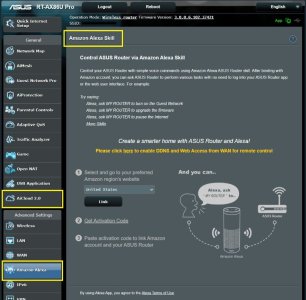
Asus router Amazon Alexa skill integration is not supported on every router. If one has this specific feature on their router they may want to ensure it's not enabled if they are not using it. Example from Asus stock firmware on RT-AX86U Pro attached.

The whole point is to block as much inbound access to the router, it's GUI, and local LAN clients as possible including also limiting the use of port forwarding if using that feature.
 

Attachments

  • RT-AX86U_Pro_Stock_Asus_Firmware.jpg
    RT-AX86U_Pro_Stock_Asus_Firmware.jpg
    89.6 KB · Views: 11

Support SNBForums w/ Amazon

If you'd like to support SNBForums, just use this link and buy anything on Amazon. Thanks!

Sign Up For SNBForums Daily Digest

Get an update of what's new every day delivered to your mailbox. Sign up here!
Back
Top