What's new

Release Asuswrt-Merlin 3006.102.7 is now available

Pro?
RT-AX86U is staying on the 3004.388.x releases.
Permanently? I didn't know about this and I cloned the repo and I was surprised that I ran through tones of build errors. Spent the whole day fixing them and I got it to a working state (tho I still have a bug that I need to fix).
1772310728383.png
 
Permanently? I didn't know about this and I cloned the repo and I was surprised that I ran through tones of build errors. Spent the whole day fixing them and I got it to a working state (tho I still have a bug that I need to fix).
View attachment 70556
I'm really surprised to see this. I have no advice to give. I'll be watching.
Did you get guest network pro working?
 
I'm really surprised to see this. I have no advice to give. I'll be watching.
Did you get guest network pro working?
Doubtful. Being able to build an older router from the main branch may be possible after a lot of fixups, but the selected build options in the target.mak file (that determine the features) probably were left alone. This would be a Franken-build at best. Probably many problems lurking beneath.
 
Last edited:
Permanently? I didn't know about this and I cloned the repo and I was surprised that I ran through tones of build errors. Spent the whole day fixing them and I got it to a working state (tho I still have a bug that I need to fix).
View attachment 70556
Just because it boots does not mean that it will work properly. Any code related to SDN or VLAN in the closed source bits will be missing from your build since you are running the original 3004 code in all those closed source components.

Asus has currently no plans to migrate the BCM4908 devices to the 3006 code base.
 
I'm really surprised to see this. I have no advice to give. I'll be watching.
Did you get guest network pro working?
It's not there. Only normal guest network. It doesn't build for this model and if I try to force it, I get build error because, as RMerlin said, those parts are in a form of a prebuilt binaries that are closed source (tho I'm almost sure I can probably reverse engineer the whole thing).
Just because it boots does not mean that it will work properly. Any code related to SDN or VLAN in the closed source bits will be missing from your build since you are running the original 3004 code in all those closed source components.

Asus has currently no plans to migrate the BCM4908 devices to the 3006 code base.
I only faced a couple of minor frontend errors which I fixed. But then had 1 major issue with the client list (in the index page) not showing the clients list (missing properties). The struct in httpd is expected to match the one from the closed source networkmap. I fixed it. Same issue in the client list of AiMesh which I also fixed. Not seeing any obvious bugs right now.
 
I have an AXE-1600 and have been running 3006_102.7 beta 1 for awhile and everything was fine. I also have AT&T IPV6. I just upgraded to 3006_102.7 (from the beta) and I started losing a few devices on the local lan. Saw the thread "ipv6 with controld stops working after about 2 hours." So, when I would reboot the router, the devices came back and then would disappear in - you guessed it - about two hours. Nothing was apparent in the logs, but I'm far from an expert. Tried "service restart_dhcp6c" and that had no effect. So, I just regressed back to 3006_102.7 beta1 to see if things stabilize, and I'll report back in a day or so. I do believe the devices that are going off line are being handled via IPV6 (things like Alexa, etc.). Maybe a line of code got corrupted somewhere from beta1 to final. Don't know, just fumbling in the dark.

Update: Back on beta 1 and everything is fine - no device drops.
 
Upgrade from 3006.102.6 to 3006.102.7 went smooth as expected, about 2 days uptime, logs are consistent, no issues, OpenVPN Client and Server connections working, Wireguard Server good.

First update since upgrading both Mesh nodes from legacy AC86U 386.14_2 to AX86U Pros.

It's nice to have everything on the same 3006 codebase and feature set. Now I'm ready to extend some Wired VLANs around the property and get my security cameras up and running.
 
Updated to 3006.102.7 without issue on my RT-AX86U PRO (via the MerlinAU script). All appears fine.
 
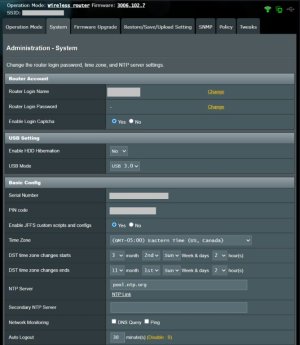
Hello everyone, this is my first post here. I updated my AX86U Pro from 3006.102.6 to 3006.102.7 and I noticed that both "Enable local NTP server" and "Intercept NTP client requests" were missing from Administration -> System -> Basic Config.

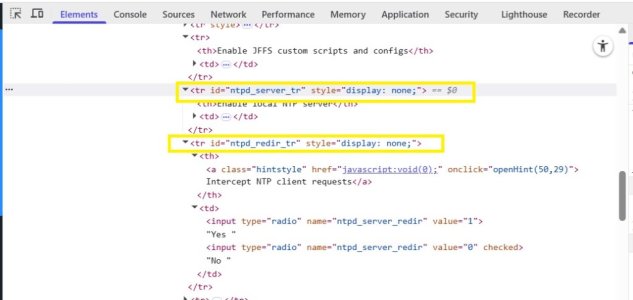
Thinking that maybe something had gone wrong I flashed 3006.102.7 again but the result didn't change, so I tried resetting my router using the WPS button method and after manually reconfiguring everything from scratch those two options were still missing. At this point, wanting to know more about what was happening, I inspected the HTML code of the page in my browser where I saw that both options were hidden with a style="display: none;" attribute. Removing this attribute allowed me to correctly view both options in the web GUI and enable the NTP server and NTP redirection (I checked and both NVRAM variables are set correctly after applying changes), however if I refresh the page those options get hidden again. Reverting to 3006.102.6 fixed the problem. Do you have any ideas on why this is happening? Thanks!

 
Last edited:
  • Like
Reactions: MDM
Hello everyone, this is my first post here. I updated my AX86U Pro from 3006.102.6 to 3006.102.7 and I noticed that both "Enable local NTP server" and "Intercept NTP client requests" where missing from Administration -> System -> Basic Config.

Thinking that maybe something had gone wrong I flashed 3006.102.7 again but the result didn't change, so I tried restoring my router using the WPS button method and after manually reconfiguring everything from scratch those two options were still missing. At this point, wanting to know more about what was happening, I inspected the HTML code of the page in my browser where I saw that both options were hidden with a style="display: none;" attribute. Removing this attribute allowed me to correctly show both options in the web GUI and enable the NTP server and NTP redirection (I checked and both NVRAM variables are set correctly after applying changes), however if I refresh the page those options get hidden again. Reverting to 3006.102.6 fixed the problem. Do you have any ideas on why this is happening? Thanks!
Hmmm didn't notice it, but I am missing them too..
 
Hello everyone, this is my first post here. I updated my AX86U Pro from 3006.102.6 to 3006.102.7 and I noticed that both "Enable local NTP server" and "Intercept NTP client requests" where missing from Administration -> System -> Basic Config.
Can confirm. Missing on my RT-AX86U Pro as well. Both values are set to hidden.

Remember someone else during the alpha 3006.102.7 having a similar issue, but it was while their BE58_Go was in WISP mode. And which was apparently fixed in the 3006.102.7 release version per the change log. (PS: Commit 11a4dfd)
3006.102.7 (22-Feb-2026)
- FIXED: ntpd options missing when operating in WISP mode.
 

Attachments

  • System.jpg
    System.jpg
    64.1 KB · Views: 16
  • inspect.jpg
    inspect.jpg
    51.2 KB · Views: 15
Last edited:
Can confirm. Missing on my RT-AX86U Pro as well. Both values are set to hidden.

Remember someone else during the alpha 3006.102.7 having a similar issue, but it was while their BE58_Go was in WISP mode. And which was apparently fixed in the 3006.102.7 release version per the change log. (PS: Commit 11a4dfd)
Same here for the RT-AX86 Pro. Thanks, I hadn't noticed.

FWIW I also have a BE58 Go, operating in wireless router mode (i.e. not WISP), and can see the "Enable local NTP server" and "Intercept NTP client requests" options on that device.
 
Hello everyone, this is my first post here. I updated my AX86U Pro from 3006.102.6 to 3006.102.7 and I noticed that both "Enable local NTP server" and "Intercept NTP client requests" were missing from Administration -> System -> Basic Config.

Thinking that maybe something had gone wrong I flashed 3006.102.7 again but the result didn't change, so I tried resetting my router using the WPS button method and after manually reconfiguring everything from scratch those two options were still missing. At this point, wanting to know more about what was happening, I inspected the HTML code of the page in my browser where I saw that both options were hidden with a style="display: none;" attribute. Removing this attribute allowed me to correctly view both options in the web GUI and enable the NTP server and NTP redirection (I checked and both NVRAM variables are set correctly after applying changes), however if I refresh the page those options get hidden again. Reverting to 3006.102.6 fixed the problem. Do you have any ideas on why this is happening? Thanks!
Mine shows on my be96u, but mine is disabled. When I click yes it shows the intercept toggle. I have ntpMerlin installed and functioning though, so have been using that with chrony instead.
 
Can confirm. Missing on my RT-AX86U Pro as well. Both values are set to hidden.

Remember someone else during the alpha 3006.102.7 having a similar issue, but it was while their BE58_Go was in WISP mode. And which was apparently fixed in the 3006.102.7 release version per the change log. (PS: Commit 11a4dfd)
The Wifi6 models are case-sensitive to the check for operation mode, the wifi7 models are not. So a genuine bug in a release thread.
 

Similar threads

Support SNBForums w/ Amazon

If you'd like to support SNBForums, just use this link and buy anything on Amazon. Thanks!

Sign Up For SNBForums Daily Digest

Get an update of what's new every day delivered to your mailbox. Sign up here!
Back
Top