What's new

AX88U and improvements for Wireguard VPN.....

Vimes

Regular Contributor
Hi

My AX88U continues to serve me well, except when being used as a VPN client....

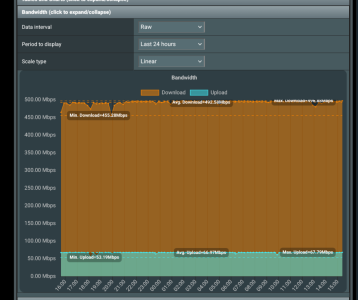
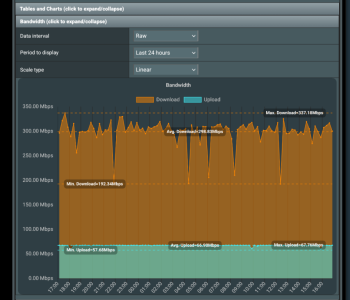
Now that we have moved to a FTTP connection, full fibre, and have started with a 500Mb connection it is proving too much to expect the venerable, but good, router to be able to cope when used as a VPN client. Switching from OpenVPN to Wireguard improved things but this is wha twe will see in terms of throughput without the VPN running through the router....

No router.png


when I use the VPN Wireguard client....

Router used.png


Does anyone have experience to know if using a router like the BE88U has more processing capabilities in terms of sustained performance when applying a Wireguard VPN client, and if so what are its limits...?

Unless that is somewhat pushing the limits of what is to be expected from these routers, without building a box with pfsense..?

I am using Windscribe as the VPN.

Thanks
 
Last edited:
I have an AX88Pro on which I run WG clients. Download speed from ISP tests at 2.1 Gig when running speed test on router. Often when testing speed of WG clients on router download speed tests in excess of 600 Mbps to both close and intermediate distant servers .
 
Thanks, good to know. I see the BE88U increases the speed, not sure of the type or revision changes, if any, of the CPU from 2Ghz to 2.6Ghz. Not sure if it improved the VPN client capabilities in what its sustained capable download would be, over that of the AX88UPro.

Then again, albeit I am only reading what Google informed me, the AX88U and the Pro is rated at 2Ghz, yet your test shows almost double the throughput of what mine could achieve.

Using Windscribe's desktop app or browser extension, not the router, and the same server for VPN is maxing out my 500Mb connection. The router being the limiting factor, if used.
 
Wireguard on an RT-BE88U will saturate your 500Mbit connection.
Mine:
1000031106.png
 
There are reports here that the max WG speed is 300-350 for an ax88.

Mine is on a 600/20 connection, and I connected as a WG client to my AX86 Pro on a 1g/400 connection. Speedtests on both are about that, with some overprovisioning. I did a speedtest from the AX88 over the WG client to the AX86 Pro to the ISP for the AX86. Both have HW acceleration enabled. So in theory my maximum download on the 88 would be limited by the 400 upload speed on the 86. The download to the AX88 topped out at 340mb/s with two of its cores maxing out at around 60%. The AX86 at the same time had one core at 80% and another at 60%. The other two cores on each were much lighter. The 88 has 1.8ghz quad cores and the 86 2.0ghz quad cores, so it looks like there is a bit more headroom on the processing side. Other factors may be limiting though. But that is consistent with the other reports.

I would start by seeing if there is a limit on your server side. Windscribe has shifted over to a new WG implementation to address bottlenecks, so maybe not.
 
Last edited:
I remember when I had the AX88U my WG connection to Nord would run between 300-350, so the gain on my BE88U (to the same nord servers) is clear.
The trick to speed gain is to use wireguard servers and Ookla servers as close as you can get to your home. The ping for the chart I gave earlier is 4ms.
 
Wireguard on an RT-BE88U will saturate your 500Mbit connection.
Mine:
View attachment 69028


Is that with a maxed out 500Mb connection or are you limited any other way..? I'm hopeful that the BE88U will be more capable than maxing out a 500Mb connection, noting that @CaptainSTX can get around 600Mb on a AX88U, the previous "gen" router.

The VPN servers I use are as clsoe to my location as possible. Using the same server shows the difference in overall sustained speed, the max being around 330Mb for the std AX88U.

Thanks
 
Is that with a maxed out 500Mb connection or are you limited any other way.
That's with a maxed out 500Mbit connection, yes. No other limiting factors.
I've dug out an old screenshot of the same nord wireguard speedtest on my old AX88U. Exact same settings and server, just new hardware.
1000031109.png
 
Last edited:
Is that with a maxed out 500Mb connection or are you limited any other way..? I'm hopeful that the BE88U will be more capable than maxing out a 500Mb connection, noting that @CaptainSTX can get around 600Mb on a AX88U, the previous "gen" router.

The VPN servers I use are as clsoe to my location as possible. Using the same server shows the difference in overall sustained speed, the max being around 330Mb for the std AX88U.

Thanks
NOTE: I stated and I do have AX88 Pro which has a quad processor 2000Mhz.
 
NOTE: I stated and I do have AX88 Pro which has a quad processor 2000Mhz.


Yes, I know. I replied directly after you posted and commented on that :)

I find it useful to note that on your setup, using the Pro version, that you can get such a good improvement over what I am able to do with the non pro. Both using a quad core 2Ghz processor, but that does not mean they are the same, nor anything else as to what contributes to making that difference.
 
I have a RT-BE88U and have run into this as well. I have a 1Gbps fiber connection and I run a Synology NAS, I have a Speedtest container that gets 940Mbps download and 940Mbps upload consistently.

But I also have a Gluetun network set up on this NAS, which runs ProtonVPN, WireGuard protocol. Before I switched to the RT-BE88U I would get 800Mbps download and 800Mbps upload consistently via another Speedtest container that sits behind the Gluetun network.

I searched and searched for reasons why my VPN speeds went down so much (now it’s like 500Mbps download and 400Mbps upload with 15% packet loss).

I see now it appears to be a hardware acceleration issue with the UDP traffic. I can see the CPU going sky high on my router when running the Speedtest behind the VPN network, but not when running within the VPN - despite reaching higher speeds.

Does anyone know if this can or will ever be fixed? I’m running Merlin also by the way.
 
RT-AX88U (and RT-AX86U) has a 1.8 GHz CPU
RT-AX88U Pro (and RT-AX86U Pro and GT-AX6000) has a 2.0 GHz CPU
RT-BE88U has a 2.6 GHz CPU

I see now it appears to be a hardware acceleration issue with the UDP traffic. I can see the CPU going sky high on my router when running the Speedtest behind the VPN network, but not when running within the VPN - despite reaching higher speeds.
It's not just hardware acceleration, but also the need for additional encryption of transmitted data, etc. This requires a lot of CPU usage (usually without any real need or benefit).

BTW: In my opinion, sending all traffic through the VPN client on the router doesn't make sense... But this has already been discussed many times in other topics on the forum.
 
sending all traffic through the VPN client on the router doesn't make sense...

Yes, but aggressive scare tactics advertising is working pretty well. The less you know the more you pay.
 
When you guys say the VPN Client on the router, just so I understand correctly, I’m not using the VPN client on the router etc.

I run a VPN container on docker on my NAS which uses Wireguard. This is mainly for torrenting.

What are the alternatives? Just don’t run it through VPN at all? (Just curious what others do)
 
I run a VPN container on docker on my NAS which uses Wireguard. This is mainly for torrenting.
If I understand correctly, your problem has nothing to do with the router.
 
If I understand correctly, your problem has nothing to do with the router.
I think it does involve the router and here’s why..

When I run a speed test directly from the NAS (no VPN), I get full 940/940 Mbps and the router CPU stays low (under 10%).

When I run a speed test through the WireGuard container (Gluetun), throughput drops to ~400–500 Mbps and one router CPU core spikes to 100%. Before swapping to the Asus router my old router handled this type of traffic without this issue (I must add the Asus does everything else better though!)

This to me indicates the router is handling that UDP/NAT flow in software rather than hardware offload. If it were purely a NAS/container limitation, the router CPU wouldn’t be pegging during the test I would think.

So the difference appears to be how the router is classifying and accelerating that specific UDP flow, not an issue with the NAS itself.
 
@Brackasus, for additional context.
You say you are running Merlin on the RT-BE88U, it may help if you list the specific version of Merlin you are running.
Do you have any QoS enabled on the router?
Do you have AiProtection enabled on the router?
What other router features have you enabled or are you using (including USB drives attached, addon scripts, etc.)?
Have you made any changes to the router via SSH?
Are you using any sort of port forwarding on the router to forward traffic to/from the Synology NAS?
How is the Synology connected to the router (any switches or extenders in the path)? And to which specific router port is the Synology NAS connected to?

Last resort suggestion, perform a hard factory reset on the router. Sometimes a hard factory reset followed by basic manual configuration (do not import a saved router.cfg file) can sometimes fix weird issues.
 
@Brackasus, for additional context.
You say you are running Merlin on the RT-BE88U, it may help if you list the specific version of Merlin you are running.
Do you have any QoS enabled on the router?
Do you have AiProtection enabled on the router?
What other router features have you enabled or are you using (including USB drives attached, addon scripts, etc.)?
Have you made any changes to the router via SSH?
Are you using any sort of port forwarding on the router to forward traffic to/from the Synology NAS?

Last resort suggestion, perform a hard factory reset on the router. Sometimes a hard factory reset followed by basic manual configuration (do not import a saved router.cfg file) can sometimes fix weird issues.
Hey,

I’m running the latest release - 3006.102.7
QoS is disabled, as well as AIProtection. I also haven’t played with any scripts etc.

I did log in via SSH to toggle Runner / Flow Cache off (troubleshooting) but have since turned back on when no improvement was observed.

I only forward one port on the NAS (32400) for Plex
 
@Brackasus, which specific port on the RT-BE88U is the Synology NAS connected to? As a troubleshooting step, if possible, try connecting it to a different port and see if the issue you are experiencing continues. If connected to ports 1-4 try port 5-8 and vise versa. If using the gaming port try a different port. If in port 1 (WAN/LAN) try port 2.
 
It’s connected to one of the 2.5G ports, but when I get home I’ll test with different ports as well and update in here, thanks!
 

Similar threads

Latest threads

Support SNBForums w/ Amazon

If you'd like to support SNBForums, just use this link and buy anything on Amazon. Thanks!

Sign Up For SNBForums Daily Digest

Get an update of what's new every day delivered to your mailbox. Sign up here!
Back
Top