What's new

BACKUPMON BACKUPMON v1.10.0 [2026-Apr-19] - Backup/Restore your Router: JFFS + NVRAM + External USB Drive! Encrypt/CIFS/SMB/NFS! (Available in AMTM!)

OK, but if you are running the -secondary flag, secondary backups would have to already be enabled, which means that the encryption menu would allow you to configure encryption for the secondaries. Or am I missing something?

Do you automatedly enable/disable the secondaries in the config with a script?
No, once secondary backups have been initially enabled/configured, one can disable them and continue to run on demand using the -secondary flag.
 
No, once secondary backups have been initially enabled/configured, one can disable them and continue to run on demand using the -secondary flag.
Must be a feature, not a bug! Lol
 
The new single file decryption works great! Thank you!!
 
Again, tested a full backup and restore - all good here
:cool:
 
Must be a feature, not a bug! Lol
Yes, it's a feature that you created for me many, many versions ago.

I actually create three (3) different backup sets using backupmon:
  1. primary backup to NAS;
  2. secondary backup to remote (offsite) NAS; and
  3. additional backup to local USB SSD.
Yes, some may consider this overkill, but it's something that works easily in the background. I have three cru entries in services start:
Code:
cru a backupmon    "30 0 * * * /bin/sh /jffs/scripts/backupmon.sh -backup"
cru a backupmonSec "35 0 * * * /bin/sh /jffs/scripts/backupmon.sh -secondary"
cru a backupmonUSB "40 0 * * * /bin/sh /jffs/scripts/backupmonUSB"

The backupmonUSB script swaps backupmon.cfg files to change the primary backup destination from network to USB, execute the backup, and revert the backup destination — backupmon.USB and backupmon.network are saved snapshots of the two respective backupmon.cfg files:
Code:
#!/bin/sh

cp /jffs/addons/backupmon.d/backupmon.cfg     /jffs/addons/backupmon.d/backupmon.network
cp /jffs/addons/backupmon.d/backupmon.USB     /jffs/addons/backupmon.d/backupmon.cfg

sh /jffs/scripts/backupmon.sh -backup

cp /jffs/addons/backupmon.d/backupmon.network /jffs/addons/backupmon.d/backupmon.cfg

Works like a champ, and now works with encryption!

 
Yes, it's a feature that you created for me many, many versions ago.

I actually create three (3) different backup sets using backupmon:
  1. primary backup to NAS;
  2. secondary backup to remote (offsite) NAS; and
  3. additional backup to local USB SSD.
Yes, some may consider this overkill, but it's something that works easily in the background. I have three cru entries in services start:
Code:
cru a backupmon    "30 0 * * * /bin/sh /jffs/scripts/backupmon.sh -backup"
cru a backupmonSec "35 0 * * * /bin/sh /jffs/scripts/backupmon.sh -secondary"
cru a backupmonUSB "40 0 * * * /bin/sh /jffs/scripts/backupmonUSB"

The backupmonUSB script swaps backupmon.cfg files to change the primary backup destination from network to USB, execute the backup, and revert the backup destination — backupmon.USB and backupmon.network are saved snapshots of the two respective backupmon.cfg files:
Code:
#!/bin/sh

cp /jffs/addons/backupmon.d/backupmon.cfg     /jffs/addons/backupmon.d/backupmon.network
cp /jffs/addons/backupmon.d/backupmon.USB     /jffs/addons/backupmon.d/backupmon.cfg

sh /jffs/scripts/backupmon.sh -backup

cp /jffs/addons/backupmon.d/backupmon.network /jffs/addons/backupmon.d/backupmon.cfg

Works like a champ, and now works with encryption!
Must have forgotten about that one! ;) I'll fix the encryption menu so you can configure encryption even on a secondary if it's not enabled.
 
Must have forgotten about that one! ;) I'll fix the encryption menu so you can configure encryption even on a secondary if it's not enabled.
Like I said, it works to temporarily enable the secondary backup, enable/configure encryption, and subsequently disable secondary backup. I don't leave secondary backup enabled since that would cause duplicate runs of secondary backup (once when primary network is run and a second when the USB backup is run). If it's too much effort to change, leave it as is.
 
If it's too much effort to change, leave it as is.
Easy-peasy lemon squeezy. Not a prob at all. Glad you at least found a workaround 👍
 
This may be an opportune moment for an update to the saved instructions, particilarly around the encryption on a fresh system.
 
This may be an opportune moment for an update to the saved instructions, particilarly around the encryption on a fresh system.
Definitely worth adding some language in there about it, though for the most part it's pretty transparent during the restore.

If you have any suggestions or wording changes, please don't hesitate to make suggestions! ;)
 
Quick update to v1.10.0b13 that addresses the issue @visortgw was mentioning above:

- PATCH: Per suggestion from @visortgw, removed the functionality that doesn't allow you to set up encryption on the Secondary backup if the Secondary backup is currently disabled. This feature will also not automatically remove any previously set Public/Private keys if it sees that the Secondary backups are disabled, and leaves them in place unless you specifically disable the Secondary backup encryption settings.

Download Link (BETA) v1.10.0b13
Code:
curl --retry 3 "https://raw.githubusercontent.com/ViktorJp/BACKUPMON/develop/backupmon.sh" -o "/jffs/scripts/backupmon.sh" && chmod 755 "/jffs/scripts/backupmon.sh"

Download Link (RELEASE) v1.9.1
Code:
curl --retry 3 "https://raw.githubusercontent.com/ViktorJp/BACKUPMON/main/backupmon.sh" -o "/jffs/scripts/backupmon.sh" && chmod 755 "/jffs/scripts/backupmon.sh"
 
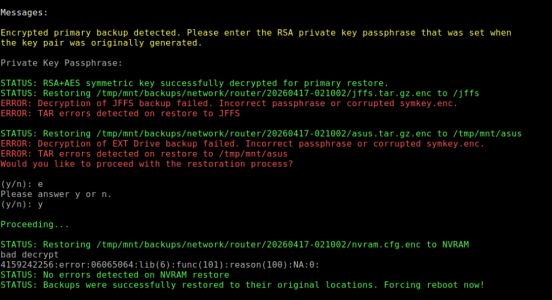
Just a little quirk when restoring to a fresh system.
filezilla.png
The key was correct, the same 24 character key I've used all along.
Despite the final line the restore did not complete. You can see everything is failing to restore Screwy.
Steer me right someone.
(Actually it's a reallt BIG quirk)

**edit** Where is the symkey.enc supposed to go?


Going back to the instructions.txt file, perhaps a brief explanation of the handling of symkey.enc and the need not to generate a new key pair.
Rookie mistake 😣
 
Last edited:
Just a little quirk when restoring to a fresh system.
View attachment 71339
The key was correct, the same 24 character key I've used all along.
Despite the final line the restore did not complete. You can see everything is failing to restore Screwy.
Steer me right someone.
(Actually it's a reallt BIG quirk)

**edit** Where is the symkey.enc supposed to go?


Going back to the instructions.txt file, perhaps a brief explanation of the handling of symkey.enc and the need not to generate a new key pair.
Rookie mistake 😣
Having gone through this experience, please suggest some tips and language you'd like me to include! I'd love your feedback.

I've done about a dozen encrypted restores so far without issue thank goodness. But seeing the failure to decrypt while giving success messages is something I need to hone in on.
 
Having gone through this experience, please suggest some tips and language you'd like me to include!
Best I can do, trying to keep it brief but precise:

"symkey.enc is enlosed in the backup folder. This should be restored to /jffs/addons/backupmon.d before attempting to run a restore session. Do not create a new key pair, just enter your original Private Key Passphrase when prompted during a restore session."

Feel free to shorten it if you can.

But seeing the failure to decrypt while giving success messages is something I need to hone in on.
I can't be much help right now, unless of course I go through it all again. I'm willing as it only takes 20 minutes for me to get a working system again.
 
Best I can do, trying to keep it brief but precise:

"symkey.enc is enlosed in the backup folder. This should be restored to /jffs/addons/backupmon.d before attempting to run a restore session. Do not create a new key pair, just enter your original Private Key Passphrase when prompted during a restore session."

Feel free to shorten it if you can.
The function of the symkey.enc is that it helps create uniquely encrypted backup sets and should stay with the backup sets created at that time within their backup folder. You should not have to move it, as the script will be looking for it in the same backup folder.

Each symkey.enc is unique, and compliments the backups within that folder, and is a key component needed to decrypt those particular files.

If you used a different symkey.enc from a different folder, the restore would fail.

And yeah, definitely do not create a new keypair unless you're setting up a brand new system and starting fresh with its own set of backups.

The easiest thing to do when restoring a brand new router is to just follow the same steps, which is copying the backupmon.sh and backupmon.cfg into your /jffs/scripts folder, and run from there. Both those files have everything they need to reattach to your backup drives, and has your current keypair to work with.

I can't be much help right now, unless of course I go through it all again. I'm willing as it only takes 20 minutes for me to get a working system again.
I definitely don't want you to have to go through that... I'll run some more restores on this end with incorrect passkeys and see what I can do to shore up some of the messaging.
 
You should not have to move it, as the script will be looking for it in the same backup folder.
First attempted restore that didn't seem to happen. I manually copied it across for the last successful attempt.
 
Last edited:
First attempted restore that didn't seem to happen. I manually copied it across for the last, successful attempt.
Thing is, I have nothing in my code that would be looking for a symkey.enc in the /jffs/addons/backupmon.d folder. All code explicitly points to the backup folder location for this file, along with the associated jffs/nvram/ext drive files as they should all stay together.

I'll continue to throw weird situations at it so I can try to break it. ;)
 
I could always be wrong, it has been known! :cool:
 
I could always be wrong, it has been known! :cool:
Let that be the 1st and only time this year. :p

Probably a fluke, trying different variations until something stuck. I'm going through the code and messaging now to firm this up.
 

Similar threads

Latest threads

Support SNBForums w/ Amazon

If you'd like to support SNBForums, just use this link and buy anything on Amazon. Thanks!

Sign Up For SNBForums Daily Digest

Get an update of what's new every day delivered to your mailbox. Sign up here!

Members online

Back
Top