kstamand
Regular Contributor
This Beta is now closed. Repot any issues or questions in the main thread for this addon
Last edited:
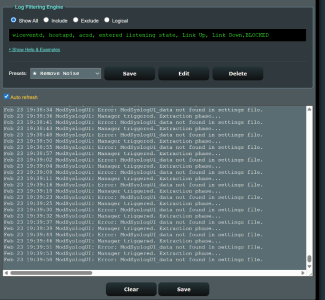
Feb 23 19:05:13 ModSyslogUI: Error: ModSyslogUI_data not found in settings file.
Feb 23 19:05:15 ModSyslogUI: Manager triggered. Extraction phase...
Feb 23 19:05:20 ModSyslogUI: Error: ModSyslogUI_data not found in settings file.
Feb 23 19:05:22 ModSyslogUI: Manager triggered. Extraction phase...
Feb 23 19:05:27 ModSyslogUI: Error: ModSyslogUI_data not found in settings file.
Feb 23 19:05:29 ModSyslogUI: Manager triggered. Extraction phase...
Feb 23 19:05:34 ModSyslogUI: Error: ModSyslogUI_data not found in settings file.
Feb 23 19:05:36 ModSyslogUI: Manager triggered. Extraction phase...
Feb 23 19:05:41 ModSyslogUI: Error: ModSyslogUI_data not found in settings file.
Feb 23 19:05:43 ModSyslogUI: Manager triggered. Extraction phase...
Feb 23 19:05:48 ModSyslogUI: Error: ModSyslogUI_data not found in settings file.
Feb 23 19:05:50 ModSyslogUI: Manager triggered. Extraction phase...
Feb 23 19:05:55 ModSyslogUI: Error: ModSyslogUI_data not found in settings file.
Feb 23 19:05:57 ModSyslogUI: Manager triggered. Extraction phase...
Feb 23 19:06:02 ModSyslogUI: Error: ModSyslogUI_data not found in settings file.
Feb 23 19:06:04 ModSyslogUI: Manager triggered. Extraction phase...
Feb 23 19:06:09 ModSyslogUI: Error: ModSyslogUI_data not found in settings file.
Feb 23 19:06:11 ModSyslogUI: Manager triggered. Extraction phase...
Feb 23 19:06:16 ModSyslogUI: Error: ModSyslogUI_data not found in settings file.
Can you go into your browser dev tools and then into console tab and grab a screenshot of any errors, if any (modsyslogui would need to be installed)?I did the same as Saison2023 above, everything seemed to work, except this constant messaging in log, I couldn't get it to stop so uninstalled.
Code:Feb 23 19:05:13 ModSyslogUI: Error: ModSyslogUI_data not found in settings file. Feb 23 19:05:15 ModSyslogUI: Manager triggered. Extraction phase... Feb 23 19:05:20 ModSyslogUI: Error: ModSyslogUI_data not found in settings file. Feb 23 19:05:22 ModSyslogUI: Manager triggered. Extraction phase... Feb 23 19:05:27 ModSyslogUI: Error: ModSyslogUI_data not found in settings file. Feb 23 19:05:29 ModSyslogUI: Manager triggered. Extraction phase... Feb 23 19:05:34 ModSyslogUI: Error: ModSyslogUI_data not found in settings file. Feb 23 19:05:36 ModSyslogUI: Manager triggered. Extraction phase... Feb 23 19:05:41 ModSyslogUI: Error: ModSyslogUI_data not found in settings file. Feb 23 19:05:43 ModSyslogUI: Manager triggered. Extraction phase... Feb 23 19:05:48 ModSyslogUI: Error: ModSyslogUI_data not found in settings file. Feb 23 19:05:50 ModSyslogUI: Manager triggered. Extraction phase... Feb 23 19:05:55 ModSyslogUI: Error: ModSyslogUI_data not found in settings file. Feb 23 19:05:57 ModSyslogUI: Manager triggered. Extraction phase... Feb 23 19:06:02 ModSyslogUI: Error: ModSyslogUI_data not found in settings file. Feb 23 19:06:04 ModSyslogUI: Manager triggered. Extraction phase... Feb 23 19:06:09 ModSyslogUI: Error: ModSyslogUI_data not found in settings file. Feb 23 19:06:11 ModSyslogUI: Manager triggered. Extraction phase... Feb 23 19:06:16 ModSyslogUI: Error: ModSyslogUI_data not found in settings file.
no errors seen on dev tools, yes there is a custom_settings.txt..attachedCan you go into your browser dev tools and then into console tab and grab a screenshot of any errors, if any (modsyslogui would need to be installed)?
Also, from an SSH session into your router, can you enter the command "ls /jffs/addons" and share the output? I'm particularly interested if the custom_settings.txt file is missing or not.
Thanks in advance
i thought the same, so i already tried uninstalling, reinstalling, same issue@JB_1366 - I think the problem you encountered MAY have been a result of installing on top of the current production version. If you do try installing it again, now that you have already uninstalled, it may work as expected.
Let me know it that is true or not, so I can modify the install function to compensate
I just posted the fix. Please run the SSH Menu's update function and let me know if you run into any other issuesFound a bizarre bug:
Feb 24 04:24:36 ModSyslogUI: Manager triggered. Extraction phase...
Feb 24 04:24:41 ModSyslogUI: Error: ModSyslogUI_data not found in settings file.
It’s keeps repeating itself every once in a while, not sure why.
The issue doesn’t occur right away, takes a few hours before it begins showing in the logs, and not sure if related but Devices list breaks completely showing 0 devices unless if I reboot. (Only started to happen when I updated this add on, might be coincidence? Or two separate issues?)
all good. I will monitor for anything else that might pop up. GREAT job btw!!I corrected the repeating ModSyslogUI_data log error messages.
@JB_1366 - please re-install and let me know if the issue is resolved or not
@saison2023 - please run the UPDATE function from the SSH Menu and let me know if there are any problems
In SSH, ran UPDATE and select overwrite current installation, no issue until now.I corrected the repeating ModSyslogUI_data log error messages.
@JB_1366 - please re-install and let me know if the issue is resolved or not
@saison2023 - please run the UPDATE function from the SSH Menu and let me know if there are any problems
FYI: i updated my addons, addition stuck first time.In SSH, ran UPDATE and select overwrite current installation, no issue until now.
Only little thing: I had updated "My addons" preset to include "AdGuardHome" and after the Update & overwrite, I saw it was not there and I had to reconfigure it.
Not a big deal, but sharing in case it could be useful
(I imagine that you may create a file to receive custom settings, but it could also be complicated to maintain. I am not a developer, so I can't imagine the amount of work)

Feature Request 1: change default PRESET list on page loadI just posted the fix. Please run the SSH Menu's update function and let me know if you run into any other issues
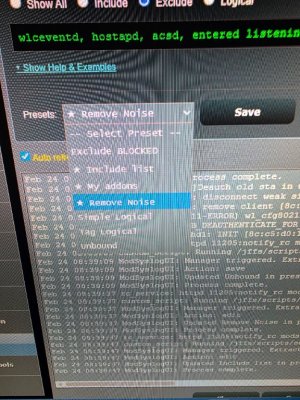
@JB_1366, hopefully I understand your feature request correctly, but the current version allows for both. You can add as many presets as you want and you can set ANY ONE (system will only allow one) to be the default.Feature Request 1: change default PRESET list on page load
Feature Request 2: add your own custom list
only an ask, this works great the way it is.
i was able to have 2 with load automatically, and it defaulted to remove noise, i was able to add as many as i wanted to load auto (maybe check on that, as you said there can only be 1).@JB_1366, hopefully I understand your feature request correctly, but the current version allows for both. You can add as many presets as you want and you can set ANY ONE (system will only allow one) to be the default.
When Editing or Saving a preset, you can select which one will be the default (Load automatically)
View attachment 70476
I will check into the why it allowed selecting more than one as default.i was able to have 2 with load automatically, and it defaulted to remove noise (maybe check on that, as you said there can only be 1).
i unchecked remove noise, as that was the default, now loads my addons as default. thank you
not sure how to add new preset?
We use essential cookies to make this site work, and optional cookies to enhance your experience.