What's new

FlexQoS FlexQoS 1.5.3 - Flexible QoS Enhancement Script for Adaptive QoS

It's telling me i cant install this because I have a wifi 7 router (gt-be98). Thing is, i only use the router for ethernet connections, not the wifi 7. Is there a way to install this and use it just for ethernet?
No. It’s not the WiFi part that is a problem. The problem is that all WiFi 7 routers have a newer, broken Adaptive QoS implementation that prevents this script from working.
 
Hi,

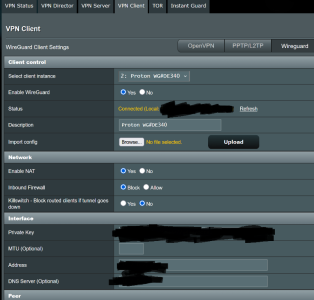
I found out that with a VPN Router config file on my AX88U-Pro AsusWRT-Merlin, FlexQoS is not identifying traffic correctly.

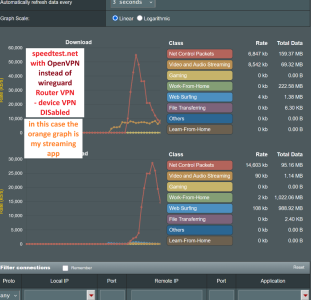
- OpenVPN config Proton VPN file -> all traffic in the FlexQoS graph stays at ~ 0 KB/s.
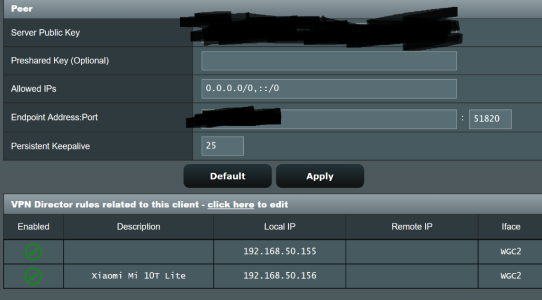
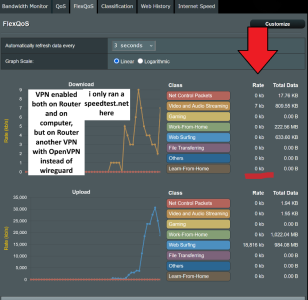
- WireGuard .conf Proton VPN file -> Download traffic is identified correctly, but Upload is always identified as "Router VPN Outbound Traffic" though the VPN is enabled on the Router and not on the device/computer. (This leads to other devices in my network having slow upload when e.g. my backup server is uploading data at the same time)
- NordVPN Router .ovpn showing no Download traffic and only "Router Outbound" Upload traffic again

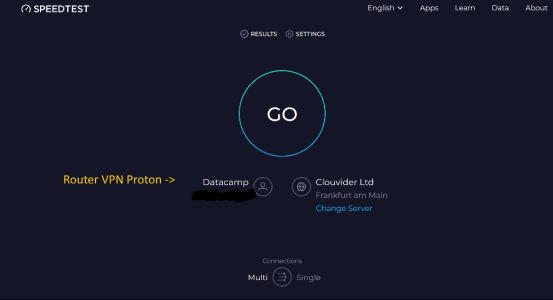
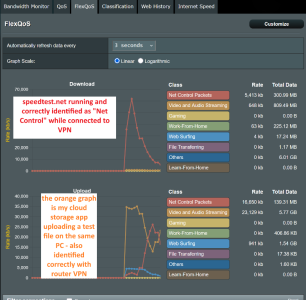
I tried this with www.speedtest.net set to "Net Control Packets" in FlexQoS.

Is there any known fix to this so the traffic is identified correctly?

Edit: It seems to be device-related as it is working with my android phone. I will do further testing tomorrow.
 
Last edited:
Upload is always identified as "Router VPN Outbound Traffic" though the VPN is enabled on the Router and not on the device/computer.
Yes, that makes sense since the upload traffic is already encrypted in the VPN tunnel when it passes through QoS, so it’s not possible to identify the traffic.
 
Hi again, I think you misunderstood me. When the VPN is only enabled on my router, it should work and identify traffic in FlexQoS correctly because the traffic is NOT vpn encrypted on the end device thus reaching the router un-tunneled. But however, as soon as I enable the VPN on the router, the above described traffic misidentification occurs. Without router vpn, the traffic is correctly identified.
Of course, as soon as I enable VPN on my end device, the traffic is identified as "Router Outbound". But I don't have VPN on my end device enabled in this case.

However again I did some testing and found out the misidentification only occurs on my 2 windows computers. On my android phone as well as on Ubuntu on the computer, it is fully working with correct identification in FlexQoS. I tried different browsers on Windows but all don't work correctly as described with FlexQoS + VPN on Router.

/Edit: I narrowed down the issue and found out only on Windows and WiFi my issues happen, not when connected via LAN cable, both being connected to Router VPN.

--> /Edit 2: It seems I found the cause which is IPv6. It needs to be enabled on both Windows WiFi adapter hardware settings as well as on AsusWRT Merlin Router. Every other combination will cause the misidentification in FlexQoS for me. I can reproduce this on 2 different windows machines.
 
Last edited:
When the VPN is only enabled on my router, it should work and identify traffic in FlexQoS correctly because the traffic is NOT vpn encrypted on the end device thus reaching the router un-tunneled.
It doesn’t work that way, unfortunately. The traffic arrives at the router unencrypted, but gets encrypted by the router’s VPN client before being sent out through the WAN interface. Even if Adaptive QoS was able to classify it early, it could not apply the correct QoS priority as it leaves the router, since it’s all just a single encrypted stream of traffic to the VPN provider.
seems I found the cause which is IPv6. It needs to be enabled on both Windows WiFi adapter hardware settings as well as on AsusWRT Merlin Router. Every other combination will cause the misidentification in FlexQoS for me
I don’t see how this is relevant except to wonder if IPv6 traffic is bypassing your VPN client? Do you have VPN rules that are only IPv4-based?
 
I only care about the QoS inside the router and not about what happens with the traffic beyond WAN. It is working now with the IPv6 enabled though I don't know why. And on my Ubuntu system and Android smartphones - where IPv6 is disabled I think - it also works, too, so I also wonder why on Windows this seems to be a problem. I changed WiFi adapter properties in Windows and disabled as much programs as possible to narrow down the issue and ended up with this IPv6 setting.
I use Merlins VPN Director with static DHCP IP addresses for my devices. Or what do you mean with IPv4 based VPN? I just downloaded the OpenVPN or Wireguard configuration files and uploaded them into the VPN Client Merlin tab.
Also, the traffic is not bypassing my Router VPN client - at least I think so because in speedtests etc. I see the Router VPN IP and not my ISP one's, and between this sits FlexQoS correctly identifying my traffic.
However, I still have VPN software installed on some of my end devices though I wouldn't need it because I would have 2 VPNs ("double VPN" computer + router) simultaneously then, but I think that when I need to change my IP from router VPN's IP to a different server IP on my computer VPN software that I have benefits like maybe unblock some particular websites or so. This is because the end device's IP is preferred even though it still goes through the Router VPN afterwards (speedtest.net check).
I am experimenting with Merlin and FlexQoS for about 1 year now but I am no super expert in this of course.

The background of all this is that I wanted to use high-priority network tasks like Cloud-Gaming or Streaming to be prioritized over my other devices in the same WiFi network which for example regularly transfer backup data to my cloud storage providers and I got this to work only with Merlin and FlexQoS and now added a VPN on the router because if I would use the VPN on my end device, it is always identified as "Router Outbound" or "Web Surfing" no matter if it is Streaming or File Transferring and using the "split-tunneling" function of my VPN software would work but is of course not VPN-protected then. Now, I combined all of these features.
 
Last edited:
I only care about the QoS inside the router

I'm thinking you may misunderstand QoS by the above sentence.

Think of: Device → Router → VPN Client → QoS → Internet
And Not: Device → Router → QoS → VPN Client → Internet

When you turn on a VPN client on the router, the router puts all your traffic into one “big envelope” (the VPN tunnel) before it sends it to QoS and out the internet.
Not on the LAN side "inside the router" as you said above. By the time traffic reaches the QoS point, it’s already inside that one big VPN envelope. Which is what @dave14305 is explaining.

So the router can’t reliably tell: “this traffic is Netflix, this part is gaming, this part is backups”. It mostly sees: "this is the VPN tunnel upload/download”
That’s why “Router VPN Outbound Traffic” behavior is expected with the router QoS implementation.

Yes, you’re right that device → router traffic arrives unencrypted.
But the part that doesn’t follow is: “therefore FlexQoS should classify it correctly even with router VPN.” As you mentioned here:

When the VPN is only enabled on my router, it should work and identify traffic in FlexQoS correctly because the traffic is NOT vpn encrypted on the end device

Simply put, it should not matter if the device VPN client established the VPN connection or the router VPN client does, because in both cases, traffic is encrypted before it reaches QoS on the WAN side for priority shaping.
Classification would only help if QoS is applied before the traffic gets stuffed into the big VPN envelope, and Adaptive QoS/FlexQoS does it differently, on the way out of the WAN side, which you say you don't care about:

not about what happens with the traffic beyond WAN.

With IPv6, that can change things because some IPv6 traffic might bypass/leak through the VPN (if rules are effectively IPv4-only).
That can make behavior look inconsistent, but it doesn’t change the main point which is the VPN turns everything into one tunnel at the point QoS is shaping.
 
Last edited:
Okay, I am really overwhelmed now because I spent about 200 hours into this and still don't understand it as it seems.
I just wonder why for example speedtest.net shows the Router VPN IP (v4 address) but can still be classified in FlexQoS (I set it to Net Control). When I run a streaming app on the same PC, I set it to "Streaming" and I guess it uses the Router VPN, too, and in FlexQoS I have both traffic identified.
Sorry if I am annoying you.
 
Okay, I am really overwhelmed now because I spent about 200 hours into this and still don't understand it as it seems.
I just wonder why for example speedtest.net shows the Router VPN IP (v4 address) but can still be classified in FlexQoS (I set it to Net Control). When I run a streaming app on the same PC, I set it to "Streaming" and I guess it uses the Router VPN, too, and in FlexQoS I have both traffic identified.
Sorry if I am annoying you.

Your not annoying anyone, we are just trying to explain why VPN traffic is not correctly classified.

If you believe otherwise, please set the record straight and show us screenshots of what your describing, so we can better assist.

For example, Speedtest.net can be run from devices or from the router. So we need to know in which instance your referencing.

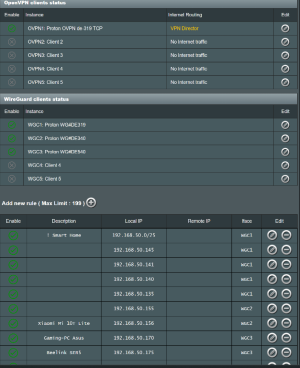
Also show us screenshots of your VPN Director rules, VPN Configuration, and we may be better able to assist.
 
Thank you very much for your time and assistance!

I am referring to running speedtest on my end devices, not on the router interface.

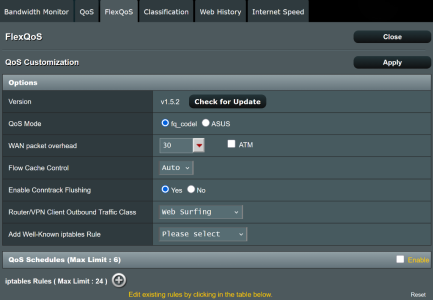
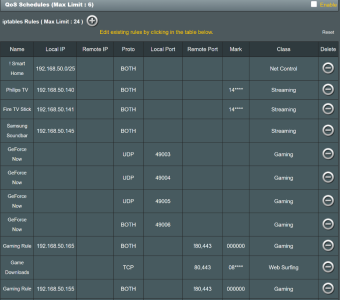
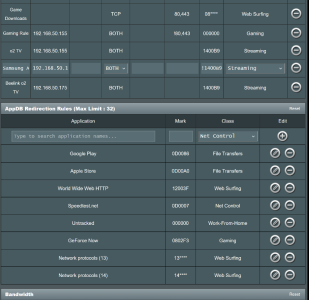
Regarding the current state of my FlexQoS settings - I am still experimenting to properly prioritize all my programs and traffic.
 

Attachments

  • Screenshot 2026-02-20 171449.png
    Screenshot 2026-02-20 171449.png
    149.3 KB · Views: 48
  • Screenshot 2026-02-20 171513.png
    Screenshot 2026-02-20 171513.png
    159.8 KB · Views: 41
  • Screenshot 2026-02-20 171622.png
    Screenshot 2026-02-20 171622.png
    167.1 KB · Views: 34
  • Screenshot 2026-02-20 171834.png
    Screenshot 2026-02-20 171834.png
    145 KB · Views: 35
  • Screenshot 2026-02-20 171947.png
    Screenshot 2026-02-20 171947.png
    138.6 KB · Views: 36
[ additional screenshots ]
 

Attachments

  • Screenshot 2026-02-20 172012.png
    Screenshot 2026-02-20 172012.png
    111.1 KB · Views: 35
  • Screenshot 2026-02-20 172708.png
    Screenshot 2026-02-20 172708.png
    52 KB · Views: 32
  • Screenshot 2026-02-20 175359.png
    Screenshot 2026-02-20 175359.png
    174.9 KB · Views: 41
  • Screenshot 2026-02-20 174022.png
    Screenshot 2026-02-20 174022.png
    174.3 KB · Views: 38
  • Screenshot 2026-02-20 173011.png
    Screenshot 2026-02-20 173011.png
    195.7 KB · Views: 41
Do I assume that Flex QOS still does not work on the BE-98PRO router?

CC
 
I am referring to running speedtest on my end devices, not on the router interface.
Do any of these speedtest connections appear in the Tracked Connections list? If so, please post screenshots.
 
Do any of these speedtest connections appear in the Tracked Connections list? If so, please post screenshots.

Sorry for the delay all. This report did catch my interest, I don't have as much time to test stuff.
Now I may be missing it, but I’m not sure I see a screenshot that cleanly matches each case you reported @xTc2k

- OpenVPN config Proton VPN file -> all traffic in the FlexQoS graph stays at ~ 0 KB/s.
- WireGuard .conf Proton VPN file -> Download traffic is identified correctly, but Upload is always identified as "Router VPN Outbound Traffic" though the VPN is enabled on the Router and not on the device/computer.
- NordVPN Router .ovpn showing no Download traffic and only "Router Outbound" Upload traffic again

So instead, I got some time tonight to reinstall FlexQoS and replicate these scenarios on my side (RT-AX92U / Gnuton).
I managed to recreate 2 of the 3 original reported situations below:

1) The only situation I did NOT manage to recreate was the first report for:
"all traffic in the FlexQoS graph stays at ~ 0 KB/s."

2) Here are the screenshots of the second situation:
"Download traffic is identified correctly, but Upload is always identified as "Router VPN Outbound Traffic""

Wireguard Enabled, With Reconnect2.png


- Same behavior as @xTc2k : download may appear classified, but upload collapses into Router/VPN Outbound (Router/VPN Client Outbound Traffic Class).
And to answer your question @dave14305 ; yes the speedtest connections in the Tracked Connections list as seen below with a MARK of 0D0007 (or 0x400d0007 if using “direction bits + class bits”)

Speedtest with Wireguard.png


What convinced me the “upload lumping” is expected is where ASUS QoS actually shapes:
Code:
wg show wgc1 fwmark
-> off (so not an fwmark collision in my case)
Code:
ip rule show
-> routing is by source (e.g. from <client IP> lookup wgc1)

1771739432874.png

And most importantly! Adaptive QoS/FlexQoS (often) uses WAN (tcwan) for upload, and LAN bridge (br0) for download (at least on my setup!)

On my RT-AX92U,
Code:
tc qdisc show dev eth0
shows the HTB hierarchy (qdiscs/classes), while
Code:
tc qdisc show dev wgc1
is empty.

1771739475108.png


That implies upload shaping happens AFTER wg encapsulation.
You can also see this with tc filter counters: the Speedtest/Net Control mark (0x400d0007) does not get hit during VPN upload, meaning the WAN shaper isn’t seeing that mark on the outer encapsulated packets:

Code:
tcwan="$(cat /sys/module/tdts_udb/parameters/qos_wan 2>/dev/null || nvram get wan_ifname)"
tc -s filter show dev "$tcwan" | sed -n '/0x400d0007/,+12p'

So by the time packets hit the WAN shaper it's what we originally described:
LAN traffic → router → VPN encapsulates/encrypts → (now it’s just “VPN tunnel traffic”) → QoS on WAN → internet
So the FlexQoS accounting happens on br0 (LAN egress), and it sees packets after WG decrypts them.

Code:
tc -s filter show dev br0 | head -n 60

3) And here is the screenshot of the 3rd reported situation:
"ovpn showing no Download traffic and only "Router Outbound" Upload traffic"

1771641374652.png


I see the same general behavior @xTc2k described: download often doesn’t show up in the FlexQoS graph, while upload is lumped into my “Router/VPN Client Outbound Traffic Class” (Web Surfing on my config).
- I don’t see “everything stuck at 0 KB/s” in my test though, upload counters definitely move.

I believe FlexQoS only “counts/classifies” traffic that already has the ASUS QoS direction marks set: (Correct me if I'm wrong @dave14305 )
  • Download path hook in FlexQoS:
    • POSTROUTING -o "${lan}" -m mark --mark 0x80000000/... -&gt; FlexQoS_down
  • Upload path hook in FlexQoS:
    • POSTROUTING -o "${wan}" -m mark --mark 0x40000000/... -&gt; FlexQoS_up
So if ASUS’ QoS engine doesn’t apply the 0x80000000 “download-direction” mark to those packets, FlexQoS effectively won’t “see” them for the download graph.

Code:
iptables -t mangle -vnL POSTROUTING | grep -E 'FlexQoS_(down|up)'
iptables -t mangle -vnL FlexQoS_down

So my result is WireGuard decrypted packets still get 0x80… marks → FlexQoS download graph shows real traffic (as in the WG screenshot).
But OpenVPN download packets forwarded to the LAN are not carrying the 0x8000… download-direction mark. FlexQoS_down only counts packets with that mark, so OpenVPN download can show ~0.

I would say the takeaway is that even if this is “expected behavior”, upload tends to get lumped under router VPN traffic, and OpenVPN download classification/accounting may be inaccurate.
The practical fix is still:
- set Router/VPN Client Outbound Traffic Class to a low-priority/bulk class, and/or
- exclude heavy uploaders from the router VPN via VPN Director/policy routing.

Hope this helps explain better @xTc2k

@dave14305 if you think I’m missing anything FlexQoS-specific here, happy to test further!
But at least on my setup, it looks like a limitation of where Adaptive QoS shapes (WAN egress) once traffic is inside a router VPN tunnel.

 
Last edited:
1) The only situation I did NOT manage to recreate was the first report for:
"all traffic in the FlexQoS graph stays at ~ 0 KB/s."
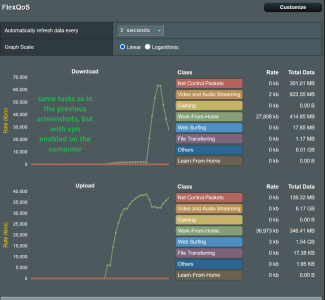
Seems you are right, I tried and could also not reproduce this Upload-showing-0KB issue. I am unsure, but if I remember correctly and am not dumb at all, I had a speedtest running and both graphs showed no traffic. However, the reason for this could be that sometimes when I change settings (I don't remember in what section of Merlin), I get wrong graph classification in FlexQoS and need to reboot the router or restart the operating system to show correct graph colors again. I am wondering because in my screenshot above with the green "Work-from-Home" graph it seems to be classified as "Untracked" though it was VPN traffic (Router VPN + device VPN) and should show a blue "Web Surfing" ("Router Outbound") graph corresponding to my settings - and when I repeat this now I get blue graphs, so this points to another thing than my initial classification issue.

I don't fully understand your post @ExtremeFiretop as I am no network/linux pro but I hope I can help you improve the software with my observations.

However, as my traffic types are correctly classified with Router VPN, this is something good, isn't it? (However I didn't manage to add own QoS marks in Windows so I am still struggling with how to let my cloud storage apps' traffic identify as a very low class; with GeforceNow for example it is working because Nvidia gives a tutorial on this and uses fixed ports which I can prioritize in FlexQoS)

And as I am using my "cloud server" computer also for general tasks (it's a mini-pc to save power), the VPN Director tunneling the whole computer's traffic into a low-priority class is bad for me but I don't know if it is possible to exclude heavy uploaders from the VPN Director ?


And @ExtremeFiretop: Did you try to reproduce the thing I mentioned with IPv6 enabled on both Windows network adapter properties and Native IPv6 enabled in Merlin because in your screenshot, speedtest.net shows only a red "Net Control" graph in Download, but a blue "Router Outbound" in Upload. This is the same for me, but only if IPv6 is not enabled. With both enabled, I have both graphs in red even with Router VPN. And this is not only for speedtest.net - every traffic is correctly identified (mark) which led me to my initial "end device - router - QoS - VPN - WAN" theory :)
 
Last edited:
I believe FlexQoS only “counts/classifies” traffic that already has the ASUS QoS direction marks set: (Correct me if I'm wrong @dave14305 )
  • Download path hook in FlexQoS:
    • POSTROUTING -o "${lan}" -m mark --mark 0x80000000/... -&gt; FlexQoS_down
  • Upload path hook in FlexQoS:
    • POSTROUTING -o "${wan}" -m mark --mark 0x40000000/... -&gt; FlexQoS_up
So if ASUS’ QoS engine doesn’t apply the 0x80000000 “download-direction” mark to those packets, FlexQoS effectively won’t “see” them for the download graph.
This was necessary to prevent router reboots once HND5.04 routers appeared.

I am surprised by the OpenVPN download traffic not registering anywhere, but “surprised” only in the sense that I don’t remember anyone reporting this way back in the day.

In theory, a similar rule could be added for unclassified download traffic going out br0, but might not be worth the risk for other LAN traffic.

Sorry it took long to respond. I just watched the end of a hockey game. 🇺🇸
 

Latest threads

Support SNBForums w/ Amazon

If you'd like to support SNBForums, just use this link and buy anything on Amazon. Thanks!

Sign Up For SNBForums Daily Digest

Get an update of what's new every day delivered to your mailbox. Sign up here!
Back
Top