What's new

GT-BE19000AI – 2.4 GHz band extremely slow and unstable

TF1470

Occasional Visitor
Hello everyone,

I have a very serious issue with my ASUS GT-BE19000AI (WiFi 7) on the 2.4 GHz band that makes all my home automation (IoT) devices practically unusable.

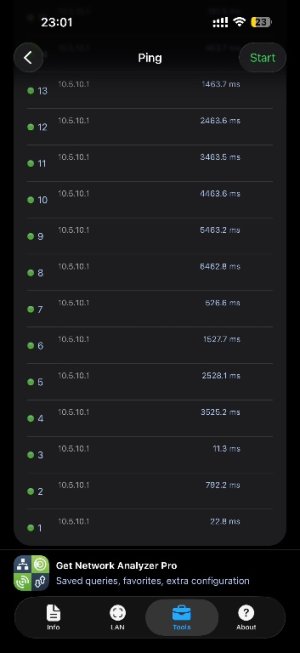
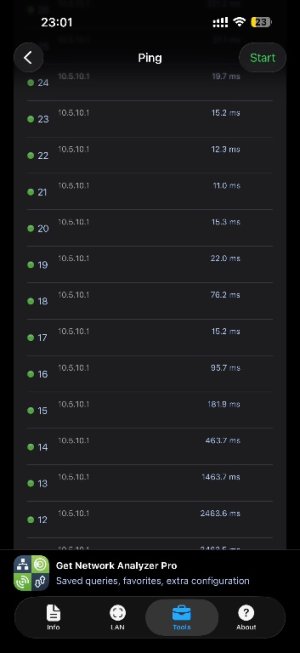
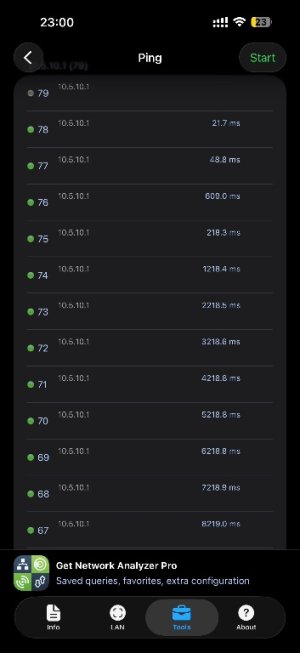
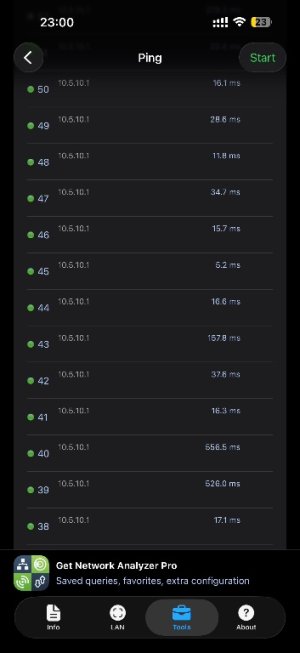
The 5 GHz and 6 GHz bands work perfectly (ping to router ~10–15 ms stable, 0% loss), but the 2.4 GHz band is problematic across the entire 2.4 GHz network, not just one or two devices. I only use the 2.4 GHz band (20 MHz width) for my IoT/home automation devices (WiFi 7 features disabled on this band)

Hardware:
  • Main router: ASUS ROG Rapture GT-BE19000AI
  • AiMesh node: GS-BE18000
  • Internet connection: Starlink in bypass mode (no Starlink router active)
Symptoms :
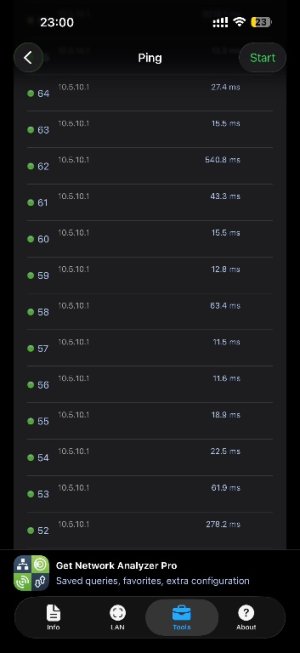
  • Ping to the router itself (10.5.10.1) from any device on 2.4 GHz: average 200–400 ms, peaks up to 2–4 seconds, frequent packet loss (3–19% depending on the test, e.g. avg 88 ms but still peaks at 2614 ms and losses).
  • All home automation (IoT) devices are affected: command execution delays of several seconds to over 10 s, commands stuck on "executing…" or timeout, random disconnections.
I created a separate IoT 2.4 GHz network and connected a few devices to it for parallel testing.
I tested on both the main 2.4 GHz SSID and the dedicated IoT SSID – same issues persist on both.

Comparison:With my previous basic Starlink router, none of these issues on 2.4 GHz with the same IoT devices.

I am running the latest ASUSWRT firmware (checked and updated). The problem seems specific to the 2.4 GHz band.
I have tested both Auto channel and manual channels 1, 6, 11 – same issues persist on 2.4 GHz.

Thank you in advance for any feedback!
 

Attachments

  • IMG_7459.jpeg
    IMG_7459.jpeg
    47.5 KB · Views: 94
  • IMG_7461.jpeg
    IMG_7461.jpeg
    47.2 KB · Views: 51
  • IMG_7462.jpeg
    IMG_7462.jpeg
    47.2 KB · Views: 53
  • IMG_7458.jpeg
    IMG_7458.jpeg
    47.1 KB · Views: 83
  • IMG_7460.jpeg
    IMG_7460.jpeg
    46.8 KB · Views: 58
This is the perfect example of the '$1,000 Furnace' syndrome we’ve been talking about. You’ve bought a flagship Wi-Fi 7 beast, yet it’s being outperformed by a basic Starlink router on the most fundamental band.

A 2,000ms–4,000ms ping and 19% packet loss on 2.4 GHz isn’t just a 'bug'—it’s a total failure of the core networking stack. It’s embarrassing that a device marketed with 'AI' and 'Wi-Fi 7' features can’t even handle a simple 20MHz IoT stream that routers from a decade ago managed with ease.

You're not an early adopter; you're an unpaid beta tester for a half-baked Broadcom/ASUS experiment. If I were you, I’d return this 'concept car' and go back to a high-end Wi-Fi 6 unit that actually WORKS. Stop letting these companies sell you 'the future' when they haven't even mastered the basics of the past
 
What are the RSSI values at each end of the wifi link ?
Sounds like either 1) devices are connecting to the radio on the furthest node rather than the strongest nearby , or 2) hardware failure for the 2.4 GHz radio on both APs (assuming clients should be connecting to the node rather than the main)
What happens if you turn off the 2.4 Ghz radio in the main router leaving the node available ? and vice versa ?

If you are using 5GHz radios for backhaul, then the 2.4 GHz power level is likely too high and there is too much overlap. The test with the Starlink router suggests this as this would be a single 2.4 GHz radio situation.
 
I am in wired backhaul, the devices connect both on the node and on the main router. I did the ping test with my iphone 1m from the router. The RSSI of the devices vary between -40 to -70 but as explained, it's all the devices that mess up. I can deactivate the wifi 2.4 of the node but not of the main router.
 
I had 2 RT-BE92Us in a wiredbackhaul Ai Mesh so I thought let me buy a GT-BE19000 and set it as the main router and leave one of the BE92U as the node and sell the other one. BIG MISTAKE. The GT-BE19000 which I thought should give better signal was showing me 4 out of 5 bars when sitting one foot away from it on my laptop which has an Intle BE200 WLAN Card; so was the case with my Pixel 10 Pro and other smarphones. Maybe it was a lemon but I sent that thing back and bought another cheap BE92U and went back to my old setup which works like a charm.

Lesson learned, latest and greatest on paper doesn't translate to a better real-world experience.
 
It may be specific to your environment, or a hardware defect with your router. 2.4GHz works fine on my GT-BE19000AI. Wireless signal is on par, or better than what I had with a RT-AX86U_Pro with 2 mesh nodes. I replaced all three devices with the GT-BE19000AI. During the initial setup, I set up the GT-BE19000AI with the 2 mesh nodes, but I had to remove them due to device connection issues. Too much wifi, I suppose. After a few days, I did have to change the 2.4GHz wireless channel (went from Channel 11 to Channel 1) , and I lowered the 2.4GHz beacon interval slightly to keep a couple of IoT devices from random disconnections. I would be curious to see your Wireless Professional Settings for the 2.4GHz. Here are mine:
Screenshot 2026-02-18 175137.jpg
 
We used to have this issue before, but it was fixed in recent firmware updates. I have this router running flawlessly, though I have major issues with the AIboard. But the router as such is stable and enabled with MLO with other routers in aimesh.
Please check the option under Wireless->Professional->OFDMA / MU-MIMO is DISABLED.
And set the 2.4Ghz channel to 11, so that it can transmit in full power. If its still an issue, then its time for RMA, if you cannot return :)
 
Thank you everyone for your feedback.
As previously stated, the only change in my setup is swapping the Starlink router for this ASUS GT-BE19000AI — same location, same devices, same environment.
Yet I never experienced any Wi-Fi issues with the original Starlink router.

I would be curious to see your Wireless Professional Settings for the 2.4GHz. Here are mine:

Here are my current 2.4 GHz wireless settings:

professional_wireless.jpg


wifi insight :

asus_1.jpg


Please check the option under Wireless->Professional->OFDMA / MU-MIMO is DISABLED.
And set the 2.4Ghz channel to 11, so that it can transmit in full power. If its still an issue, then its time for RMA, if you cannot return :)
All these settings are already disabled. Channel 11 was far too unstable with too many interferences, whereas channel 6 gives significantly better results

I did another test this morning while connected to the AiMesh node on 2.4 GHz, and I pinged the main router :

IMG_7481.png


I’ve already submitted a support ticket to ASUS, but if anyone has additional ideas or suggestions in the meantime, I’d greatly appreciate it. Thank you all for your help!
 
OK, I took my AiMesh node (GS-BE18000) and set it up as the main router to test and see if the same issues occur.

I left all settings at default, only fixed the 2.4 GHz band to channel 6 / 20 MHz.

Here are the ping results to the router:

--- 10.5.10.1 ping statistics ---100 packets transmitted, 100 packets received, 0.0% packet lossround-trip min/avg/max/stddev = 3.493/8.757/28.251/4.843 ms"

I’ll reset the BE19000AI once more and wait for the response from ASUS support.
 
I am in wired backhaul, the devices connect both on the node and on the main router. I did the ping test with my iphone 1m from the router. The RSSI of the devices vary between -40 to -70 but as explained, it's all the devices that mess up. I can deactivate the wifi 2.4 of the node but not of the main router.
Whether or not to keep it, I can not answer because it did not cost me anything as of yet, (disclaimer).

This might be an issue with AiMesh, more specifically when the primary router has a 4x4 2.4 GHz radio and any node has a 2x2 2.4 GHz radio:

Is MLO enabled? It is by default off.

This Ai router is touted to avoid channels of interference with the help of Ai. I'm no expert at reading those graphs, but that brown area looks like interference. Please change back channel width and channel selection to Auto.

In my screenshots I am sharing the Ai router is all by itself (no AiMesh), and I isolated 2.4 GHz for the sole purpose to connect to it on the Ai router. I have an AT&T gateway right next to it, and have enabled it's 2.4 and 5 GHz channels. I also have a HDD connected to the USB 3.0 port, the cable is extended to max length in an attempt to avoid any proximity interference. Tx power was cut off, but it is maximum as default.
Network_2_4.jpg

Settings_2_4_Professional.jpg
 
Sorry for an extra post:

I have enabled WiFi Agile Multiband (WAM) specifically for my network environment. It is not enabled by default nor do I recommend turning it on unless you also run your Starlink router or any other brands than ASUS.

Enabling Ethernet Backhaul Mode under -> AiMesh -> System Settings (tab) may be helpful.
 
Thank you for your response.

I also have the impression that when AiMesh is enabled with a second node, the Wi-Fi starts going haywire. I reset everything and reconfigured without directly adding the node, and the ping tests were stable. As soon as I added the node (located on the second floor), things started bugging out.

Another strange thing: all my main devices (2,4GHz) connect to the farthest node even though they are physically closer to the main router.

I have not enabled MLO. Everything else is at default settings. My Starlink router is in bypass mode. The backhaul is properly wired via Ethernet with the relevant options enabled.

I haven’t received a reply from ASUS yet, but I keep sending them my tests. I’m curious to see what they say…
One last test : ( MacBook Air, 2,4GHz 20MHz Wifi 7 enabled, RSSI -45dBm, noise -43dBm)

100 packets transmitted, 99 packets received, 1.0% packet loss
round-trip min/avg/max/stddev = 2.943/28.171/1093.122/112.570 ms
 
I started my ASUS journey around 2012 with an RT-AC68U. In 2022 I continued with a GT-AXE11000 (after a short stint with a Linksys Hydra, which I accidentally ethernet looped). Eventually I had (with the help of a friend) received a GT-BE98 Pro. This was end of November 2023, so at that time the RT-AC68U was not End of Life. I hence had 3 generations of WiFi on AiMesh, from 5 - 7. I can tell you from experience that AC routers have the longest range, in fact I got signal across the street. The middle would be AX, and weakest, especially on 6 GHz without AFC, BE...

AiMesh has some logic to it. For example after a node gets a firmware update, it "avoids" connection to that now labeled unstable connection for a while, unless it is the only node within range. Right now I have a hodgepodge of various ASUS routers running on my network, and following the above the model with the most devices connected is an AX ExpertWiFi EBM68....

Ethernet Backhaul Mode is optional. In fact it was unstable on 6E routers per my experience, and I would not enable it until I started with WiFi 7 models, after which it did appear to be stable. I do believe in turning it on since yours is WiFi 7....

Yes there seems to be a lot of noise. You have any USB 3.0 devices? How about UPS? If you have either of the two or both I suggest simply ejecting the USB and connecting to a simple surge protector...
 

Latest threads

Support SNBForums w/ Amazon

If you'd like to support SNBForums, just use this link and buy anything on Amazon. Thanks!

Sign Up For SNBForums Daily Digest

Get an update of what's new every day delivered to your mailbox. Sign up here!
Back
Top