What's new

help I updated official firmware

Open your browser in private mode. If that doesn't work press the reset button for 5 seconds and setup the router from scratch.
 
I can't get it the router what do I do. it doesn't accept my user and password
May help if you provide more information.
What router model? GT-AXE1600 or something different?
What firmware did you update to, 3006.102.7 or something else?
Have you tried turning off the power to the router waiting a few minutes then power the router back on then try to access the router GUI at the router's IP address?
Have you tried a different computer and different web browser? Clear the browser's cache too.
You can likely reset the router by pressing the router reset button on the router for 5 to 10 seconds.
 
Run your browser in safe mode. If that doesn't work press the reset button for 5 seconds and setup the router from scratch.
it doesn't reset it it always comes the same
I tried wps mode it was stick on green and I turned it off on and still back


what do I do . the password supposed to work it's what I used with Merlin . but I updated official one to see if I have issues
 
it doesn't reset it it always comes the same
I tried wps mode
May help if you provide more information.
What router model? GT-AXE1600 or something different?
What firmware did you update to, 3006.102.7 or something else?
Have you tried turning off the power to the router waiting a few minutes then power the router back on then try to access the router GUI at the router's IP address?
Have you tried a different computer and different web browser? Clear the browser's cache too.
You can likely reset the router by pressing the router reset button on the router for 5 to 10 seconds.
it doesn't reset no matter what I do
axe16000 3.006 official
I was using Merlin 3007

it doesn't want to reset it comes with the same settings but doesn't let me get it menu

2 computers
 
ROG Rapture GT-AXE16000 Hard Factory Reset method:
[Wireless Router] ASUS router Hard Factory Reset - Method 2

1. Turn the router off.
2. Press and hold the WPS button and turn the router on.
3. Power light is on (keep holding the WPS button).
4. Release the WPS button after the power light is off.
5. Reboot your router by manually pressing the power button.
ok it works now after I did reset normally but it ask for password and I don't get it. what kind of password does it wants

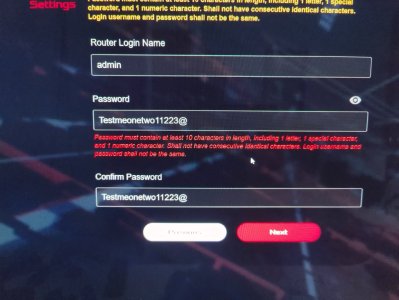
pass word mist contain at least 10 length . 1 letter . 1 special 1 nuemeric

that's why it didn't want to get in because the password wasn't like it wanted. but I am trying all kind of password it doesn't accept
 
what does it want
 

Attachments

  • 17718804741592277681447001135427.jpg
    17718804741592277681447001135427.jpg
    112.2 KB · Views: 110
what does it want
Read the password creation instructions. Do not use passwords with consecutive numbers or letters.
 
what kind of password does it wants??
its https maybe that's issue ?
No. Read the password creation instructions. You cannot use consecutive numbers or letters. Your password "Testmeonetwo11223@" has consecutive numbers (1122).
Edit to add:
[Wireless Router] How do I enter my ASUS router's setting page using Web GUI?
Use long and more complex passwords: Use passwords with more than 10 characters mixed with capitalized letters, numbers, and special characters to increase the security level of your devices. Do not use passwords with consecutive numbers or letters, such as 1111111111, 1234567890, abcdefghij, or qwertyuiop.
 
Read the password creation instructions. Do not use passwords with consecutive numbers or letters.
ok it worked
No. Read the password creation instructions. You cannot use consecutive numbers or letters. Your password "Testmeonetwo11223@" has consecutive numbers (1122).
Edit to add:
[Wireless Router] How do I enter my ASUS router's setting page using Web GUI?
Merlin MUST put a warning when updating to official. if you don't have the password of 10 like I said and all the others then you can't login anymore!. Merlin doesn't care about that from older versions. so I was stuck. I didn't have strong password becuase hell, i just want to remember it, too many password around. official using HTTPS if you didn't enable it. so it's mess up if you return to official without reset just to check stuff without messing with all the settings all over again which takes A LONG TIME

Thanks everyone anyway.

Reset 10 sec eventually reset the device, official didn't want to connect to WAN and i didn't have time to mess with it so I just updated to merlin again and used my old settings, now it enters with the new password still, so restore Settings doesn't save password I see

I just had hurt attack almost, I scratch my faces from nervous, I had too many issues lately and still am. 2x TForce Z540 nvme died after 1.6 year and i did get much of the data, but then I bought another one Samsung 9100 pro 2tb just died 2 months! barely touched it, because of the stupid windows update! both of them died totally. Samsung I can replace, it's on RMA , Tforce wants to speed run of tests and it cost extra money to send them.
and some other weird issues, audio suddenly sound like crap somehow , the super charger 5va of my dac/amp suddenly burn/blowup . many weird things.
 
Merlin MUST put a warning when updating to official. if you don't have the password of 10 like I said and all the others then you can't login anymore!. Merlin doesn't care about that from older versions. so I was stuck.
Merlin did put in a warning in the Change Log about the Asus password change with the 3006.102.6 firmware:
3006.102.6 (25-Nov-2025)
- NOTE: Asus has made some security related changes. Password
requirements are stricter, and UPNP is no longer
enabled by default. New password rules were
slightly loosened for Asuswrt-Merlin, repeating
characters are still allowed.
And to be fair the onscreen QIS password instructions, including when you put in a password that doesn't comply with Asus's new password requirement, tells the user not to use consecutive identical characters.
Password must contain at least 10 characters in length, including 1 letter, 1 special character, and 1 numeric character. Shall not have consecutive identical characters. Login username and password shall not be the same.
Others have complained about Asus's new password requirements last year. For example:
More posts complaining about it can be found via search: https://www.snbforums.com/search/1930327/?q=new+password&o=relevance
 
Merlin did put in a warning in the Change Log about the Asus password change with the 3006.102.6 firmware:

And to be fair the onscreen QIS password instructions, including when you put in a password that doesn't comply with Asus's new password requirement, tells the user not to use consecutive identical characters.

Others have complained about Asus's new password requirements last year. For example:
More posts complaining about it can be found via search: https://www.snbforums.com/search/1930327/?q=new+password&o=relevance
yes but I am talking about a warning when going back to OFFICIAL. it didn't register the password and I couldn't get in because it was HTTPS without a certificate that you need to download which I only get after reset. so those warnings are not there.

Certificate needed because official firmware uses HTTPS that you need to download and install which wasn't avaliable with the Merlin at the time. I don't do reset like many of you because it takes much time and usually doesn't change anything and can cause terrible issues.
even though I read the instruction it doesn't say about the certificate or the HTTPS on the official. at least from what I managed to read. I don't come to blame but this things if they BLOCK you from accessing the router is serious if for example I didn't do a fresh backup for some reason or any other thing

I ask for help, people helped, thanks very much. just some notification from my experience that I don't do it every day all day. many people are like me I guess, it just tiring when there are 90000 things to know and read and remember. I can barely remember 50% of my password because there are different requirements every time and they keep asking you to reset the password for a many places.

It was just a nervous experience dealing with this when I work from home, and I had a shift 2 hours later. So this was really, really terrible. I literally scratched my face from nervousness.
sorry that I am not a router pro, I deal with other things usually, and this moment I deal with many different things related to computer, audio, video and data, so many issues lately that got me out of control in mood. tired and angry because it wasted so much of my time and I lost data.
 
Last edited:

Similar threads

Latest threads

Support SNBForums w/ Amazon

If you'd like to support SNBForums, just use this link and buy anything on Amazon. Thanks!

Sign Up For SNBForums Daily Digest

Get an update of what's new every day delivered to your mailbox. Sign up here!

Members online

Back
Top