May help if you provide more information.I can't get it the router what do I do. it doesn't accept my user and password
it doesn't reset it it always comes the sameRun your browser in safe mode. If that doesn't work press the reset button for 5 seconds and setup the router from scratch.
I tried wps modeit doesn't reset it it always comes the same
it doesn't reset no matter what I doMay help if you provide more information.
What router model? GT-AXE1600 or something different?
What firmware did you update to, 3006.102.7 or something else?
Have you tried turning off the power to the router waiting a few minutes then power the router back on then try to access the router GUI at the router's IP address?
Have you tried a different computer and different web browser? Clear the browser's cache too.
You can likely reset the router by pressing the router reset button on the router for 5 to 10 seconds.
ROG Rapture GT-AXE16000 Hard Factory Reset method:I tried wps mode
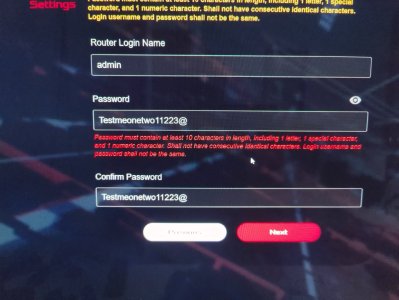
ok it works now after I did reset normally but it ask for password and I don't get it. what kind of password does it wantsROG Rapture GT-AXE16000 Hard Factory Reset method:
[Wireless Router] ASUS router Hard Factory Reset - Method 2
1. Turn the router off.
2. Press and hold the WPS button and turn the router on.
3. Power light is on (keep holding the WPS button).
4. Release the WPS button after the power light is off.
5. Reboot your router by manually pressing the power button.
"Shall not have consecutive identical characters."what does it want
Read the password creation instructions. Do not use passwords with consecutive numbers or letters.what does it want
No. Read the password creation instructions. You cannot use consecutive numbers or letters. Your password "Testmeonetwo11223@" has consecutive numbers (1122).what kind of password does it wants??
its https maybe that's issue ?
Use long and more complex passwords: Use passwords with more than 10 characters mixed with capitalized letters, numbers, and special characters to increase the security level of your devices. Do not use passwords with consecutive numbers or letters, such as 1111111111, 1234567890, abcdefghij, or qwertyuiop.
ok it workedRead the password creation instructions. Do not use passwords with consecutive numbers or letters.
Merlin MUST put a warning when updating to official. if you don't have the password of 10 like I said and all the others then you can't login anymore!. Merlin doesn't care about that from older versions. so I was stuck. I didn't have strong password becuase hell, i just want to remember it, too many password around. official using HTTPS if you didn't enable it. so it's mess up if you return to official without reset just to check stuff without messing with all the settings all over again which takes A LONG TIMENo. Read the password creation instructions. You cannot use consecutive numbers or letters. Your password "Testmeonetwo11223@" has consecutive numbers (1122).
Edit to add:
[Wireless Router] How do I enter my ASUS router's setting page using Web GUI?
We use essential cookies to make this site work, and optional cookies to enhance your experience.