r80xcore
Regular Contributor
Help wanted: mapping LAN / ETH ports for MerVLAN device support
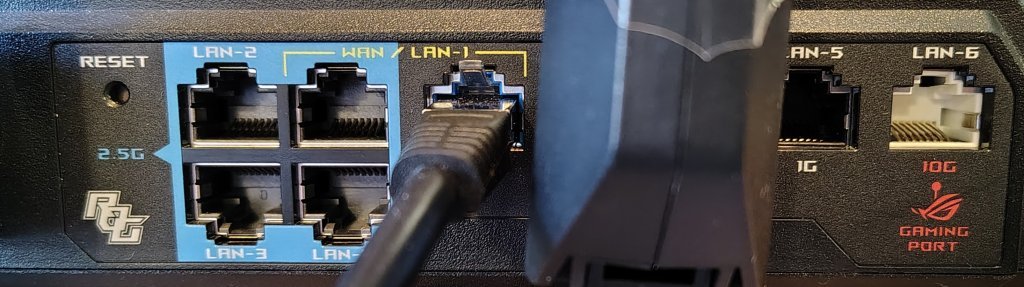
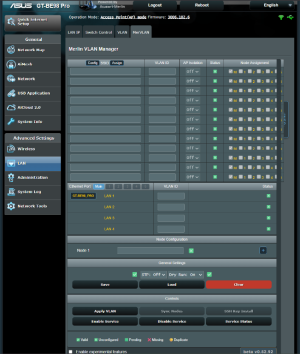
I’m looking for help from users willing to map the physical LAN ports on their router so proper MerVLAN device support can be added upstream.
I’ve created a fully standalone helper script that:
 Important notes
** RT-AX88U can map VLAN ID on port 1-4 individually. Port 5-8 (seen as LAN 5) can only be tagged as a group.
If you know the mapping already you can just fill in a template, examples below (text in brackets [ ] is only informational):
In this example we start by naming the template [nvramname], this is important as this is compared to the nvram to select the right template. The model can have the same name and is only informational.
Then we map eth4->LAN1, eth3->LAN2, eth2->LAN3, eth1->LAN4 and the eth5 (2.5gb port) to LAN5. We map WAN to eth0 and set the map LAN ports to 5.
Here we can see another example, the Asus XT8. Here we can see a clear difference on a model that has a [nvramname] that differs a lot from the common name the model is know as. We also see that in this mode the eth ports are mapped to the LAN ports in order.
Here we have a model that doesn't map WAN to eth0, but instead to eth4
You do need to specify the name [nvramname] of the unit as it is printen in nvram. Run this command if you are unsure of it (only needed when manually editing):
MerVLAN: Models Requiring Testing
Or manual mapping from already known info.
WiFi 7 / BE Series
ROG & High-Performance Series
TUF Gaming Series
Standard RT-AX Series
ZenWiFi (Mesh) Series
All models that gets a profile gets exluded from this list.
Any help testing different router models is hugely appreciated. Thanks for helping make MerVLAN better!
I’m looking for help from users willing to map the physical LAN ports on their router so proper MerVLAN device support can be added upstream.
I’ve created a fully standalone helper script that:
- Detects the WAN/uplink interface
- Walks you through mapping each physical LAN port (LAN1, LAN2, …)
- Generates a ready-to-use hw_probe.sh case snippet
- Saves a full report under /tmp
- Provides a pre-filled GitHub issue link for submitting the results
- Optionally patches a local MerVLAN install with temporary support (until official support is added)
Run it with this one-liner
Code:
mkdir -p /tmp/mervlan_tmp && /usr/sbin/curl -fsL --retry 3 "https://raw.githubusercontent.com/r80xcore/mervlan/dev/functions/device_support_mapper.sh" -o "/tmp/mervlan_tmp/device_support_mapper.sh" && chmod 0755 /tmp/mervlan_tmp/device_support_mapper.sh && sh /tmp/mervlan_tmp/device_support_mapper.shHow to use the script
- Start with only the WAN cable connected
Unplug all LAN cables before running the script. - WAN detection (Step 1/2)
The script will attempt to detect which interface is used as WAN/uplink. - LAN port mapping (Step 2/2)
- You’ll be asked how many physical LAN ports your router has (excluding WAN)
- For each LAN port (LAN1 → LANX):
- Unplug the LAN cable
- When prompted, plug the cable into the requested LAN port
- Press Enter and confirm the detected interface
- You can retry, skip, or quit at any step
- Report generation
- A detailed report is printed and saved under /tmp/mervlan_tmp/results
- The script outputs a direct GitHub link with a pre-filled device support request
- Copy/paste any extra notes if needed and submit the issue
- Optional local patch
- If MerVLAN is already installed, the script can patch hw_probe.sh
- This enables temporary local support for your device
- This does not replace official upstream support
Important notes- You do NOT need to have MerVLAN installed to be able to run this.
- /tmp is cleared on reboot, nothing persistent is left on the unit — save the report or submit the GitHub issue.
- Local patching is only meant as a stopgap; please submit the report so official support can be added.
- This is for AP mode testing, but if we can verify if it works in router mode too it would be great for debugging.
Community added model support This is the currently added profiles. Special Thanks & High-fives to the users that provided the data to broaden support and help me develop MerVLAN! |
MODEL | CONTRIBUTOR | FROM | Added in version |
RT-AC86U RT-AX86U GT-AX6000 RT-AX86S RT-AX58U RT-AX88U** RT-AX88U_PRO | mistermoonlight1 mistermoonlight1 kstamand /SNB bieniu commodoro amplatfus jksmurf | SNB SNB SNB Github SNB SNB SNB | v0.52.3 TBR v0.52.4 TBR v0.52.4 v0.52.3 TBR v0.52.4 TBR v0.52.4 TBR v0.52.4 |
If you know the mapping already you can just fill in a template, examples below (text in brackets [ ] is only informational):
Code:
[nvramname]       [model]                   [interface]                          [LAN ports]                   [max lan ports]       [wan port]
RT-AX86U) MODEL="RT-AX86U"; ETH_PORTS="eth4 eth3 eth2 eth1 eth5"; LAN_PORT_LABELS="LAN1 LAN2 LAN3 LAN4 LAN5"; MAX_ETH_PORTS=5; WAN_IF="eth0" ;;Then we map eth4->LAN1, eth3->LAN2, eth2->LAN3, eth1->LAN4 and the eth5 (2.5gb port) to LAN5. We map WAN to eth0 and set the map LAN ports to 5.
Code:
[nvramname]       [model]
RT-AX95Q) MODEL="XT8"; ETH_PORTS="eth1 eth2 eth3"; LAN_PORT_LABELS="LAN1 LAN2 LAN3"; MAX_ETH_PORTS=3; WAN_IF="eth0" ;;
Code:
[nvramname]        [model]                                                                                                [wan port]
RT-AX58U) MODEL="RT-AX58U"; ETH_PORTS="eth3 eth2 eth1 eth0"; LAN_PORT_LABELS="LAN1 LAN2 LAN3 LAN4"; MAX_ETH_PORTS=4; WAN_IF="eth4" ;;You do need to specify the name [nvramname] of the unit as it is printen in nvram. Run this command if you are unsure of it (only needed when manually editing):
Code:
nvram get productidMerVLAN: Models Requiring Testing
Or manual mapping from already known info.
WiFi 7 / BE Series
- RT-BE58 Go
- RT-BE86U
- RT-BE88U
- RT-BE92U
- RT-BE96U
- GT-BE98 Pro
- GT-BE19000AI
ROG & High-Performance Series
- GT-AX11000
- GT-AX11000 Pro
- GT-AXE11000
- GT-AXE16000
- RT-AX86U Pro
TUF Gaming Series
- TUF-AX3000 v1
- TUF-AX3000 v2
- TUF-AX5400 v1
Standard RT-AX Series
- RT-AX5400
- RT-AX58U v2
- RT-AX68U
- RT-AX82U v1
- RT-AX82U v2
- RT-AX92U
- DSL-AX82U
- DSL-AX5400
ZenWiFi (Mesh) Series
- ZenWiFi ET8
- ZenWiFi Pro XT12
All models that gets a profile gets exluded from this list.
Any help testing different router models is hugely appreciated. Thanks for helping make MerVLAN better!
Last edited: