
How to undo/cancel the scheduled reboot via terminal
- Thread starter wizin
- Start date


 So what is the truth? Are you using the script in post #1 or the AMTM option shown in your screen shot. The screen shot also shows a reboot time of 05:25, not the 05:15 you stated.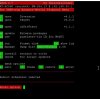
Similar threads


Similar threads
| Thread starter | Title | Forum | Replies | Date |
|---|---|---|---|---|
| M | Scheduled reboot drops Internet connection | Asuswrt-Merlin | 18 | |
| E | AImesh Devices Scheduled Reboot? | Asuswrt-Merlin | 2 |
Similar threads
Latest threads
-
-

-
-

-
 Scribe Scribe v3.2.11 /UIScribe v1.4.13 not showing WLCEVENTD.log Entries - Reinstalled no Success
- Started by killweav
- Replies: 3
Support SNBForums w/ Amazon
If you'd like to support SNBForums, just use this link and buy anything on Amazon. Thanks!
Sign Up For SNBForums Daily Digest
Get an update of what's new every day delivered to your mailbox. Sign up here!
Staff online
-
 RMerlinAsuswrt-Merlin dev