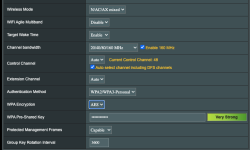
Would you mind sharing your WiFi settings? I just bought this router recently and would like to make sure I'm as optimized as possible. Thanks.I can push Wifi 6 to around 2Gbps by using 160 MHz channels when nobody's around on the same channels. Yep, twice the speed of Gigabit Ethernet...
You need to be in a region that allows DFS channels, and to enable 160 MHz in the router's wireless settings.Would you mind sharing your WiFi settings? I just bought this router recently and would like to make sure I'm as optimized as possible. Thanks.
I believe I am in a region that allows DFS channels since I see that setting on my router and can select it. However, when I check after connecting to my WiFi, it seems I'm always on the 80 bands even though 160 is manually set. Am I missing something?You need to be in a region that allows DFS channels, and to enable 160 MHz in the router's wireless settings.
About everything else is largely kept to their default settings.
I'm not sure what that means but I am using an iPhone 12 Pro Max and a MacBook Pro 2018.what is your client radio capable of ?
Your clients may not be capable of 160 MHz.I believe I am in a region that allows DFS channels since I see that setting on my router and can select it. However, when I check after connecting to my WiFi, it seems I'm always on the 80 bands even though 160 is manually set. Am I missing something?
Really? I didn't know this. Sucks lolBest iPhones from support.apple.com only support 80MHz.
Is this an optimal setup? My oldest device is an iPhone XS and MacBook Pro 2018.
Apple does not support 160MHz in any mode
Because they are always after user experience and 160MHz is not needed on a phone/tablet and is not guaranteed for desktop/laptop.
Since they write their own drivers, they focus on features that work well...
We use essential cookies to make this site work, and optional cookies to enhance your experience.