
What's new

Looking for help Trunking on WAN Port RT-AX86U 3004.388.11

geobernd

Regular Contributor
I am hoping for someone smarter than me to be able to give me a command sequence to put into the startup scripts to
trunk WAN traffic (tagged with VLAN 201 through IPTV settings) and LAN traffic (no VLAN tag) together onto the physical 2.5G Port so it will travel over one ethernet connection to the ONT.

Ideally LAN traffic would just be guest network traffic without intranet access but I am happy with regular LAN onto the physical 2.5G Port so it will travel over one ethernet connection (to the ONT.


More Background:
I am trying to solve a latency spike issue with my Quantum Fiber Q1000K ONT/SmartNID that happens when the ONT is running in transparent bridge mode (caused by it not being able to get a local DHCP address and internet access for it's management engine/interface).

To do so I need to have the WAN traffic (which is VLAN 201 tagged through the IPTV settings on the RT-AX86U)
and
a LAN link that allows the Q1000K to get a local DHCP address and give the management engine in it access to the internet
go through the same physical connection - i.e. the 2.5G wan port

I want to avoid
  • running a second Ethernet connection (ONT is at the other end of the house and I only have one CAT6 going there)
  • buying a small managed switch that trunks together the VLAN 201 tagged WAN port and one of the untagged LAN ports from my RT-AX86U to go to the Q1000K
The ONT will know what to do with untagged vs 201 tagged traffic so nothing is needed on that end.
 
Here is a general guide if you haven't seen it:
To view this content we will need your consent to set third party cookies.
For more detailed information, see our cookies page.

And in one of these two I believe someone did, or talked about doing, what you are trying to here.
To view this content we will need your consent to set third party cookies.
For more detailed information, see our cookies page.
To view this content we will need your consent to set third party cookies.
For more detailed information, see our cookies page.
 
Thank you - I had seen these reddit posts but could not find a way to do it on the RT-AX86U without adding a switch.

Either way I may abort my mission:
Since you are coming from the same GPON-Calix to GPON Q1000K and are having similar issues my test results may be interesting to you:

In router mode there is a 7ms ping with 1-2ms jitter to the major CDNs whereas with the Callix 803g I had <1ms jitter and totally stable 6ms ping

When I switch to tagged bridge mode there is no improvement in latency and jitter is up compared to router mode

When I switch on untagged bridge mode on the Q1000K pings are a little more stable compared to router mode but somehow my routing within the level3 network changes (I have done this 3 times now back and forth yesterday and today and had the same results every time) and the ping times increase to 10ms
Once I restart the Q1000K (to simulate extended power outage where the UPS shuts down) and it comes back up I get the nasty 70+ms ping spikes 1-2 per minute that people talk about...

Summary:
803g: 6ms ping, no noticable jitter (obviously I can't go back there)
Q1000K default Router Mode: 7ms ping, 1-2ms jitter
Q1000K Tagged Bridge: 7ms ping, 2-5ms jitter
Q1000K Untagged Bridge: 10ms ping, <1ms jitter
Not tried yet: untagged bridge with the LAN connection the Q1000K

I'll wait a little longer to see is someone here has a command sequence to bridge the interfaces - otherwise I may just dig out my long spare 200 ft ethernet cable for a test before I order a managed switch....

My major worry about having double NAT in my network is actually unfounded: Both my SIP lines and passive FTP work just fine (I didn't expect that) - so the SIP hardware and the FTP client must somehow detect what the real IP is...
 
What are you using to get your results?

With my RT-AX86U-Pro on the 2.5gb port from the Q1000k 10gb port to 8.8.8.8:
Q1000K default Router Mode: 14ms with spikes every 10-30sec to 70ms
Q1000K DMZ Router Mode: 14ms with spikes every 10-30sec to 70ms
Q1000K Tagged Bridge: 14ms with spikes every 10-30sec to 70ms
Q1000K Untagged Bridge: 12ms with ~1ms jitter

Whats weird is if I place my router in the DMZ, and then enable Untagged Bridge mode, it still gives the same 14ms with spikes every 10-30sec to 70ms.
 
Thank you for the results. I am using the 2.5gb port on my RT-AX86U.
I am using pingplotter 5 on a PC with the connection being just lightly used...
Pinging 8.8.8.8, google.com and akamai.com - all with basically the same results... 8.8.8.8 and google.com didn't go over 10ms once in the last 3 hours since I started the latest run...

It is truly bizarre: You are getting the large spikes exactly when I am not getting them and vice versa...
And I am only getting the 70ms ones when the untagged bridge goes "cranky" because it starts either looking for a local DHCP response/IP or tries to reach some admin stuff on the internet...

Maybe they have different OLTs+Routers in use at the headends despite both of us coming from infrastructure with 803g's ....

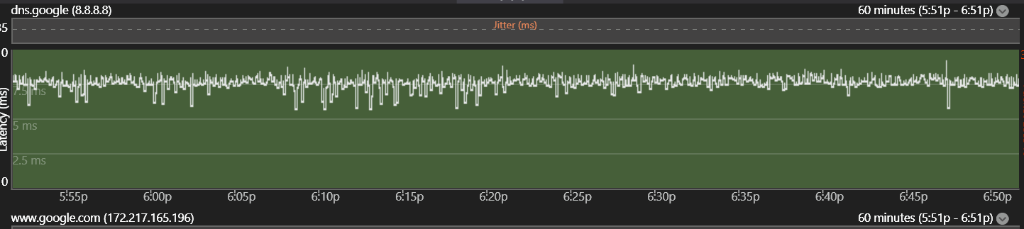
Attached is a screenshot that shows the minor jitter (it's only 1-2 ms but on the 803g it was very close to 0 - so it looks like the Q1000K is doing other stuff and not prioritizing the main routing work enough)...
 

Attachments

  • Screenshot 2026-02-20 185148.png
    Screenshot 2026-02-20 185148.png
    64.8 KB · Views: 5
I came from a 716ge-i rev2
Probably we are both connected to a Calix E7 OLT
The original and Pro models do have different SoC. I wonder if the 2.5g Ethernet controllers are different?

Edit: also maybe there is something with the different 3.0.0.4 and 3.0.0.6 codebases?
 
Last edited:
So I just read that the AX86U can have either a Broadcom or Realtek 2.5gb PHY ethernet. Maybe that is why there is a difference in our experiences? Maybe yours has a Realtek? The Pro has a BCM4912 that has an integrated 2.5gb PHY.
From people who have done testing, it does seem Broadcom has an issue with the Q1000K in tagged mode. Where maybe Qualcomm and Realtek do not.
 
Last edited:

Similar threads

Latest threads

Support SNBForums w/ Amazon

If you'd like to support SNBForums, just use this link and buy anything on Amazon. Thanks!

Sign Up For SNBForums Daily Digest

Get an update of what's new every day delivered to your mailbox. Sign up here!
Back
Top