What's new
  • SNBForums Code of Conduct

    SNBForums is a community for everyone, no matter what their level of experience.

    Please be tolerant and patient of others, especially newcomers. We are all here to share and learn!

    The rules are simple: Be patient, be nice, be helpful or be gone!

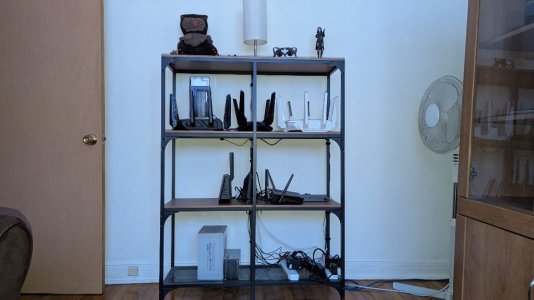
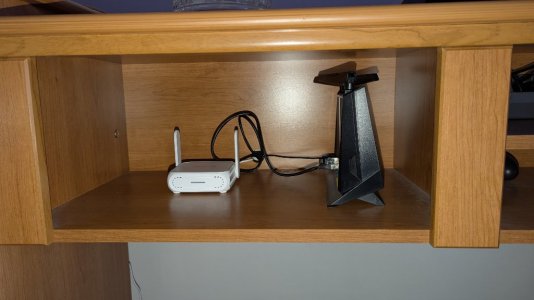
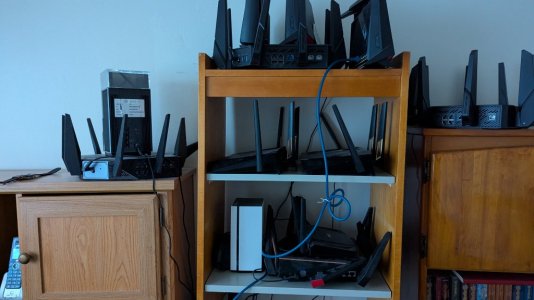
My two router nurseries (November 2025)

RMerlin

Asuswrt-Merlin dev
Staff member
First is the older AX models, second is the newer AX and BE models.

The older unsupported models are in a box in the closet.

The newer models are all plugged in to a pair of smart power bars, so I can remotely turn on any specific router as needed, either through a mobile app or through Home Assistant.
 

Attachments
  • Lab1-Nov-2025.jpg
    Lab1-Nov-2025.jpg
    94.2 KB · Views: 304
  • Lab2-Nov-2025.jpg
    Lab2-Nov-2025.jpg
    81.4 KB · Views: 305
Last edited:
I had a laugh when I read the word, "nurseries" in the title.

So which model is the daily driver?
 
I had a laugh when I read the word, "nurseries" in the title.

So which model is the daily driver?
RT-BE96U, which is why it's not in those pictures.

There's also an RT-AX86U_Pro and the RT-BE58_Go not shown there because they are in another location. The RT-AX86U_Pro used to run 24/7 for fulltime testing, and the RT-BE58_Go because it was so small it was easy to put it next to that RT-AX86U_Pro.
 
i actually recently repurposed (gave away and setup an older rt-ac5300 ) to a neighbor having wifi dropout issues with older still on dsl .. lol
 
A few more, put them in circle, turn them up max. WiFi, and you might have enough energy to heat up ☕ ! 😁
 
I have always wondered what that room looked like.
I expected a crazy mess of wires all over the room.
But this looks like a 'controlled environment' :)
 
I am surprised by the order of so many routers, in my case with 4 routers you would be scared to see mine is Halloween. I hope you can recover them that I have no doubt you can.
 
I have always wondered what that room looked like.
I expected a crazy mess of wires all over the room.
But this looks like a 'controlled environment' :)
The old setup is more messy, there's a bunch of unplugged AC adapters on my desk next to it, with labels identifying their router. I have to untangle and plug them as needed, plus only two Ethernet cables that need to be plugged to the appropriate router.

The location for the newer setup is actually cable managed, with all the wires attached at the back of the shelve poles with velcro straps. Takes a long time to rearrange everything whenever I add a model to the setup, but it looks fairly neat. It only gets tricky if for some reason I need to disassemble one to access its serial connector, but that's rarely necessary these days.
 
A few more, put them in circle, turn them up max. ☕ ! 😁

This may be how we get First Contact with a civilization outside our solar system--or galaxy even.

Radio waves versus light waves in our galaxy:


Some of the first stars from 14 billion plus years ago (behind all the galaxies)

galaxies.webp
 
RT-BE96U, which is why it's not in those pictures.

There's also an RT-AX86U_Pro and the RT-BE58_Go not shown there because they are in another location. The RT-AX86U_Pro used to run 24/7 for fulltime testing, and the RT-BE58_Go because it was so small it was easy to put it next to that RT-AX86U_Pro.
Do you also use AiMesh?
 
Any particulars on the Power Bars?
I went for the cheapest I could find, because I thought Kaza too expensive and they didn't have enough outlets. These two are 6 outlets each. And if you pair them using the Tuya app instead of Geeni's own (Tuya is the original manufacturer), then they can also be managed through Home Assistant.
 

Latest threads

Support SNBForums w/ Amazon

If you'd like to support SNBForums, just use this link and buy anything on Amazon. Thanks!

Sign Up For SNBForums Daily Digest

Get an update of what's new every day delivered to your mailbox. Sign up here!
Back
Top