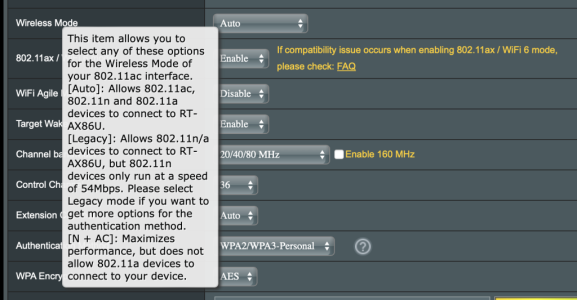
On my AC router, this is what I've found:
2.4Ghz:
-Auto without disable B checked leaves all rates enabled and sets the basic/beacon rate to 1 meg, this can be problematic as even an N device can attempt to stay connected at 1M when on the fringe of the signal and drag down the network. All 2.4ghz device types including B can connect which isn't desirable either. Beacon rate of 1 meg also itself can impact performance some. So I wouldn't run that mode.
-Auto + Disable B disables all the legacy DSSS and CCK rates, leaving only OFDM enabled and setting the lowest connection rate and the Beacon rate to 6 megs, which is a good thing (some would even argue that a 12M minimum rate is preferable but there is no way to do that via the Asus GUI). There are two disadvantages here. First, some draft-N devices require at least one CCK rate, I have one of them that will not connect when set in this mode. Second if a G device did come in range it would be allowed to connect and potentially drag down performance a bit as it would connect at a lower rate than other devices, but those devices are rare. B devices won't be able to connect since all the supported rates are disabled.
-N/AC disables only DSSS and sets the minimum/beacon rate to CCK 5.5 and also leaves CCK 11 enabled. This is more compatible as those draft-N devices can connect, however B and G devices should not be able to as the router should reject them. So for me this is the best setting. But the first one above is probably better as long as you don't have older N devices that can't connect when set that way.
5Ghz
Auto sets the basic/beacon rate to 6 megs minimum, however if an A device came in range it would be able to connect and potentially drag down performance, but those are rare.
N/AC sets the same basic/beacon rates but should reject an A device (not based on rate but some other parameter, possibly something like seeing support for only HT and not VHT, or some other way it differentiates, I'm honestly not sure what the Asus uses to make that decision). I run this mode just in case some A device was ever in the area but in reality the two modes should operate the same for most people.
When you add AX into the mix it is basically the same thing except you can choose to totally disable N I believe.
So I'd say:
For 2.4ghz set it to auto and disable B, as long as you don't have any issues with any devices, this should be good. If there are issues, set it to N/AC (or N/AC/AX).
Worth noting - there is really no such thing as 2.4Ghz AC - it's just N. Not really sure why they put it as N/AC but I'm assuming people would be confused and think it was limiting them if AC wasn't mentioned. Or maybe it is to denote that it is leaving a couple legacy draft-N rates enabled, not sure.
For 5ghz, Auto is probably fine for most, but N/AC/AX or even AC/AX might keep performance higher if you want to reject A and/or N devices from that band.