H
Hobett
Guest
Im New here and have a ASUS RT-AC68U router. I wanted to check for any firmware upgrades for my router.
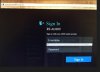
I went to router.asus.com/main_login.asp site/page.
I entered my user name and password and the ASUS router screen came up and I reviewed all the router info and checked for any firmware updates.
The thing I noticed was that at the router.asus.com/main_login.asp site/page there was NO Lock Icon in the title bar. I use Firefox, if that makes any difference.
The questions are , did I enter my information into a unsecured site? And why is there not a Lock Icon for the ASUS router login? Is there some other site I should be using?
I also have a ASUS site account , that has a Lock Icon, but that seems to be separate from the Router login. Any comments are appreciated.
I went to router.asus.com/main_login.asp site/page.
I entered my user name and password and the ASUS router screen came up and I reviewed all the router info and checked for any firmware updates.
The thing I noticed was that at the router.asus.com/main_login.asp site/page there was NO Lock Icon in the title bar. I use Firefox, if that makes any difference.
The questions are , did I enter my information into a unsecured site? And why is there not a Lock Icon for the ASUS router login? Is there some other site I should be using?
I also have a ASUS site account , that has a Lock Icon, but that seems to be separate from the Router login. Any comments are appreciated.