What's new

Not possible to set static IPs in VLAN (network with different subnet)?

When I was experimenting with dnsmasq-x.conf.add (one of the approaches mentioned above) I did have a conflict whereby it didn’t work until I deleted the duplicate values in GNP manually assigned IPs first [see EDIT 3].

If this conflict logic applies equally to any pair of the three methods dnsmasq/GNP Manual/YazDHCP, wondering if there’s some legacy assignment entries anywhere (including in /jffs/nvram/dhcp-list which might be holding yours up? Just a thought.
Yes, any sort of conflict will cause problems and likely generate some system log dnsmasq error messages. See my post here where I show some example error messages when there is a conflict:
https://www.snbforums.com/threads/y...of-dhcp-reservations.94827/page-4#post-971519

It cannot be stressed enough that one cannot just update to YazDHCP 1.2.0 and walk away expecting things to work without carefully either reading the YazDHCP CLI carefully to understand the changes and how conflicts can happen. Or not read both of Martinski posts on the v1.2.0 release. People need to pay particular attention to the Notes section in the second post link below.
https://www.snbforums.com/threads/y...of-dhcp-reservations.94827/page-4#post-971788
https://www.snbforums.com/threads/y...of-dhcp-reservations.94827/page-4#post-971789
Also, it's very important to make sure you remove all IP address reservations from your custom files that have been transferred to YazDHCP to prevent dnsmasq from getting duplicate entries/directives, which is bound to cause some issues when restarting the dnsmasq process.
 
Yes, any sort of conflict will cause problems and likely generate some system log dnsmasq error messages.
Yes.
See my post here where I show some example error messages when there is a conflict:
Interesting; I didn’t look at the error that closely when you first posted it TBH but now that folks are piling into YazDHCP it seems there are a few duplicate entries messages. Effectively there were only two beta testers (you and me) so I guess part of the prompting to go live was to haul some more in.. :-).. and what a catch …

Might be time for @CaptainSTX to post in that forum, they’ve answered every one of your posts (I’m just chopped liver :) ) but it might need some more forensic analysis by @Martinski if the current issues cropping up in the YazDHCP thread is anything to go by.
 
Interesting; I didn’t look at the error that closely when you first posted it TBH but now that folks are piling into YazDHCP it seems there are a few duplicate entries messages.
It would help if when people are having issues if they could expand on if they were using custom scripting to store manual IP reservations (including those manual reservations for YazFi). Custom scripting like the following files:
Code:
/jffs/scripts/dnsmasq-sdn.postconf
/jffs/configs/dnsmasq-INDEX.conf.add
/jffs/scripts/dnsmasq.postconf
 
Last edited:
It would help if when people are having issues if they could expand on if they were using custom scripting to store manual IP reservations (including those manual reservations for YazFi). Custom scripting like the following files:
Code:
/jffs/scripts/dnsmasq-sdn.postconf
/jffs/configs/dnsmasq-INDEX.conf.add
/jffs/scripts/dnsmasq.postconf
For completeness, also to advise if they still have any Manually Assigned DHCPs (max 32) in the Advanced Settings menu of their Guest Network Pro profile. These should be deleted so the count reverts to zero.

This is also a potential source of conflict and for me, caused (when I was using them which I no longer do) my dnsmasq-index.conf.add file to fail. Note that YazDHCP adds a one line entry to each GNP instance of that file, each of which refers to a list of the actual YazDHCP MAC:IP:HOSTNAME entries (.staticlist, .staticlist_br52, .staticlist_br53 etc under the YazDHCP Addons dir /jffs/addons/YazDHCP,d/.).

IMG_2544.jpeg
 
Its threads like this that make this community awesome. I've become comfortable with how GNP works, the nvram variables it uses, how it's different from the 388 codebase, which I used to use the dnsmasq.add method for my IoT devices and the old GN1 that was replicated to mesh nodes.

I'm sitting on a couple boxes of KASA smart switches and I'm at 20 of the 32 manual GNP reservations, so I'm approaching the need for a new method. YazDHCP sounds nice, moving the GNP reservations back to the main LAN/DHCP Setting. Appreciate the extra insight.
 
If you are interested in the updated YazDHCP that supports Guest Network Pro, see the YazDHCP v1.2.0 release discussion and the issues some appear to be having:
https://www.snbforums.com/threads/y...of-dhcp-reservations.94827/page-4#post-971788

… issues that appear (hopefully) to have been solved by the latest “develop” branch of that Addon 👍, which is awesome.

It seems to have solved the issues of two users that have tried it, hopefully will also fix CaptainSTX issue referred to in this thread when they are able to find time to test it.
 
Evening all
I am trying to achieve (what I believe is) the same result, that is being able to reserve ips for identifiable devices, whether they live on the main network or on separate, IoT type, VLANs.
The VLANs do NOT use the same subnet as the main network.
I do not use YazDHCP.

I believe the list appearing on GUI (LAN/DHCP Server/Manually assigned...) resides in NVRAM, whereas the actual assignment/reservation job is done at the level of dnsmasq.conf

My idea would be to manually edit the router's config via ssh dnmasq.conf.add, clearing previous entries and, for consistency, simultaneously update the dhcp_staticlist in jiffs so my clients are nicely displayed in the GUI.
Which brings a few questions:
It seems the jury is still out on whether different subnets can make use of the router manual assignment capabilities, but since last post is 6 months old, would the be feasible now?
Is my approach (dnsmasq.conf.add + dhcp_staticlist) too 'naive' and guaranteed to fail?

Many thanks for your inputs!
 
Evening all
I am trying to achieve (what I believe is) the same result, that is being able to reserve ips for identifiable devices, whether they live on the main network or on separate, IoT type, VLANs.
The VLANs do NOT use the same subnet as the main network.
I do not use YazDHCP.

I believe the list appearing on GUI (LAN/DHCP Server/Manually assigned...) resides in NVRAM, whereas the actual assignment/reservation job is done at the level of dnsmasq.conf

My idea would be to manually edit the router's config via ssh dnmasq.conf.add, clearing previous entries and, for consistency, simultaneously update the dhcp_staticlist in jiffs so my clients are nicely displayed in the GUI.
Which brings a few questions:
It seems the jury is still out on whether different subnets can make use of the router manual assignment capabilities, but since last post is 6 months old, would the be feasible now?
Is my approach (dnsmasq.conf.add + dhcp_staticlist) too 'naive' and guaranteed to fail?

Many thanks for your inputs!
Guest network Pro has the ability to manually reserve IP addresses. If your router has GNP that is.
 
I do not use YazDHCP.
Any particular reason why you don't want to use YazDHCP?
What router and what firmware are you using?

Using YazDHCP makes things so much easier to manage manual IP reservations on both the main LAN, Guest Network (if using 3004.388.x firmware) or Guest Network Pro (if using 3006.102.x firmware) over using SSH and manually creating or editing a; dnsmasq-sdn.postconf, or dnsmasq-INDEX.conf.add, or dnsmasq.postconf, or dnsmasq.conf.add file.

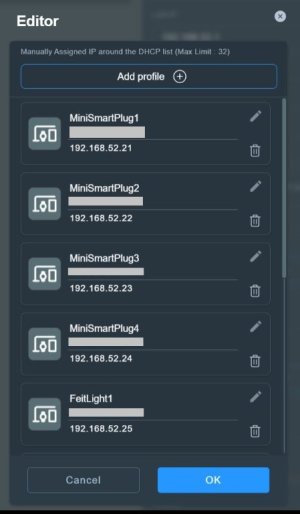
Or as @bbunge indicated one can manually assign Guest Network Pro client IP addresses under the Guest Network Pro profile's Advanced Settings > Manually Assign IP around DHCP list (Max Limit: 32). As explained earlier on page one, the use of separate IP subnet ranges typically depends on how one has configured the Guest Network Pro profile's Use same subnet as main network option.


Edit to add: An example of the 3006.102.x firmware's Guest Network Pro profile's Advanced Settings > Manually Assign IP around DHCP list (Max Limit: 32) option with Guest Network Pro clients assigned manual IP's.

SDN_Manual_IP.jpg
 
Last edited:

Latest threads

Support SNBForums w/ Amazon

If you'd like to support SNBForums, just use this link and buy anything on Amazon. Thanks!

Sign Up For SNBForums Daily Digest

Get an update of what's new every day delivered to your mailbox. Sign up here!
Back
Top