What's new

Entware Okay to install entware update?

I am having an issue syslog-ng on my mesh nodes only. Twice now I have found syslog-ng not running and had to start it
on all three mesh nodes.

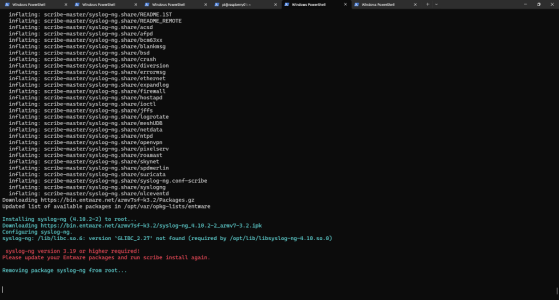
This is what I am seeing in the messages file.
Digging myself a bigger hole.
1) Tried rebooting node. ( syslog-ng stops after a period)
2) Attempted to reinstall scribe. ( same result)
3) unistall scribe,reboot and reinstall scribe. Went from bad to worst.
Now getting the following message on install.
 

Attachments

  • Screenshot 2026-04-07 144109.png
    Screenshot 2026-04-07 144109.png
    148.5 KB · Views: 20
Also Tailscale is downgraded (expected) and broken...

tailmon seems stuck on this:
Code:
error fetching current status: Failed to connect to local Tailscale daemon for /localapi/v0/status; not running? Error: dial unix /opt/var/run/tailscale/tailscaled.sock: connect: connection refused

EDIT: Fixed by running tailmon -setup and updating the Tailscale binaries again.
 
Digging myself a bigger hole.
1) Tried rebooting node. ( syslog-ng stops after a period)
2) Attempted to reinstall scribe. ( same result)
3) unistall scribe,reboot and reinstall scribe. Went from bad to worst.
Now getting the following message on install.
Ok, so I got scribe installed. Not sure how but there was an LD_LIBRARY_PATH set. I check my other two nodes and they do not have that set.
I just ran unset LD_LIBRARY_PATH and installed scribe. Now if it will just stay running.
 
This whole update process gives me Windows NT service pack vibes. Will be waiting for the weekend to update so I can handle all the fall-out in case the whole kit&kaboodle goes down. 👎
 
This whole update process gives me Windows NT service pack vibes. Will be waiting for the weekend to update so I can handle all the fall-out in case the whole kit&kaboodle goes down. 👎

@Viktor Jaep

Glad I'm not the only one to remember NT service pack updates - the horror, the horror! :p

Ok, I did a quick Entware update last night and apart from the expected need to manually upgrade Tailscale and a quick re-install of Scribe as syslog-ng it has gone from version 4.7.1-2 -> 4.10.2-2, I noted the following with regard to your scripts after I had "stabilised everything" and looked closer.

I have vpnmon-r3, tailmon and rtrmon starting up from post-mount, with the following lines:

Code:
(sleep 30 && /jffs/scripts/vpnmon-r3.sh -screen -now) & # Added by vpnmon-r3

(sleep 40 && /jffs/scripts/tailmon.sh -screen -now) & # Added by tailmon

(sleep 50 && /jffs/scripts/rtrmon.sh -screen -now) & # Added manually

I think I may have tweaked the delay on a couple of them but it's so long ago I can't remember ... anyway all been working great prior to the latest Entware updates.

After the Entware updates, it seemed like none of them had run from post-mount, a "screen -ls" gave no results.

I did note the Entware "screen" utility had been updated from 4.9.1-2 -> 5.0.1-1, which may explain something?

I ran those post-mount lines manually from the command line and they appear to work ok, so it's only running from within post-mount at startup they are failing ... which has me a bit stumped?

Anyway, at that point I'd run out of my allowed upgrade window (thought it was going to be a quick and easy one - famous last words), so I did a quick "run away" and restored yesterday's backup from backupmon - how much do we love that? A lot! And back in business for now, but with that red "Entware packages -> 85p available" staring me in the face and triggering my OCD 😁.

So when you have a play on the weekend maybe you can confirm my results and have a look at what may be causing it?

Cheers,

Stephen

 
Last edited:
@Viktor Jaep

Glad I'm not the only one to remember NT service pack updates - the horror, the horror! :p

Ok, I did a quick Entware update last night and apart from the expected need to manually upgrade Tailscale and a quick re-install of Scribe as syslog-ng it has gone from version 4.7.1-2 -> 4.10.2-2, I noted the following with regard to your scripts after I had "stabilised everything" and looked closer.

I have vpnmon-r3, tailmon and rtrmon starting up from post-mount, with the following lines:

Code:
(sleep 30 && /jffs/scripts/vpnmon-r3.sh -screen -now) & # Added by vpnmon-r3

(sleep 40 && /jffs/scripts/tailmon.sh -screen -now) & # Added by tailmon

(sleep 50 && /jffs/scripts/rtrmon.sh -screen -now) & # Added manually

I think I may have tweaked the delay on a couple of them but it's so long ago I can't remember ... anyway all been working great prior to the latest Entware updates.

After the Entware updates, it seemed like none of them had run from post-mount, a "screen -ls" gave no results.

I did note the Entware "screen" utility had been updated from 4.9.1-2 -> 5.0.1-1, which may explain something?

I ran those post-mount lines manually from the command line and they appear to work ok, so it's only running from within post-mount at startup they are failing ... which has me a bit stumped?

Anyway, at that point I'd run out of my allowed upgrade window (thought it was going to be a quick and easy one - famous last words), so I did a quick "run away" and restored yesterday's backup from backupmon - how much do we love that? A lot! And back in business for now, but with that red "Entware packages -> 85p available" staring me in the face and triggering my OCD 😁.

So when you have a play on the weekend maybe you can confirm my results and have a look at what may be causing it?

Cheers,

Stephen
Exactly what I was afraid of. Getting NT 4.0 SP3 BSOD flashbacks after reading all this! Lol. Thank you for testing the waters. I will definitely give it a go and test on Saturday. Will let you know what I find! So glad we can revert back to the last known good! Ha!!
 
@Viktor Jaep - Hi there, I ran the Entware update yesterday and rebooted my router today.
Tailmon doesn't seem to have started up, no mention of it in syslog or in "ps | grep tailmon"

EDIT: I ran the "/jffs/scripts/tailmon.sh -screen &" command that I saw in post_mount and now it seems to be running.
 
@Viktor Jaep - Hi there, I ran the Entware update yesterday and rebooted my router today.
Tailmon doesn't seem to have started up, no mention of it in syslog or in "ps | grep tailmon"
I think someone else mentioned they had to go into tailmon and force an update to the latest version to get it working again?
 
I think someone else mentioned they had to go into tailmon and force an update to the latest version to get it working again?
tailscale itself was running OK
I did the "opkg flag hold tailscale" thing a while ago to stop Entware updating it.
 
In my post-mount script, the spdMerlin command is right before tailmon and that started OK.
 
EDIT: I ran the "/jffs/scripts/tailmon.sh -screen &" command that I saw in post_mount and now it seems to be running.
This seems to be similar behavior to what @Stephen Harrington was experiencing right above:


In my post-mount script, the spdMerlin command is right before tailmon and that started OK.
It might have something to do with the new version of "screen"? Oh boy. ;(
 
It might have something to do with the new version of "screen"? Oh boy. ;(
I don't use screen (except a long time back) and Tailscale works fine for me, after the entware update.
 

Latest threads

Support SNBForums w/ Amazon

If you'd like to support SNBForums, just use this link and buy anything on Amazon. Thanks!

Sign Up For SNBForums Daily Digest

Get an update of what's new every day delivered to your mailbox. Sign up here!
Back
Top