I would say consider how your antennas are placed. people generally want to put them in a Y shape, but that is generally not a very good setup. Think of the antenna as doughnuts. if they are pointed straight up the hole of the doughnut would be the space right above/below the antenna itself, not going to get the best coverage there but as you go out it broadens. now in a straight line from where the line of the antenna is is the best coverage from that antenna. I suggest having at least 1 & at most half of your antennas pointed straight up&down. the others should be adjusted with slight variations from up&down to reach areas that have problems being covered. If you have 1 spot that doesn't get coverage think about where that place is from your router, adjust one of the antennas to have the flat side pointing towards that spot. That will give you the best coverage. The same for the access point.
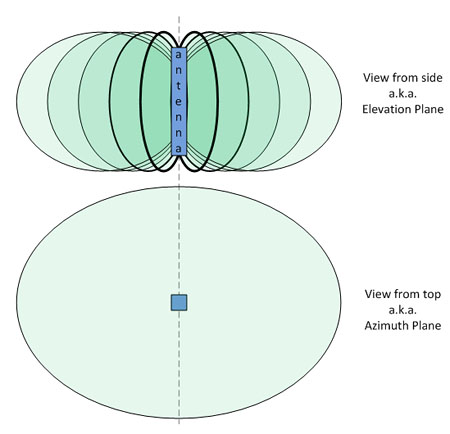
Now some things like metal pipes can cause some bending of the signals as well, so a good practice is to test, make small changes & test again until you find something that works well for you.
As far as the Access Point having low speeds... Well that could be the type &/or setup of the access point. Is it a wired into the router via ethernet cable? Is it connected via WiFi? is it connected using a Powerline Adapter?
Each of those setups have plusses & minuses, but even the best setup will have slower speeds. If your access point is connecting to your router over WiFi & then you are connected to it over WiFi your speeds should be about ½ what you get at best. If you are getting less than that your Access Point may need to be closer to your router or maybe put somewhere where there's less signal interference. & just because the connection is strong doesn't necessarily mean you will have great speeds. There are times when certain objects like cement walls may give you high connectivity on the other side, but slow speeds. I've seen this happen when someone was getting slow speeds even though the router was just on the other side of the wall, but that wall was cement with rebar beams in it.
NOTE: When I clicked the thread it showed no comments for some reason. Seeing the comments I'd still ask how you have the AP connected over WiFi or via Ethernet?



 AdGuardHome No WAN connection after DNS encryption setup.
 RT-BE92U No 802.1Q settings after Firmware Version 3.0.0.6.102_37563