What's new

Restricting Wireguard server client access to the router

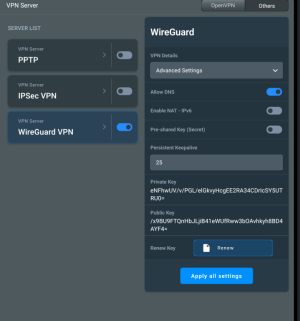
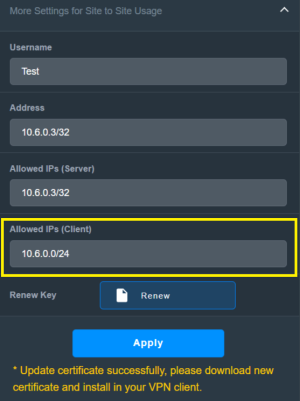
This settings work for me, it prevents access to both gui and ssh over WG:
Screenshot_20260118_174831_Samsung Internet.jpg


But please note that it creates a high priority firewall rule that prevents access to all not listed so you better be sure to add your lan ip /24 so you dont lock yourself out.

if you use ssh, test with that only first and only add the gui after you know it is working as intended, both granted and restricted.
 
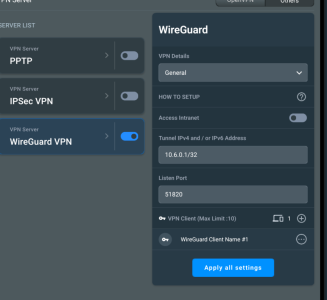
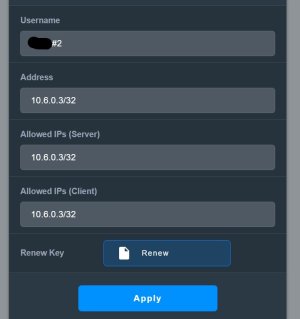
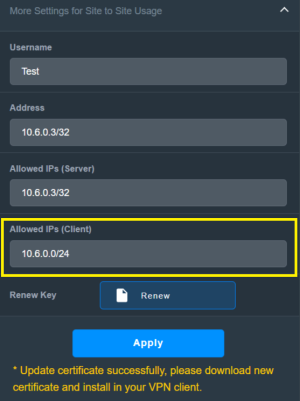
@postoronnim-v, made a correction to my earlier post, had a slight incorrect value in the Allowed IP (client) field. Just retested and this example works. Client can access internet but not access local network clients including the router.

WireguardServer3.png

PS: Edited my prior posts to reflect this example which appears to work correctly..
 
Last edited:
PS: Edited my prior posts to reflect this example which appears to work correctly..
Thanks, I tested it on a local drive. Access was maintained.
This setting will only affect traffic to router itself and only the ports related to gui and/or ssh, nothing else.
This completely solves the problem with accessing the router's web panel and SSH. However, it doesn't solve the problem with the rest of the local network.
 
This completely solves the problem with accessing the router's web panel and SSH. However, it doesn't solve the problem with the rest of the local network.
What do you mean? If access intranet is set to No, WG is not allowed to be forwarded to LAN. Are you saying you can communicate with lan from WG even though access intranet is disabled?
Or are you talking about something else?
 
But there is access to it. Is that how it should be?
How are you testing? When you changed the client entry in the Wireguard Server client section did download the new certificate and import it into the device running the Wireguard client program/software?
 
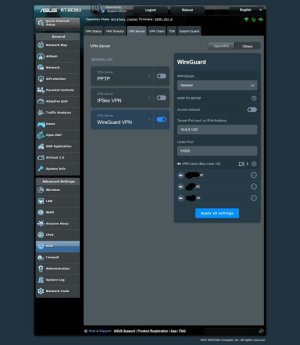
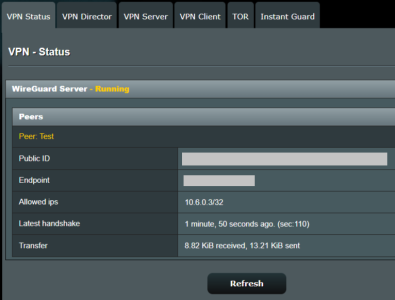
On an Android smartphone with WiFi disabled using Wireguard client app to access the Wireguard server on a RT-AX86U Pro, that Android smartphone cannot access any of the Intranet (local LAN) clients. That smartphone can access internet websites like this one (SNBForums). Cannot ping the router from the smartphone. Cannot access a USB hard drive attached to the router and cannot access a NAS on the local intranet (local network).

VPNServer.png

WireguardServer3.png
 
How are you testing? When you changed the client entry in the Wireguard Server client section did download the new certificate and import it into the device running the Wireguard client program/software?
I created a new client with the specified Allowed IPs settings of 10.6.0.0/24. I installed the certificate on my smartphone. I connected to the router from the smartphone via the mobile network. I then accessed the router's disk using the smartphone's file explorer. I also accessed Transmission, which is installed on the router, through the smartphone's browser. Access to the router's control panel is currently blocked because I made the changes suggested earlier.
 
I created a new client with the specified Allowed IPs settings of 10.6.0.0/24. I installed the certificate on my smartphone. I connected to the router from the smartphone via the mobile network. I then accessed the router's disk using the smartphone's file explorer. I also accessed Transmission, which is installed on the router, through the smartphone's browser. Access to the router's control panel is currently blocked because I made the changes suggested earlier.
Is your smartphone connected by WiFi to the same Asus router running the Wireguard server? If so disable the WiFi on the smartphone so it uses cellular data only.
 
that Android smartphone cannot access any of the Intranet (local LAN) clients.
Ofcource, its not using the tunnel anymore if AllowedIPs (client) is limited to wg subnet. All other data would not use the tunnel at all. Im assuming the OP want internet via his router as that would be the only reason left.


I'm currently accessing the router's hard drive by connecting from my smartphone via WireGuard.
Another resource local to the router itself.

Unfortunately Im not seeing any other way to block this besides adding custom firewall entries, as there are no such options in the Gui.

Would you be up for adding custom firewall stuff on your router via ssh?
 

Similar threads

Latest threads

Support SNBForums w/ Amazon

If you'd like to support SNBForums, just use this link and buy anything on Amazon. Thanks!

Sign Up For SNBForums Daily Digest

Get an update of what's new every day delivered to your mailbox. Sign up here!
Back
Top