What's new

Restricting Wireguard server client access to the router

Yes, if it's not too much trouble for you.
Before we create files for persistance, if you log in over ssh and execute this line
Code:
iptables -D WGSI -i wgs1 -j ACCEPT
It should not give any output if it works.
Then test if all that should work over wg is working and you get the effect you want. Just be careful, any config change on the router will undo this so just do this and then test.

If this gets the job done let me know and we make it stick.

Note: this will prevent any access from wg to the router, so even dns will not work anymore.
 
Ofcource, its not using the tunnel anymore if AllowedIPs (client) is limited to wg subnet. All other data would not use the tunnel at all. Im assuming the OP want internet via his router as that would be the only reason left.
The Wireguard client installed on the smartphone doesn't have an option for Allowed IPs. I assume this option doesn't change anything on the server itself, and is merely informative for the client. In other words, the client can change this option at its own discretion (without consulting the server). But perhaps I'm mistaken.
 
The Wireguard client installed on the smartphone doesn't have an option for Allowed IPs. I assume this option doesn't change anything on the server itself, and is merely informative for the client. In other words, the client can change this option at its own discretion (without consulting the server). But perhaps I'm mistaken.
Hmm, ok. Using non-official apps? And you are right, it wouldnt be secure from user tampering. The AllowedIP at the client is meant to tell the client which destination ip to go over the tunnel and which should not. But there are only a set of AllowedIPs, you cannot prevent an ip. So if you want ALL ips except a specific subnet it would be messy.
 
Using non-official apps?
I'm forced to use the v2rayNG client. It allows me to connect to a proxy VPS server (which allows internet access during cellular operator restrictions—we call them "whitelists"). It's in turn connected to my router, which is in turn connected to another VPS (which has access to the internet). Something like that.
 
A small addition. I currently have domain_vpn_routing installed on my router: https://github.com/Ranger802004/asusmerlin
Will this affect its operation? Is there anything I should check before making changes?
Depends on how it is setup to be used. The only thing that could matter is if you need dns lookup on the router (from wg server connected clients) for it to work.
"Allow DNS" options are disabled.
If this is your intended operation you should be good. We are not affecting any lan operation or any routing stuff.

Try it out with the command. If anything is not working just run the command again but change -D to -A and it will be back to normal
 
The only thing that could matter is if you need dns lookup on the router (from wg server connected clients) for it to work.
There is no need for this yet.
iptables -D WGSI -i wgs1 -j ACCEPT
After running this command, everything worked. Access to the disk was lost, as was access to the Transmission client. How can I make this command run after a reboot? /jffs/scripts/firewall-start ?
 
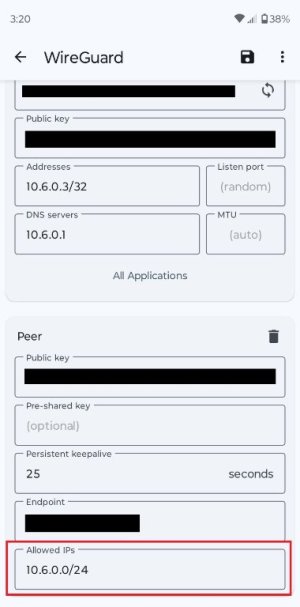
The Wireguard client installed on the smartphone doesn't have an option for Allowed IPs.
The Android Wireguard has an Allowed IP's section.

Screenshot.png
PeerEdit.jpg
 
Ofcource, its not using the tunnel anymore if AllowedIPs (client) is limited to wg subnet. All other data would not use the tunnel at all. Im assuming the OP want internet via his router as that would be the only reason left.
Yep, not having internet traffic through the VPN tunnel to the router's WAN port would be an issue. 😆

The problem appears to be with the Access Intranet option in WireGuard Server. When disabled while Wireguard clients might not be able to access other intranet clients they can still access the router and any USB device attached to the router. At least that's what happens for me on a RT-!X86U Pro.
 
The Android Wireguard has an Allowed IP's section.
That's correct. And you (as the client) have the right to enter whatever you want there. If your smartphone falls into the wrong hands, it will lead to access to your router and other devices on your network. The only difference for me is that instead of a smartphone, I'm forced to use a VPS, which, by default, is in the wrong hands.
 
A small addition. I currently have domain_vpn_routing installed on my router:
Perhaps step back for a second and list out everything you are running on the router. List out all of your VPN Director settings as well. List the specific WireGuard app (its developer) on your smartphone.
 
How can I make this command run after a reboot? /jffs/scripts/firewall-start ?
No, that would not be reliable as the firewall rebuilds itself every now and then and not when wg-server is started.

We would need to do this in wgserver-start

First you need to turn on userscripts in the gui (Administration -> system)

Then edit the file executed when wg server starts
Code:
nano /jffs/scripts/wgserver-start
This will open the nano text editor with a blank docuent.

Paste in
Code:
#!/bin/sh

#remove firewall rule to allow wgs1 access to router:
iptables -D WGSI -i wgs1 -j ACCEPT

#prevent this rule from being re-added:
sed -i '/iptables -A WGSI -i wgs1 -j ACCEPT/d' /etc/wg/fw_wgs1.sh
Save and exit (CTRL+x, y [enter])

Make the file executable:
Code:
chmod +x /jffs/scripts/wgserver-start
do this, then stop and restart your server and verify it is as intended.
Please also go into ssh and run
Code:
cat /etc/wg/fw_wgs1.sh
and make sure the command
Code:
iptables -A WGSI -i wgs1 -j ACCEPT
Is no longer in the list of commands to be reapplied on firewall rebuild.
 
Last edited:
and make sure the command
iptables -A WGSI -i wgs1 -j ACCEPT
Code:
iptables -t nat -A LOCALSRV -p udp --dport 51820 -j ACCEPT
iptables -A WGSI -p udp --dport 51820 -j ACCEPT
ip6tables -A WGSI -p udp --dport 51820 -j ACCEPT
ip6tables -A WGSI -i wgs1 -j ACCEPT
iptables -t mangle -I PREROUTING -i wgs1 -j MARK --or 0x1
iptables -t mangle -I POSTROUTING -o wgs1 -j MARK --or 0x1
ip6tables -t mangle -I PREROUTING -i wgs1 -j MARK --or 0x1
ip6tables -t mangle -I POSTROUTING -o wgs1 -j MARK --or 0x1
My ip6tables entry differs from the expected iptables entry. But access to router resources via the Wireguard server client has been interrupted. Should we leave it as is?
 
My ip6tables entry differs from the expected iptables entry. But access to router resources via the Wireguard server client has been interrupted. Should we leave it as is?
Depends, and up to you. I didnt know you had IPv6 enabled. So, right now the firewall allows IPv6 from Wireguard Server to the router but not IPv4. if you are not using IPv6 over your VPS then it shouldnt matter.

but just for the sake of:
/jffs/scripts/wgserver-start
Code:
#!/bin/sh

#remove firewall rule to allow wgs1 access to router:
iptables -D WGSI -i wgs1 -j ACCEPT
ip6tables -D WGSI -i wgs1 -j ACCEPT

#prevent this rule from being re-added:
sed -i '/iptables -A WGSI -i wgs1 -j ACCEPT/d' /etc/wg/fw_wgs1.sh
sed -i '/ip6tables -A WGSI -i wgs1 -j ACCEPT/d' /etc/wg/fw_wgs1.sh

you can just edit the file with the updates. save and exit. restart the WG server and check again.
 
I didnt know you had IPv6 enabled.
It is disabled by default in the router settings.
restart the WG server and check again.
now everything worked out
Code:
iptables -t nat -A LOCALSRV -p udp --dport 51820 -j ACCEPT
iptables -A WGSI -p udp --dport 51820 -j ACCEPT
ip6tables -A WGSI -p udp --dport 51820 -j ACCEPT
iptables -t mangle -I PREROUTING -i wgs1 -j MARK --or 0x1
iptables -t mangle -I POSTROUTING -o wgs1 -j MARK --or 0x1
ip6tables -t mangle -I PREROUTING -i wgs1 -j MARK --or 0x1
ip6tables -t mangle -I POSTROUTING -o wgs1 -j MARK --or 0x1

And another question: was it possible to make prohibition commands:

Code:
#!/bin/sh
iptables  -I WGSI 1 -i wgs1 -j DROP
ip6tables -I WGSI 1 -i wgs1 -j DROP
 
And another question: was it possible to make prohibition commands:
Sure, but there is really no need. The firewall is built up upon dropping everything last, then on top of it allow whatever should be allowed. now we removed the firewall rule that would allow wgs1 to access the router so this means it will be dropped by the firewall.

any specific reason you would want to add these?

if you would want to looks at the firewall rules for the INPUT chain, filter table, you can just:
Code:
iptables -nvL FORWARD
and to follow into custom chains, for example:
Code:
iptables -nvL WGSI
 
@ZebMcKayhan Could you tell me if there was a risk while accessing the drive connected to the router via the Wireguard server? Entware is installed on the drive. Also, what else should I pay attention to if I have access to the router via the Wireguard server?
 
Could you tell me if there was a risk while acc
I dont do that. There always a risk with whatever you do and this means different things to different people.

what else should I pay attention to if I have access to the router via the Wireguard server?
Not sure I understand what you mean.

With the firewall rule removed, there is basically the same access from WG server to the router that there is from WAN to the router. Run a portscan using for example PingTools for Android to see if any ports are open or responding.

What you should do is test this occationally, especially after a firmware upgrade on the router to make sure access is still blocked.
 
@ZebMcKayhan Please help me out: I decided to try allowing DNS access. I tried making the following changes to wgserver-start
Code:
#!/bin/sh

# Allow DNS (53) from VPN clients to router
iptables  -I WGSI 1 -i wgs1 -p udp --dport 53 -j ACCEPT
iptables  -I WGSI 2 -i wgs1 -p tcp --dport 53 -j ACCEPT

# Allow DNS over TLS (853) from VPN clients to router
iptables  -I WGSI 3 -i wgs1 -p tcp --dport 853 -j ACCEPT

# IPv6
ip6tables -I WGSI 1 -i wgs1 -p udp --dport 53 -j ACCEPT
ip6tables -I WGSI 2 -i wgs1 -p tcp --dport 53 -j ACCEPT
ip6tables -I WGSI 3 -i wgs1 -p tcp --dport 853 -j ACCEPT

# Block all other access from VPN clients to router
iptables  -I WGSI 4 -i wgs1 -j DROP
ip6tables -I WGSI 4 -i wgs1 -j DROP
but it didn't work
Code:
 iptables -L WGSI -v -n --line-numbers
Chain WGSI (1 references)
num   pkts bytes target     prot opt in     out     source               destination
1        3   296 ACCEPT     udp  --  *      *       0.0.0.0/0            0.0.0.0/0            udp dpt:51820
2        0     0 ACCEPT     all  --  wgs1   *       0.0.0.0/0            0.0.0.0/0
then I decided to add these rules to /jffs/scripts/firewall-start
Code:
#!/bin/sh

# Remove autogen full access from wgs1
while iptables -C WGSI -i wgs1 -j ACCEPT 2>/dev/null; do
  iptables -D WGSI -i wgs1 -j ACCEPT
done

# Allow DNS / DoT to router
iptables -I WGSI 1 -i wgs1 -p udp --dport 53  -j ACCEPT
iptables -I WGSI 2 -i wgs1 -p tcp --dport 53  -j ACCEPT
iptables -I WGSI 3 -i wgs1 -p tcp --dport 853 -j ACCEPT

# Drop everything else to router
iptables -I WGSI 4 -i wgs1 -j DROP

logger -t firewall-start "WGSI hardened: DNS only, drop rest"
после перезагрузки роутера вижу:
Code:
SacTUN@RT-BE88U-EB70:/tmp/home/root# iptables -L WGSI -v -n --line-numbers
Chain WGSI (1 references)
num   pkts bytes target     prot opt in     out     source               destination
1        0     0 ACCEPT     udp  --  wgs1   *       0.0.0.0/0            0.0.0.0/0            udp dpt:53
2        0     0 ACCEPT     tcp  --  wgs1   *       0.0.0.0/0            0.0.0.0/0            tcp dpt:53
3        0     0 ACCEPT     tcp  --  wgs1   *       0.0.0.0/0            0.0.0.0/0            tcp dpt:853
4        0     0 DROP       all  --  wgs1   *       0.0.0.0/0            0.0.0.0/0
5        0     0 ACCEPT     udp  --  *      *       0.0.0.0/0            0.0.0.0/0            udp dpt:51820
Did I do it correctly? And how can I check if the client has LAN access (it shouldn't)?
 
then I decided to add these rules to /jffs/scripts/firewall-start
The problem with using firewall-start isthat the firewall is not restarted when wgs1 starts, so your rules may be superseded when wgs1 starts.

The firmware is already prepared to do all this in the wgserver-start hook script, but you need to amend the /etc/wg/fw_wgs1.sh file which is executed on firewall flush events.

Instead, I would do it like this
/jffs/scripts/wgserver-start
Code:
#!/bin/sh

#remove firewall rule to allow wgs1 access to router:
iptables -D WGSI -i wgs1 -j ACCEPT
sed -i '/iptables -A WGSI -i wgs1 -j ACCEPT/d' /etc/wg/fw_wgs1.sh
ip6tables -D WGSI -i wgs1 -j ACCEPT
sed -i '/ip6tables -A WGSI -i wgs1 -j ACCEPT/d' /etc/wg/fw_wgs1.sh

# allow dns
iptables -I WGSI -i wgs1 -p udp --dport 53  -j ACCEPT
echo 'iptables -I WGSI -i wgs1 -p udp --dport 53  -j ACCEPT' >> /etc/wg/fw_wgs1.sh
iptables -I WGSI -i wgs1 -p tcp --dport 53  -j ACCEPT
echo 'iptables -I WGSI -i wgs1 -p tcp --dport 53  -j ACCEPT' >> /etc/wg/fw_wgs1.sh
iptables -I WGSI -i wgs1 -p tcp --dport 853 -j ACCEPT
echo 'iptables -I WGSI -i wgs1 -p tcp --dport 853 -j ACCEPT' >> /etc/wg/fw_wgs1.sh


# Drop everything else to router
iptables -A WGSI -i wgs1 -j DROP
echo 'iptables -A WGSI -i wgs1 -j DROP' >> /etc/wg/fw_wgs1.sh

after restart of the server, check the firewall rules and the content of /etc/wg/fw_wgs1.sh

And how can I check if the client has LAN access (it shouldn't)?
A port scan would tell you what is open or not, for example.

Edit: please note that this chain (INPUT & WGSI) are only for packets to the router itself and will not affect lan access as that goes into FORWARD and WGSF chains. So messing with the INPUT, WGSI rules will not have any effect on lan access, even if you make something wrong.
 
Last edited:

Similar threads

Latest threads

Support SNBForums w/ Amazon

If you'd like to support SNBForums, just use this link and buy anything on Amazon. Thanks!

Sign Up For SNBForums Daily Digest

Get an update of what's new every day delivered to your mailbox. Sign up here!
Back
Top