
Please excuse if I get any terminology incorrect or I have misunderstood what I have read and understood about the VLAN setting up process.
I'd like to check my understanding is correct before going ahead with the order of 1Gb fibre.
I'm currently receiving my internet in the Netherlands via Ziggo who have a cable/coaxial hybrid delivery and my 86U sits behind the ISP's router, which is in bridge mode. Everything works perfectly, though only running a 200/30 connection and I currently have the annoying addition of having to use their modem. I only use 2 ethernet ports on my router, to run a cable to a dumb switch for everything by the TV and another to the dumb switch in the office.
I am considering switching to KPN in a few months and using their 1Gb/1Gb fibre connection, but have been reading that they have multicasting IPTV and that setting up the VLAN is a nightmare on an ASUS router?
I have set up AX88U in my parents house in the UK, which is connected directly to the ISP's (Vodafone) ONT box with a PPOE connection and everything runs perfect on a 400/60 connection. Although there, I have no IPTV to worry about!
In the Netherlands I'd also like to have my 86U connected to the ONT box directly. I would run a Ethernet cable from the ONT box to my living room, where I would connect the 86U via the WAN port. I would then have a specific port for the ISP TV box and use the same 2 ethernet ports that are currently used to run to the 2 dumb switches. Is this possible, or would I need to swap the dumb switches for managed ones, or as I would only have one port for VLAN stuff, I can keep the rest of the network remaining the same and the only thing changing is the assignment of a specific port on the router for the TV box to get the IPTV?
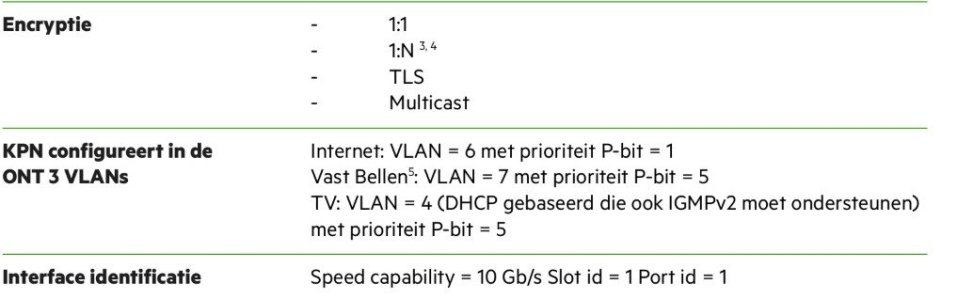
I've found the KPN document for using your own router which has the following spec for their internet protocol, it's in Dutch but I thinks it's understandable what they are needing settings wise?
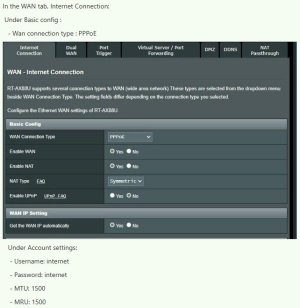
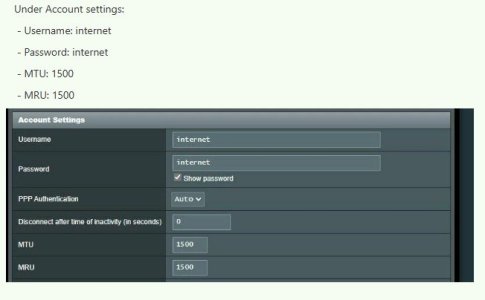
I have also found the following settings in the KPN forum that someone has suggested to use;
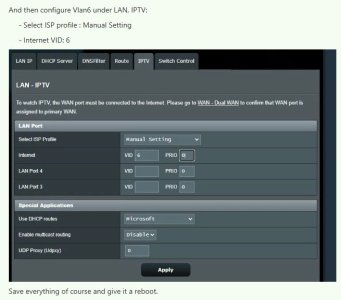
In the IPTV section there is also a drop down choice for KPN Netherlands, but this is surely too simple to be the solution? I would just plug the IPTV TV box into the ethernet LAN4 port?
I have no plans to want to use WIFI for IPTV, as we will connect the TV box via a dedicated port on the router. The above settings however do not specify a specific port for the IPTV connection? My thinking was that I assign it to LAN4 by doing the following if I don't use the KPN (Netherlands) selection from the drop down menu?
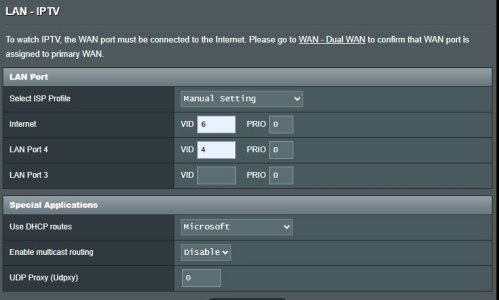
I don't really understand how to add scripts etc, so i'd like to keep it as simple as just changing the information in the router selections if possible?
Does anyone have a similar ASUS router connected directly to their KPN ONT box, that they could share their settings please and which LAN port to use for connecting the TV box?
Hopefully i've explained everything well enough for people to understand the issue that I will face?
Many thanks
David
I'd like to check my understanding is correct before going ahead with the order of 1Gb fibre.
I'm currently receiving my internet in the Netherlands via Ziggo who have a cable/coaxial hybrid delivery and my 86U sits behind the ISP's router, which is in bridge mode. Everything works perfectly, though only running a 200/30 connection and I currently have the annoying addition of having to use their modem. I only use 2 ethernet ports on my router, to run a cable to a dumb switch for everything by the TV and another to the dumb switch in the office.
I am considering switching to KPN in a few months and using their 1Gb/1Gb fibre connection, but have been reading that they have multicasting IPTV and that setting up the VLAN is a nightmare on an ASUS router?
I have set up AX88U in my parents house in the UK, which is connected directly to the ISP's (Vodafone) ONT box with a PPOE connection and everything runs perfect on a 400/60 connection. Although there, I have no IPTV to worry about!
In the Netherlands I'd also like to have my 86U connected to the ONT box directly. I would run a Ethernet cable from the ONT box to my living room, where I would connect the 86U via the WAN port. I would then have a specific port for the ISP TV box and use the same 2 ethernet ports that are currently used to run to the 2 dumb switches. Is this possible, or would I need to swap the dumb switches for managed ones, or as I would only have one port for VLAN stuff, I can keep the rest of the network remaining the same and the only thing changing is the assignment of a specific port on the router for the TV box to get the IPTV?
I've found the KPN document for using your own router which has the following spec for their internet protocol, it's in Dutch but I thinks it's understandable what they are needing settings wise?
I have also found the following settings in the KPN forum that someone has suggested to use;
In the IPTV section there is also a drop down choice for KPN Netherlands, but this is surely too simple to be the solution? I would just plug the IPTV TV box into the ethernet LAN4 port?
I have no plans to want to use WIFI for IPTV, as we will connect the TV box via a dedicated port on the router. The above settings however do not specify a specific port for the IPTV connection? My thinking was that I assign it to LAN4 by doing the following if I don't use the KPN (Netherlands) selection from the drop down menu?
I don't really understand how to add scripts etc, so i'd like to keep it as simple as just changing the information in the router selections if possible?
Does anyone have a similar ASUS router connected directly to their KPN ONT box, that they could share their settings please and which LAN port to use for connecting the TV box?
Hopefully i've explained everything well enough for people to understand the issue that I will face?
Many thanks
David


