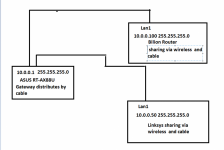
Without knowing how you've got it set up....
Set both of the wireless routers as wired Access Points, without setting IP address within the routers. Then your settings for DHCP, firewall, etc. won't matter on the APs. Use the AX88U to set static IP address for each of the two access points. Any other device connecting to one of the access points either wired or wireless will receive IP via DHCP from the AX88U. Note that if you're going to mannually assign an IP to each of the access points (Lan/DHCP tab, bottom of page.) first make sure you have the DHCP starting and ending pool established and set the two manually assigned IP addresses for the Access Points -outside- of the reserved pool of addresses. eg. if the ip pool ending address is 10.0.0.200, you could make the two 10.0.0.210 and 10.0.0.220. The devices attaching to the APs won't care because they'll pull an IP from the AX88U. And frankly you don't need to assign a static IP to the two AP's either - they'll pull an IP via DHCP as well.
If you're trying to have the two remote routers communicating back to the AX88U wirelessly, then set them up as wireless repeaters.
Either way, what you're doing with DHCP, firewall, etc won't matter. The only time that will come into play is if you're trying to use the two secondary routers to assign their own IP address to the clients, which would put you into double NATed situation. But your second message indicates that isn't what you're trying to set up.
Set them both up as a wired Access Points and your troubles should go away.
edit: thinking this through - I suspect you're manually assigning a static IP for each of the two access point routers and the assigned IPs are -within- the automatic DHCP pool start-stop addresses.



 and unsure of your home language - are you saying that your wired connections to the RT-AX88U are working fine on LAN Port 1 ...whether Billion or Linksys - BUT your Fritzbox and Netgear are not connecting wirelessly to the shared wifi network with the RT-AX88U as the primary router ???