

What's new

RT-BE88U: IPv6 routing fails for LAN clients

@Ripshod Your DNS settings that you shared are for IPv4 DNS over TLS, not related to IPv6 which needs it's own DNS IPv6 Address, this setting @JaneuX posted. It should be Automatic/Enable:
3428.png
 
My phone only got a FE80:xxx which is local ipv6. My router log showed the router got a public ipv6 (2600:xx) and a local ipv6, also the wifi guest network got its own public/local ipv6. For some reason, my phone and computer did not get their own public ipv6 addr connected to this network.
It is my understanding that "Native" means the Router assigns the IP addresses given "/64", meaning the ISP assigns the first part 2600:xxxx:xxxx:xxxx:xxxx

What I suggest is put the complete public IPv6 address as your DNS server address, (onto your PC, phone, all your devices), which is the same as what Automatic Enable that I just posted...
 
This is exactly what I have. My clients gain a IPv6 “2001” but they can’t ping ipv6.google.com

You mean set the ipv6if to „eth“ via ssh, could work?
I haven't used -ssh in a long time. I don't know the answer to that...

I tried to share all the settings I have for IPv6 and IPv4 (just in case). I am afraid I have limited understanding.

What I do know is I tried all sorts of combinations of IPv6 settings. In the end none of them worked.

I then factory reset the router. I turned on IPv6, and selected Native. It seemed to work. (Passthrough seemed to work also but I know from research AT&T is "Native" so I chose that).

I'm confident I tried this combination of settings already. The only thing that is different is now I have an invalid IPv6 DNS server address, but everything works otherwise...
 
Anything new?
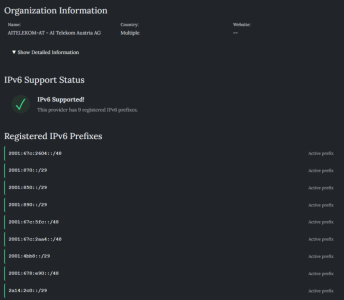
Just found this page to test your ISP. Seems to have automatically detect my ISP correctly and verifies what I already know that it supports IPv6:

 
Just found this page to test your ISP. Seems to have automatically detect my ISP correctly and verifies what I already know that it supports IPv6:

I already knew that my ISP supports ipv6. As I said, I could ping ipv6.google.com from the router and it got an ipv6 address. Just not from local computer.
 
Just found this page to test your ISP. Seems to have automatically detect my ISP correctly and verifies what I already know that it supports IPv6:

My ISP supports IPv6, but I could ping ipv6.google.com from the router and all my clients have an IPv6 adress, but they can not ping ipv6.google.com.
 

Attachments

  • 1774679139103.png
    1774679139103.png
    96 KB · Views: 8
Is it true you use PPPoE? So your setting should be Passthrough? I am worried that 2001 is a tunnel 6in4, 6to4, or 6rd...
 
My ISP supports IPv6, but I could ping ipv6.google.com from the router and all my clients have an IPv6 adress, but they can not ping ipv6.google.com.
Please post the output of these commands run on the router:
Code:
nvram get ipv6_service
ip -6 addr
ip -6 route
And this command run on the Windows device with PowerShell:
Code:
Get-NetRoute -AddressFamily IPv6
In an earlier screenshot, your eth0 device had an IP from the 192.168.1.0/24 subnet, suggesting another router in front of the Asus router. What device is that? How would it be sending IPv6 RAs to the Asus?
 

Latest threads

Support SNBForums w/ Amazon

If you'd like to support SNBForums, just use this link and buy anything on Amazon. Thanks!

Sign Up For SNBForums Daily Digest

Get an update of what's new every day delivered to your mailbox. Sign up here!
Back
Top