What's new
  • SNBForums Code of Conduct

    SNBForums is a community for everyone, no matter what their level of experience.

    Please be tolerant and patient of others, especially newcomers. We are all here to share and learn!

    The rules are simple: Be patient, be nice, be helpful or be gone!

VPNMON VPNMON-R3 v1.8.2 -Nov 23, 2025- Monitor OpenVPN/Wireguard WAN/Dual-WAN Health & Random Reset Multiple Connections (Available in AMTM!) - v1.8.3Beta1

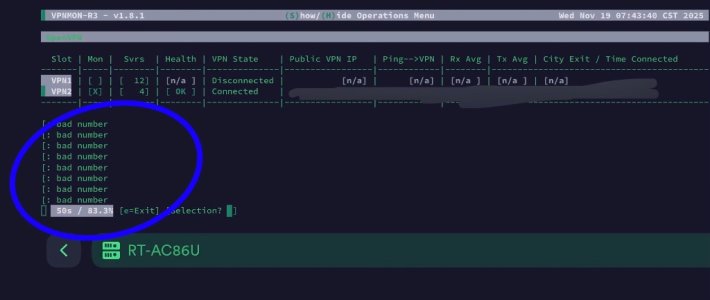
I think everything’s working, but do yall know what this is about? (Running 1.8.1, but it also showed apparently on 1.8.0)

#BadNumber

RT-AC86U
 

Attachments

  • IMG_2851.jpeg
    IMG_2851.jpeg
    74.8 KB · Views: 34
I think everything’s working, but do yall know what this is about? (Running 1.8.1, but it also showed apparently on 1.8.0)

#BadNumber

RT-AC86U
Weird. Could you please send me a screenshot of your settings? Or a copy of your vpnmon-r3.cfg?
 
I think everything’s working, but do yall know what this is about? (Running 1.8.1, but it also showed apparently on 1.8.0)

#BadNumber

RT-AC86U
Friendly follow-up, @JTnola?
 
I think everything’s working, but do yall know what this is about? (Running 1.8.1, but it also showed apparently on 1.8.0)

#BadNumber

RT-AC86U
@JTnola ... I've tried everything I could to duplicate this, but have not been able to.

1763912334311.png


Would you mind turning debug mode on in my script, and capture this error, save the output to a txt file, and send to me please? Here's some instructions:

In the vpnmon-r3.sh script, uncomment the following lines (only the left-most #):

Code:
6961 #DEBUG=; set -x # uncomment/comment to enable/disable debug mode
6962 #{              # uncomment/comment to enable/disable debug mode

8055 #} #2>&1 | tee $LOG | logger -t $(basename $0)[$$]  # uncomment/comment to enable/disable debug mode

Run the script until you see those errors... then kill (CTRL-C) the program and save the output (everything before and after where the error occurs), paste into a text file, and please share with me?

Immensely appreciated... and sorry to make you go through these steps.

Also, seeing a copy of your vpnmon-r3.cfg would also help along with this while you're at it! LOL. Thank you! :)
 
Last edited:
Nevermind, @JTnola ... I *finally* found it. Working on a fix as we speak.
 
Small bugfix patch coming your way! Enjoy! Thanks to @JTnola for reporting this... and glad I was finally able to find this! :)

What's new!?
v1.8.2 - (November 23, 2025)
- PATCH:
Thanks to @JTnola for sharing a "[: bad number" bug he was experiencing. This hard-to-find bug only seemed to come up in certain scenarios when using the limited 2-OVPN slot configuration. Variables weren't being assigned that the script was expecting, causing these errors. Fixed! :)

Download link (Or update directly with AMTM/VPNMON-R3):
Code:
curl --retry 3 "https://raw.githubusercontent.com/ViktorJp/VPNMON-R3/main/vpnmon-r3.sh" -o "/jffs/scripts/vpnmon-r3.sh" && chmod 755 "/jffs/scripts/vpnmon-r3.sh"

Significant Screenshots:

This was what @JTnola was experiencing:
1763913940179.png


And showing the fix :)
1763914075560.png
 
@JTnola ... I've tried everything I could to duplicate this, but have not been able to.

View attachment 69142

Would you mind turning debug mode on in my script, and capture this error, save the output to a txt file, and send to me please? Here's some instructions:

In the vpnmon-r3.sh script, uncomment the following lines (only the left-most #):

Code:
6961 #DEBUG=; set -x # uncomment/comment to enable/disable debug mode
6962 #{              # uncomment/comment to enable/disable debug mode

8055 #} #2>&1 | tee $LOG | logger -t $(basename $0)[$$]  # uncomment/comment to enable/disable debug mode

Run the script until you see those errors... then kill (CTRL-C) the program and save the output (everything before and after where the error occurs), paste into a text file, and please share with me?

Immensely appreciated... and sorry to make you go through these steps.

Also, seeing a copy of your vpnmon-r3.cfg would also help along with this while you're at it! LOL. Thank you! :)
Sorry just seeing these now
Glad you figured it out
Sorry I left you high and dry, so it was more difficult than need be
You’re the best — no matter what anybody says!! lol
 
Sorry just seeing these now
Glad you figured it out
Sorry I left you high and dry, so it was more difficult than need be
You’re the best — no matter what anybody says!! lol
Glad to help... continuous improvements! :)
 
Have you tried using the Recovery Timeout Opportunities? I've set mine to 3 and that has really helped stability of the connection, instead of having it reset after 1 failed response.

I'm only getting emails nightly now after it goes through it's scheduled reset. Email rate limiting is also an option now if you find it too spammy. ;)
One feature of VPMON I am finding very useful is restarting my WG clients in the middle of the night. My experience with StrongVPN WG clients is after a few days the download speeds would drop from 600+Mbps to as low as 150 Mbps. This was consistent for three clients connecting to servers at distances between 200 miles - 4,500 miles. Stopping and then restarting the clients restores the download speeds.

Thanks again Viktor.
 
@Viktor Jaep
OVPN, loading in the list using the API method, keep getting "Error State", and it's trying to continuously reconnect.
Probably hard to diagnose, but what's usually the culprit with this? Would a reinstall do anything?
 
@Viktor Jaep
OVPN, loading in the list using the API method, keep getting "Error State", and it's trying to continuously reconnect.
Probably hard to diagnose, but what's usually the culprit with this? Would a reinstall do anything?
Reinstall probably won't do anything. Anything change with the command or your VPN provider? Does the curl command work on its own? Mind posting it?
 
Reinstall probably won't do anything. Anything change with the command or your VPN provider? Does the curl command work on its own? Mind posting it?
Only thing that has changed is the update to 1.8.2

Code:
curl --silent --retry 3 --connect-timeout 3 --max-time 6 --retry-delay 1 --retry-all-errors https://airvpn.org/api/status/ | jq --raw-output '.servers[] | select(.country_name=="Netherlands") | .ip_v4_in1, .ip_v4_in2, .ip_v4_in3, .ip_v4_in4'
And yes, by itself it returns the IP's
 
Only thing that has changed is the update to 1.8.2

Code:
curl --silent --retry 3 --connect-timeout 3 --max-time 6 --retry-delay 1 --retry-all-errors https://airvpn.org/api/status/ | jq --raw-output '.servers[] | select(.country_name=="Netherlands") | .ip_v4_in1, .ip_v4_in2, .ip_v4_in3, .ip_v4_in4'
And yes, by itself it returns the IP's
I just pasted it into my v1.8.2 VPNMON-R3 and it seemed to run just fine?

1764621229575.png


Perhaps a reboot is in order? ;)
 
Thanks mate, I've tried both soft and hard reboots. I'll try and reinstall and see what else I can do
 
Thanks mate, I've tried both soft and hard reboots. I'll try and reinstall and see what else I can do
Is there anything else in the syslog showing any errors when running the curl command when it gives this error? Could you show a screenshot of what you're seeing? There have been no changes to the way this all works for many releases at this point.
 
@machinist ... What happens if you paste that curl statement into an empty slot and run it?
 
What's new!?
v1.8.2 - (November 23, 2025)
- PATCH:
Thanks to @JTnola for sharing a "[: bad number" bug he was experiencing. This hard-to-find bug only seemed to come up in certain scenarios when using the limited 2-OVPN slot configuration. Variables weren't being assigned that the script was expecting, causing these errors. Fixed! :)
Good catch!
From what I understood, was this going to happen with me when I install VPNMON tonight? I have RT-AC68U and it has a 2 OpenVPN clients limitation and no WireGuard clients at all.
Do you think this bug has been appearing for all routers with limited VPN slots?
 
Good catch!
From what I understood, was this going to happen with me when I install VPNMON tonight? I have RT-AC68U and it has a 2 OpenVPN clients limitation and no WireGuard clients at all.
Do you think this bug has been appearing for all routers with limited VPN slots?
You probably would have seen that. This was more of a display bug than anything where it wasn't handling some unassigned variables nicely. And yes, I believe all 2-slot routers would have seen that, just that nobody reported it until now.
 
Daym, that would have been my first annoying bug report if I had been able to install VPNMON earlier 😂
Appreciate your efforts, especially catching that error without further troubleshooting from users, and really appreciate your care for users feedback!
You're one of the best! 👊
 
@Viktor Jaep Think I got it. I rebuilt the OVPN config files and uploaded, and now it connects. Thanks for the quick replies
 

Similar threads

Latest threads

Support SNBForums w/ Amazon

If you'd like to support SNBForums, just use this link and buy anything on Amazon. Thanks!

Sign Up For SNBForums Daily Digest

Get an update of what's new every day delivered to your mailbox. Sign up here!
Back
Top