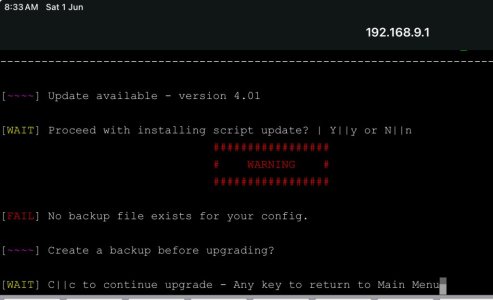
I really like this useful tool. It can automatically notify me about changes in the router's status, allowing me to check my email on my phone without having to log in to the router. Recently, I upgraded to version 4.0 and reinstalled it. I encountered the following error message when trying to use the backup function. Is this expected behavior?
I really like this useful tool. It can automatically notify me about changes in the router's status, allowing me to check my email on my phone without having to log in to the router. Recently, I upgraded to version 4.0 and reinstalled it. I encountered the following error message when trying to use the backup function. Is this expected behavior?
If you're using amtm email settings this is expected, it doesn't back up your amtm email settings, the script dynamically syncs with amtm everytime its run
edit: to clarify the script will only backup passwords saved by configuring email settings in wicens (not amtm import). All saved passwords are removed (aside from backups) when amtm import is enabled and the script does not backup your amtm email settings. Ive changed the wording around this in the backup for the next release.
4.01 out to correct multiple notifications on reboot and some appearance
Code:
## 4.01
* CHANGED: prevent cron execution if router up less than 10 mins
* CHANGED: F_getrealip don't sleep if grabbing WAN IP for the first time
* CHANGED: misc wording for when new fw version found and password backup (not backed up when amtm enabled)
The backup instructions for the new version are very easy to understand.
Additionally, I want to commend your script for being one of the few that displays the change log during the installation process. This thoughtful design saves users the time and effort of independently searching to understand the differences in the new version. Thank you!
4.01 out to correct multiple notifications on reboot and some appearance
Code:
## 4.01
* CHANGED: prevent cron execution if router up less than 10 mins
* CHANGED: F_getrealip don't sleep if grabbing WAN IP for the first time
* CHANGED: misc wording for when new fw version found and password backup (not backed up when amtm enabled)
Just a minor point the version is still showing 4.00 after the 4.01 update?
Another minor comment is it’s a bit confusing where it says “create a backup before upgrading?”, there’s no (y or n) prompt and even if I try answer (n) it doesn’t continue, I can only answer (c) continue. I did not try y.
The backup instructions for the new version are very easy to understand.
Additionally, I want to commend your script for being one of the few that displays the change log during the installation process. This thoughtful design saves users the time and effort of independently searching to understand the differences in the new version. Thank you!
Another minor comment is it’s a bit confusing where it says “create a backup before upgrading?”, there’s no (y or n) prompt and even if I try answer (n) it doesn’t continue, I can only answer (c) continue. I did not try y.
I've changed the wording around this for the next one, its meant to read as a warning to back out and create a backup from the main menu, not from within the script update menu
Got an email tonight saying
Script ran with option : reboot
But.. I wasn't logged in to run any script, and an unsure of why there would be an unexpected reboot..
It looks like this script will accomplish a very specific task I need with a little bit of help from a custom script that it can call. I've searched the forum and the Wiki for something along the lines of "change WAN DNS servers via bash or command line" but can't find anything.
I originally posted about this scenario in this thread, and Viktor was kind enough to point me here.
I use NordVPN's SmartDNS servers so that I can bypass geo-restrictions for streaming content. When my WAN IP changes, Nord's SmartDNS servers will no longer respond to DNS queries. Does anyone know how to change the WAN DNS servers via a bash script instead of going to this page on the GUI?
#!/bin/sh

# Replace with your desired DNS servers
DNS1="8.8.8.8"
DNS2="8.8.4.4"

# Apply the DNS settings
nvram set wan0_dns="$DNS1 $DNS2"
nvram set wan0_dns1="$DNS1"
nvram set wan0_dns2="$DNS2"
nvram commit

# Restart the WAN interface to apply changes
service restart_wan
But I think it was wrong about some of those nvram settings because when I used it it caused a lot of problems.
EDIT: I think this might be it:
Bash:
#!/bin/sh

# Replace with your desired DNS servers
DNS1="9.9.9.11"
DNS2="149.112.112.11"

# Apply the DNS settings
nvram set wan0_dns="$DNS1 $DNS2"
nvram set wan0_dns1_x="$DNS1"
nvram set wan0_dns2_x="$DNS2"
nvram set wan_dns="$DNS1 $DNS2"
nvram set wan_dns1_x="$DNS1"
nvram set wan_dns2_x="$DNS2"
nvram commit

# Restart the WAN interface to apply changes
service restart_wan
I used nvram show | grep dns to find the correct values.
## 4.03
Jan 8 2025
* CHANGED: added device_name to Email subject lines
Code:
## 4.04
January 22 2025
* ADDED: crlf conversion for Email text file @molejado(GitHub)
* CHANGED: example email instructions option fe
* FIXED: removal of reboot uptime temp file
* CHANGED: wording on non-existent backup file during script upgrade @jksmurf
I have a GT-AX6000 and it has the latest Merlin fw installed. Set after factory reset. I installed the wicens script. After restarting the router, I receive e-mail notifications during the day about the change of the IP address, but the IP address is still the same since the restart. It's like sending an email from the morning on repeat. I have the latest version of the wicens script. Can anyone advise what I can try?
I have a GT-AX6000 and it has the latest Merlin fw installed. Set after factory reset. I installed the wicens script. After restarting the router, I receive e-mail notifications during the day about the change of the IP address, but the IP address is still the same since the restart. It's like sending an email from the morning on repeat. I have the latest version of the wicens script. Can anyone advise what I can try?
Can you PM me your entire syslog, or post the output of grep -E 'wicens' /jffs/syslog* and redact/edit your WAN IP? Also please check the bottom of the received Emails and tell me what 'Script ran with option:' is outputting
## 4.10
Feb 3 2025
* ADDED: reboot notification has down time between power loss-reboot *approx
* ADDED: logging to independent file in wicens directory (maxsize: 200KB) option z
* ADDED: check custom script file exists w/cron (if missing we spam log with cron)
* ADDED: Email test can now send wanip/firmware update/reboot Email messages
* FIXED: script lock remove stale without relying on same call type running again
* FIXED: status display of multiline custom email text
* FIXED: ehlo in curl RFC 5321
* FIXED: F_internet_ping cycles (15 total attempts)
* FIXED: HTML structure in Emails
* FIXED: misc minor bug fixes
* CHANGED: check for dual wan on wanip change enable
* CHANGED: lock_age_max to 3mins (internet up)
* CHANGED: misc tweaks(hidden options/log time) and wording
* CHANGED: amtm style terminal exit (logo only)
## 4.10
Feb 3 2025
* ADDED: reboot notification has down time between power loss-reboot *approx
* ADDED: logging to independent file in wicens directory (maxsize: 200KB) option z
* ADDED: check custom script file exists w/cron (if missing we spam log with cron)
* ADDED: Email test can now send wanip/firmware update/reboot Email messages
* FIXED: script lock remove stale without relying on same call type running again
* FIXED: status display of multiline custom email text
* FIXED: ehlo in curl RFC 5321
* FIXED: F_internet_ping cycles (15 total attempts)
* FIXED: HTML structure in Emails
* FIXED: misc minor bug fixes
* CHANGED: check for dual wan on wanip change enable
* CHANGED: lock_age_max to 3mins (internet up)
* CHANGED: misc tweaks(hidden options/log time) and wording
* CHANGED: amtm style terminal exit (logo only)