passwordless is working fine per that post. Your scripts are set-up to use the default port 22.
I do not run on the default port for ssh access. Just looking to see if it could be a configuration option.
Just some prelim feedback: the side by side on the iPad is a bit truncated at the RHS of each screen, it’s like there’s a min window width defined and then when the screens are put into that screen-width-challenged environment it just chops off the RHS but without any scrolling.
Just some prelim feedback: the side by side on the iPad is a bit truncated at the RHS of each screen, it’s like there’s a min window width defined and then when the screens are put into that screen-width-challenged environment it just chops off the RHS but without any scrolling.
While I use YazDHCP because it’s awesome for subnets which Stock doesn’t do** , under the LAN, DHCP menu, in that menu you can define the hostnames which appear in your magic screens.
** in models with GNP, stock does allow, per defined guest network, up to 32 manually assigned IPs, where I believe you can also input hostnames. My experience however is that the 32 is not an absolute and may be constrained by the router memory. I only got 21 when I was testing it.
There is another option to define these hostnames, using manually asssigned IPs vs MAC (with hostnames) in the dnsmasq-x.conf.add files in /jffs/configs where -x is your GNP subnet 1 , 2 etc.
Just to provide some other options for "Purty Hostnames"
Looks very nice. What are hardware/firmware requirements? I have nothing to test it on currently, but will definitely take a look when I get closer to my ASUS routers.
The temperature is shown in deg F but I’m on deg C in my router? [EDIT] Actually applies to the date too I guess, 03/12 vs 12/03 on my machine.
I think just (20), (80) etc would be cleaner and neater rather than (20M) (80M) i.e. Units probably not needed here. Less clutter. If you really want, put the M (for MHz) in the header but I don't think it is needed, see next comment for why..
Similarly for Rx/Tx; Asus' own Network Map e.g. just shows a number for Rx/Tx, they don't even attempt to put units in the headers, so by now I think we all know what the units are (or can look it up). Less clutter.
These next few notes refer to the number of lines at the top of the report, which seems a wee bit top-heavy and takes away 'screen-estate' from the tables.
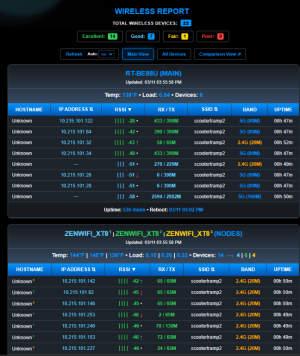
I think a single line WIRELESS REPORT: TOTAL DEVICES 19 would work better at the top, less clutter as there's 4 lines before you get to the table, then another 3 lines above each table. The Refresh and View selections need to stay at the top though.
I think the legend (Excellent, Good, Fair etc) would be better right at the bottom, under all the tables. Less clutter IMO. I am not sure it is even needed TBH, it is almost self-explanatory and comes up beautifully in each table.
I think a single line RT_AX88U_PRO (MAIN): DEVICES 8 would allow you to put Temp and Load at the bottom of each table and do away with that 3rd line at the header of each table. Maybe consider putting "Updated: 03/12 08:51:27 AM" right-justified on the same line. Then each table has one clean header line.
Would you allow a (different) time (and what is the default please, seems to be 30mins?) for the blinking blue up time being reported? So many little easter eggs in this thing, it's fantastic.
One thing that makes it a bit difficult to guess is, if you have two or more of the same node model, which ones is which. So far, @scootertramp has the high score with three identical XT8s. You can of course see which node is which by checking the devices attached to it and while the AiMesh menu has the same Model Details, it also has which room it is in. That room text would be too long, but if there was some way of having (say) a Max 5 letter suffix for each of Main, Node 1, Node 2, Node 3 e.g. MB for Main Bedroom and ANX for ANX then it would look like RT-AX86U_Pro1 (MB) | RT-AX86U_Pro2 (ANX) | RT-AX58U3 (NODES) then it would be clearer. Or in @scootertramp's case ZENWIFI_XT8 (Huey) | ZENWIFI_XT8 (Dewey) | ZENWIFI_XT8 (Louie)...
Again, when it comes to presentation, a lot is personal preference, but you asked for feedback .
I have a rather unusual edge case. I had an older AX58U as an AiMesh node. I removed it from the system. I added a spare AX86U in it's place.
I have 3 nodes - none of them AX58U's.
I did plug the AX58U in recently as a Media Bridge. More to play around with PiHole.
I went through the steps to allow password less login to the other 3, real nodes.
When I went to install, it said the AX58U would not allow password less login (even though it is not an AiMesh Node).
Sure enough nvram get cfg_device_list shows the AX58U...Again, it's not an AiMesh node - it's a Media Bridge.
For now I just set it up with password less login and the install went fine.
Begs the question - what nvram variable has the addresses of the actual nodes?
Also, could you include the IP address or hostnames of the nodes somehow in the upper display? I have 2 AX86U's as nodes and cant tell which is which ;-)
Another edge case here. Passwordless login works on 3 of my 4 AiMesh nodes. The fourth (ZenWiFI BQ16 Pro with Asus stock firmware (no Merlin support)) fails, causing the installation to fail:
Code:
==================================================
              WIRELESS REPORT AIMESH
==================================================
 STATUS: [Ready] Latest available is v1.0.4
==================================================

  (1)  Install Wireless Report
  (2)  Uninstall Wireless Report
  (3)  Check/Update Latest Script
  (e)  Exit

==================================================
 Selection: 3
[!] Wireless Report is not installed.
 Would you like to install it now? (y/n): y
[*] Checking for USB Storage...
[+] USB Found: Using /tmp/mnt/TheS1RsUSB/gen_report for history.
[*] Verifying Passwordless SSH Environment...
[*] Testing Passwordless SSH to Node (192.168.222.254) on port xxxxx... AUTHENTICATED
[*] Testing Passwordless SSH to Node (192.168.222.253) on port xxxxx... AUTHENTICATED
[*] Testing Passwordless SSH to Node (192.168.222.250) on port xxxxx... AUTHENTICATED
[*] Testing Passwordless SSH to Node (192.168.222.252) on port xxxxx... FAILED
[!] Please setup passwordless SSH Keys on your nodes and try again.
I find if I keep the bind on, some devices don't like it, and they start greying themselves out in Asus device list, weird i know, so the way I've done it works for me.