JB_1366
Regular Contributor
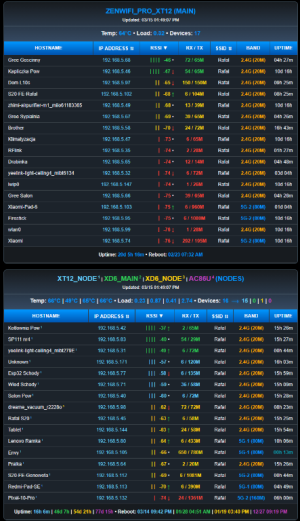
And v1.1.0 apparently adds hostnames for AiMesh nodes without the need for YazDHCP! Awesome work, @JB_1366!
View attachment 70729
v1.1.0-fix hostnames for non-yazzies
And v1.1.0 apparently adds hostnames for AiMesh nodes without the need for YazDHCP! Awesome work, @JB_1366!
View attachment 70729
fixedI uninstalled the older version. Then, reinstalled v1.1.0.
The install correctly did NOT include that non-node AX58u.
I am not seeing any node information after the main router screen. In fact, scrolling just shows the main routers information again (although the devices are in a different order. On the main router first screen, I can toggle between IP and MAC. On the repeated next screen it won't toggle.
[*] Checking for USB Storage...
[!] No USB detected: Using JFFS at /jffs/addons/wireless_report/data.
[*] Verifying Passwordless SSH Environment...
[*] Testing Passwordless SSH to ZenWiFi_Pro_XT12 (192.168.5.10) on port 22... AUTHENTICATED
[*] Testing Passwordless SSH to ZenWiFi_XD6 (192.168.5.12) on port 22... AUTHENTICATED
[*] Processing Wireless Report Files...
Rafal@XT12:/tmp/home/root# nvram get asus_device_list
<3>ZenWiFi_Pro_XT12>192.168.5.1>04:42:1A:C7:41:40>0>Rafal>255.255.255.0>1<3>ZenWiFi_Pro_XT12>192.168.5.10>04:42:1A:C7:37:A0>0>Rafal>255.255.255.0>2<3>ZenWiFi_XD6>192.168.5.13>58:11:22:54:DC:30>00>3<3>RT-AC86U>192.168.5.9>B0:6E:BF:62:6F:30>0>Rafal>255.255.255.0>3<3>ZenWiFi_XD6>192.168.5.12>58:11:22:54:DC:20>0>Rafal>255.255.255.0>2
Rafal@XT12:/tmp/home/root# nvram get asus_device_list | sed 's/</\n/g' | sort -t . -k 4,4n
3>ZenWiFi_Pro_XT12>192.168.5.1>04:42:1A:C7:41:40>0>Rafal>255.255.255.0>1
3>RT-AC86U>192.168.5.9>B0:6E:BF:62:6F:30>0>Rafal>255.255.255.0>3
3>ZenWiFi_Pro_XT12>192.168.5.10>04:42:1A:C7:37:A0>0>Rafal>255.255.255.0>2
3>ZenWiFi_XD6>192.168.5.12>58:11:22:54:DC:20>0>Rafal>255.255.255.0>2
3>ZenWiFi_XD6>192.168.5.13>58:11:22:54:DC:30>0>Rafal>255.255.255.0>3
Rafal@XT12:/tmp/home/root# nvram get asus_device_list | sed 's/</\n/g' | grep '>2$' | awk -F '>' '{print $2 "|" $3}' | sort -t . -k 4,4n
ZenWiFi_Pro_XT12|192.168.5.10
ZenWiFi_XD6|192.168.5.12
fixedI’m seeing some but still not seeing results for all active interfaces on my various routers/nodes in either network. I think the reference @Martinski gave you should have a master list (or better a function, which generates one for non-unique models) but FYI here are mine, for my limited set.
[EDIT]Maybe something like this from here, which covers non-unique models he refers to ?
https://github.com/AMTM-OSR/scMerlin/blob/master/scmerlin.sh#L154-L162
Non-unique?
Code:##-------------------------------------## ## Added by Martinski W. [2025-Feb-15] ## ##-------------------------------------## GetWiFiVirtualInterfaceName() { if [ $# -eq 0 ] || [ -z "$1" ] ; then echo "" ; return 1 ; fi nvram show 2>/dev/null | grep -E -m1 "^wl[0-3]_ifname=${1}" | cut -d'_' -f1 }
Unique Models?
Code:if [ "$ROUTER_MODEL" = "XT12" ] || \ [ "$ROUTER_MODEL" = "GT-BE98" ] || \ [ "$ROUTER_MODEL" = "GT-AX11000" ] || \ [ "$ROUTER_MODEL" = "GT-AXE16000" ] || \ [ "$ROUTER_MODEL" = "GT-AX11000_PRO" ] then Band_5G_2_Support=true fi if [ "$ROUTER_MODEL" = "GT-BE98" ] || \ [ "$ROUTER_MODEL" = "RT-BE92U" ] || \ [ "$ROUTER_MODEL" = "RT-BE96U" ] || \ [ "$ROUTER_MODEL" = "GT-BE98_PRO" ] || \ [ "$ROUTER_MODEL" = "GT-AXE16000" ] || \ [ "$ROUTER_MODEL" = "GT-AXE11000" ]
View attachment 70726View attachment 70727View attachment 70728

| Thread starter | Title | Forum | Replies | Date |
|---|---|---|---|---|
| R | Diversion Which IP is Diversion using in my AIMesh system? | Asuswrt-Merlin AddOns | 4 | |
| E | Script That Would Reboot AImesh Units via Cron? | Asuswrt-Merlin AddOns | 1 |
We use essential cookies to make this site work, and optional cookies to enhance your experience.