Could it be that SoFluffy pulled the rabbit out of the hat …OK, I can't explain why, but tried again after walking away for some hours, with no other changes, and it just worked. If I discover a reason why, I'll share. Thanks!
Since you are working on decorative items have you any thoughts on adding current version running?
Since you are working on decorative items have you any thoughts on adding current version running?![]()
Sweet..........v1.1.8-added version#
I 2nd that emoticon … i do use the history function in amtm but sometimes I also have to go find, copy and paste the long curl …I have another small request. Any chance you could locate the wr_install.sh script or have something with similar
functionally in a location that is not wiped out by a reboot. It would be nice to not have to find the curl command
to re-download you script just to upgrade.![]()
![]()
run below in ssh, now it will always be in /jffs/addons/wireless_report/wr_install.sh, even after reboot.I 2nd that emoticon … i do use the history function in amtm but sometimes I also have to go find, copy and paste the long curl …
cp /tmp/wr_install.sh /jffs/addons/wireless_report
run below in ssh, now it will always be in /jffs/addons/wireless_report/wr_install.sh, even after reboot.
Code:cp /tmp/wr_install.sh /jffs/addons/wireless_report
alias wr_install="sh /jffs/addons/wireless_report/wr_install.sh" # Allows Wireless Report install script to be run from anywhere, including root.
source /jffs/configs/profile.add
I use up/down-arrow, shell-history, easier.Great, thank you. So I just need to append this line to the profile.add file in the /jffs/configs/ dir and I can run it from anywhere. I personally use WinSCP to edit the profile.add file.
Code:alias wr_install="sh /jffs/addons/wireless_report/wr_install.sh # Allows Wireless Report install script to be run from anywhere, including root.
With that I can re-run wr_install (without the .sh) from root i.e. as soon as I get in via ssh. Cool.
I do too.. when it works…I use up/down-arrow, shell-history, easier.
www.snbforums.com
Looking for feedback
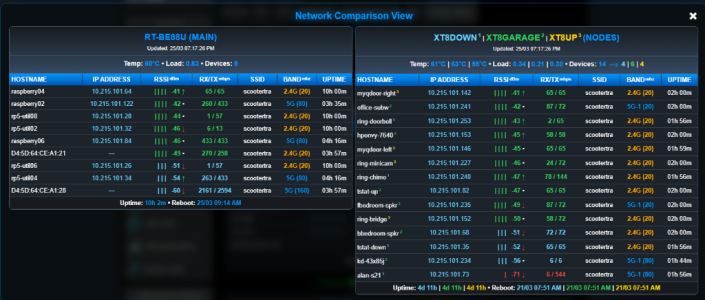
@jksmurfTHIS: RT-AX86U_Pro | RT-AX86U_Pro | RT-AX58U (NODES) (note that the raised 1, 2, 3 node numbering is not shown here for convenience only)
- Allow Node Router Name Suffixes e.g. MB, ANX, Kitchen to differentiate between similar Node Models i.e.
becomes
THIS: RT-AX86U_Pro (MB) | RT-AX86U_Pro (ANX) | RT-AX58U (Kitchen) (NODES)
agagne@rt-be88u:/jffs/addons/wireless_report# diff webui.conf webui.conf.bak
--- webui.conf
+++ webui.conf.bak
@@ -1,4 +1,4 @@
INSTALLED_PAGE=user9.asp
REPORT_UNIT=C
SSH_PORT=1220
-SSH_NODES=" XT8DOWN|10.215.101.54 XT8GARAGE|10.215.101.69 XT8UP|10.215.101.95"
+SSH_NODES=" ZenWiFi_XT8|10.215.101.54 ZenWiFi_XT8|10.215.101.69 ZenWiFi_XT8|10.215.101.95"
Thanks for that, appreciated.This is only temporary but it seems to work for this. Edit the webui.conf and adjust the names you prefer.
It would be nice to have this as a configuration option. I have not noticed any issues running with this change.
fmt_time() {
T=$1; [ -z "$T" ] || ! echo "$T" | grep -qE '^[0-9]+$' && echo "<span data-sort='0'>---</span>" && return
local pulse=""; [ "$T" -lt 1800 ] && pulse="pulse-blue"
| Thread starter | Title | Forum | Replies | Date |
|---|---|---|---|---|
| R | Diversion Which IP is Diversion using in my AIMesh system? | Asuswrt-Merlin AddOns | 4 | |
| E | Script That Would Reboot AImesh Units via Cron? | Asuswrt-Merlin AddOns | 1 |
We use essential cookies to make this site work, and optional cookies to enhance your experience.