What's new

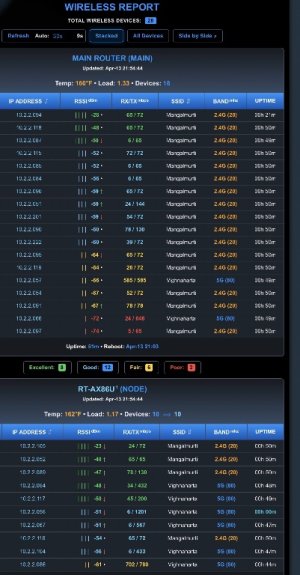
Wireless Report v1.4.7 [2026-Apr-15] - WebGUI Table of all connected Client Devices showing RSSI (available in AMTM!)

v1.4.3-minor changes to router detection.
 
v1.4.3-minor changes to router detection.
Thanks @JB_1366 for quick turnaround with new scripts - latest snapshot after second beta script works perfectly fine
 

Attachments

  • IMG_2106.jpeg
    IMG_2106.jpeg
    127.5 KB · Views: 22
Hi there, tried installing this but got Error: Download failed

Code:
==================================================
              WIRELESS REPORT AIMESH             
==================================================
 STATUS: [Offline] Could not reach GitHub
==================================================

  (1)  Install/Update Wireless Report
  (2)  Uninstall Wireless Report
  (3)  Temperature Unit: °F(def) or °C
  (4)  Set Router/Node Nicknames
  (e)  Exit

==================================================
 Selection: 1
[*] Checking for Storage...
[+] USB Found: Using /tmp/mnt/USB_120GB/wirelessreport for reports and history.
[*] Verifying Passwordless SSH Environment...
[*] Testing Passwordless SSH to RT-AX86S (192.168.1.37) on port 60001... AUTHENTICATED
[*] Processing Wireless Report Files...
[!] ERROR: Download failed.

Press [Enter] to return...
 
Hi there, tried installing this but got Error: Download failed

Code:
==================================================
              WIRELESS REPORT AIMESH           
==================================================
 STATUS: [Offline] Could not reach GitHub
==================================================

  (1)  Install/Update Wireless Report
  (2)  Uninstall Wireless Report
  (3)  Temperature Unit: °F(def) or °C
  (4)  Set Router/Node Nicknames
  (e)  Exit

==================================================
 Selection: 1
[*] Checking for Storage...
[+] USB Found: Using /tmp/mnt/USB_120GB/wirelessreport for reports and history.
[*] Verifying Passwordless SSH Environment...
[*] Testing Passwordless SSH to RT-AX86S (192.168.1.37) on port 60001... AUTHENTICATED
[*] Processing Wireless Report Files...
[!] ERROR: Download failed.

Press [Enter] to return...
"STATUS: [Offline] Could not reach GitHub" how did you install this, through AMTM or manually using curl? did you try quitting and trying more than once?
 
"STATUS: [Offline] Could not reach GitHub" how did you install this, through AMTM or manually using curl? did you try quitting and trying more than once?
I used the 'wr' option in amtm. Tried several times.
OH - and, of course, I just tried it again and it installed straight away.
Thanks.
 
I'm not sure which of the recent updates may have changed this, but one of my devices now shows "Wireless" rather than the connection SSID on MAIN. Another device on NODE connected to the same SSID is displayed properly.

It was previously working correctly. I just checked for updates and I'm using WR v1.4.4.
 
v1.4.5-enhanced router detection, added right-click sorting of node-hostnames, sorts numerically by node device (ex. 1-3, 3-1).
 
Last edited:
BE92U here, I click install and the page just refreshes, it doesn't install. I can sit hitting 1 all night and the same :(
 
BE92U here, I click install and the page just refreshes, it doesn't install. I can sit hitting 1 all night and the same :(
I had the same, I discovered the -connect-timeout params to the curl command were too short.
I edited the wireless_report.sh script and changed them all from 3 to 30 and it worked.

This has happened on other scripts as well, I don't know if I have a problem with my router connecting to curl, but it seems to be a recurrent problem for me.
 
I had the same, I discovered the -connect-timeout params to the curl command were too short.
I edited the wireless_report.sh script and changed them all from 3 to 30 and it worked.

This has happened on other scripts as well, I don't know if I have a problem with my router connecting to curl, but it seems to be a recurrent problem for me.
I'll try that, can you tell me where said file is please?
 
edited the wireless_report.sh script and changed them all from 3 to 30 and it worked.

This has happened on other scripts as well, I don't know if I have a problem with my router connecting to cur
Interesting find, thank you for drilling down into it. I have not personally had an issue on two separate systems but it does make me curious.

The fact that it’s a recurring issue and the same tweak is required for your other scripts does suggest some problem connecting to GitHub.

What hardware or software component is causing that I have no idea but I’d be curious what timeout @Viktor Jaep, @ExtremeFiretop, @Martinski use.
 
Last edited:
I'll try that, can you tell me where said file is please?
/jffs/addons
I think there's around five instances to change.
(And then the file will get overwritten by the new version)
 
All I see in that folder is the webui.conf, nothing else.
Ah - I may be out of my depth,
The script could be in a different location on your router.
 
goto post#1, and try manual install, see if that connects.
I'd tried that as well (and have done it again to make sure)
It's still the same, I get the page with the options, click 1 to install/update and it just refreshes, as mentioned in the DM I can then uninstall it, if I click uninstall again it will say not installed.
So it seems to be doing something but doesn't actaully install anything
 

Similar threads

Support SNBForums w/ Amazon

If you'd like to support SNBForums, just use this link and buy anything on Amazon. Thanks!

Sign Up For SNBForums Daily Digest

Get an update of what's new every day delivered to your mailbox. Sign up here!
Back
Top