What's new

YazDHCP YazDHCP v1.2.4 [2025-Nov-21] - Feature expansion of DHCP assignments (increasing limit on the number of DHCP reservations)

I found reading or editing of these nvram entries tedious. So I used the following script to check the entries for accuracy, consistency and typographical errors.
Code:
echo ""
nvram get custom_clientlist | tr '<' '\n' | tr '>' '\t' | sort -u
nvram get dhcp_staticlist | tr '<' '\n' | tr '>' '\t' | sort -k 3,3 -u
echo ""
Me too (the tedious part), although I used a different approach and made a custom_clientlist generator, see here, with a few other interface options there too.
It’s primarily for those who prefer a more GUI approach to manage those lists.

The thing about your dhcp_staticlist line though, is that if you use YazDHCP they will have moved, so your second line will not actually show any results.

I found this out a while back by poking around in the files dnsmasq.conf.add and dnsmasq-x.conf.add, in /jffs/configs, post YazDHCP install; they show (resp):

Code:
addn-hosts=/jffs/addons/YazDHCP.d/.hostnames #YazDHCP_hostnames#
dhcp-hostsfile=/jffs/addons/YazDHCP.d/.staticlist #YazDHCP_staticlist#

Code:
addn-hosts=/jffs/addons/YazDHCP.d/.hostnames_br52 #YazDHCP_hostnames_br52#
dhcp-hostsfile=/jffs/addons/YazDHCP.d/.staticlist_br52 #YazDHCP_staticlist_br52#

Code:
addn-hosts=/jffs/addons/YazDHCP.d/.hostnames_br53 #YazDHCP_hostnames_br53#
dhcp-hostsfile=/jffs/addons/YazDHCP.d/.staticlist_br53 #YazDHCP_staticlist_br53#

So as above, I believe, when using YazDHCP, the DHCP_clients are now listed in /jffs/addons/YazDHCP.d/DHCP_clients.
That dir also keeps (I think) a saved copy of your original clients, in .nvram_dhcp_staticlist.
 
Last edited:
The issue is this:
  • I noticed that the custom names (leftmost column) of devices that are offline (exclusively those ones) revert to New Device.
  • I also noticed that when I try to add the name back (I use the same as the DHCP HOSTNAME) and click apply it does not apply.
  • I also noticed that the correct names still appear to be in the custom_clientlist file.

WRT the YazDHCP webpage, the left-most column (i.e. "Client Name (MAC Address)" + icon) of the IP address assignment table is populated using a "clientList" array variable, which is created/generated by code from the "/www/client_function.js" file. This essentially means that YazDHCP has really no control over the functions & sources used to get the information necessary to populate the left-most column of the table.

Note that, AFAICT, most of the relevant data about which client is "online" or "offline" seems to be stored in files such as "/jffs/nmp_cl_json.js" and "/jffs/wlcnt.json", and that info is used (along with any custom icon info coming from the NVRAM custom_clientlist variable) to display the entries on the left-most column. This is particularly evident when the "Show Offline Client List" option in the drop-down listbox is clicked.

I have not dug any deeper or reviewed the /www/client_function.js code to know the minute details of how the data is initially obtained, collated, and stored in those files.

Just FYI.
 
WRT the YazDHCP webpage,

Just FYI.
Thank you @Martinski, I appreciate you having a look to see the source of it all the same.

The fact that @bennor was seeing a similar thing for long offline devices seemed a wee bit of a flag.
I do have several devices that haven't been activated in a while that do have New Device as the Client Name. Do wonder if there is something with how long a device has been offline before the Client Name reverts to New Device.
 
Last edited:
Hi Guys, I'm sure this is a simple answer but I cant find any specific info/docs on it, except CGPT so want to be sure it is correct...

I have DHCP reservations for devices .2 to .99 (I aligned device types like cams, AV equip, mobile devices, Alexa, etc based on IP number).

Most, not all, of that .2 to .99 range has Reservations in the system. I want the router to honor those existing Reservations, while only handing out a small range to new clients, limiting to .100 to .102 so I can tightly control things.

When I set the DHCP pool (Starting/Ending) .100 to .102, will completely stops giving out IPs, even to those that have Reservations.

Is there any way to "lock new DHCP requests to only a small set of IPs (100-102) while still responding to Existing DHCP Reservations (.2 to 99)?

thx
 
Last edited:
I just connected a USB hard drive to my router, formatted it, and want to back up the user icons to it using YazDHCP.

Since I'm currently switching between the stable Merlin version and the beta version, it would be nice to back up the icons periodically.

Where do I configure the path for this?

I've read this entire thread, but unfortunately haven't found an answer. Sorry if I missd it.
 
@Dedel66, if you haven't seen it already, there is some explanation about the User Icons backup and how to change the target backup directory (see Notes #3 below) on the YazDHCP GitHub page:

"Back up & Restore" custom user icons​

You can save a backup of the custom user icons found in the "/jffs/usericons" directory, and you can later select one of the backup files to restore the icons files as needed. The command line interface allows you to change the directory path where the backup subdirectory is located, and you have option to delete backup files, or list the contents of a backup file. The default maximum number of backup files to keep is 20, but you can change this maximum setting (between min=5 to max=50) using the CLI menu.

NOTES​

  1. The current implementation of the "Back up & Restore" of custom user icons does NOT export to or import from an external PC or client device connected to the router. Instead, it targets a directory available either on the router's JFFS partition or in a USB-attached disk drive. This target directory is where the subdirectory for backups is created and can be modified using the CLI menu (see note #3 below).
  2. The CLI main menu option 2 for the "Back up & Restore" functionality will show up only if there is at least one custom user icon file found in the "/jffs/usericon" directory, or if at least one backup file is found in the directory path defined for backups. If none of those 2 conditions is met, the option 2 will not show up in the main menu.
  3. To start using the "Back up & Restore custom user icons" feature, it's highly recommended to set the target directory where the subdirectory for backups is to be located (see option "dp" in the CLI menu). For the backups subdirectory to survive a "Factory Defaults Reset" of the router, it's highly recommended to use a directory path located on a disk drive plugged in to one of the router's USB ports. You don't have to have Entware installed on the USB-attached disk; any USB disk drive formatted with either NTFS or ext4 is sufficient to use as storage for the backup files.
 
@bennor
thanks for your hint.
I already read this but I didn`t know how to create an folder on an external USB drive by YazDHCP. Is that possible?

So I searched for the mountingpoint of the USB drive and created a folder on it via SSH. After that I chose that folder for the backup in YazDHCP. Now I YazDHCP saves the *.tar file on the USB drive, but it does not resore them.

What am I missing?
yazdhcp1.png
yazdhcp2.png


EDIT:
Restore via GUI does not work, but restoring with ssh/amtm menue is working.
 
@bennor
thanks for your hint.
I already read this but I didn`t know how to create an folder on an external USB drive by YazDHCP. Is that possible?

So I searched for the mountingpoint of the USB drive and created a folder on it via SSH. After that I chose that folder for the backup in YazDHCP. Now I YazDHCP saves the *.tar file on the USB drive, but it does not resore them.

What am I missing?
View attachment 70240View attachment 70241

EDIT:
Restore via GUI does not work, but restoring with ssh/amtm menue is working.
Did you open the drop-down list to select the icons file?
 
Did you open the drop-down list to select the icons file?
Just at THIS moment I recognised it....
You are SO right - shame on me.:oops:

But still there is the question how to create a new folder within YazDHCP...?
 
But still there is the question how to create a new folder within YazDHCP...?
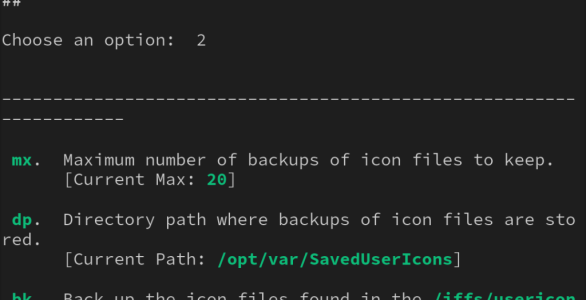
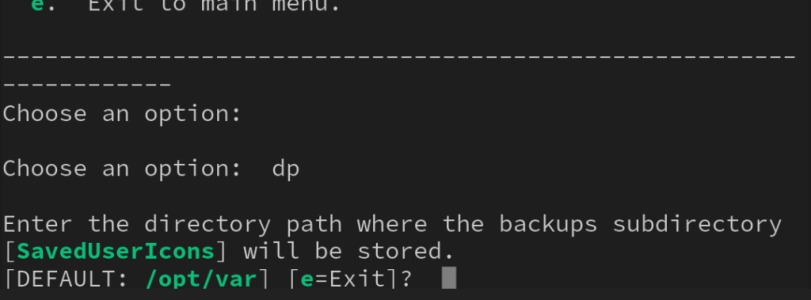
In the CLI go option 2 > dp
Mine is set to the default selected by YazDHCP when the external drive is already present.
1000048077.png

1000048078.png
You need to set the location of the "SavedUserIcons" subdirectory, not the full location of the backup file.
You may need to make a backup to establish this subdirectory.
 
Last edited:
@Ripshod

At that point I had to choose an existing folder. Perhaps I used the wrong squence in installation order?

But now it is working as expected: I can switch easier between stable and betas with a "clean" install if needed.

Thanks for your time and patience!
 
I have DHCP reservations for devices .2 to .99 (I aligned device types like cams, AV equip, mobile devices, Alexa, etc based on IP number).

Most, not all, of that .2 to .99 range has Reservations in the system. I want the router to honor those existing Reservations, while only handing out a small range to new clients, limiting to .100 to .102 so I can tightly control things.

When I set the DHCP pool (Starting/Ending) .100 to .102, will completely stops giving out IPs, even to those that have Reservations.
If I'm understanding your setup, it should work as described - assuming that the subnet mask (e.g. 255.255.255.0) defined for the subnet in question includes the range of IP addresses you're talking about.

As an example, I have one router configuration where the first 29 IP addresses (i.e. *.2 to *.30) have been set aside for manual DHCP reservations, and the IP pool has been reduced to only 32 addresses (i.e. *.31 to *.62).

YazDHCP_IP_Pool_Range.jpg

This setup has been working well for a long time, and all connected clients get their IP address leases without any issues (either via the assigned reservations or dynamically allocated for those without reservations).

I suspect something else may be going on with your particular setup if dnsmasq is not allocating any IP address leases.
 

Latest threads

Support SNBForums w/ Amazon

If you'd like to support SNBForums, just use this link and buy anything on Amazon. Thanks!

Sign Up For SNBForums Daily Digest

Get an update of what's new every day delivered to your mailbox. Sign up here!
Back
Top