What's new

Zen WiFi BT10 wifi standarts questions

JamiryoFC

Occasional Visitor
Hi everyone,

I’m running a dual-node ASUS ZenWiFi BT10 AiMesh system with Ethernet (wired) backhaul.
By default the firmware ships with:

  • Smart Connect: ON (single SSID across 2.4/5/6 GHz)
  • Roaming Assistant: ON (RSSI-based disconnect threshold)
  • Wi-Fi Agile Multiband: OFF
  • MLO: ON, but Fronthaul MLO: OFF (client-facing MLO disabled)

My main question is: with Wi-Fi Agile Multiband disabled, does the system still advertise / use any roaming assistance standards like 802.11k / 802.11v / 802.11r (FT), or are those only enabled when Agile Multiband is ON?

More specifically:
  • Do the AP beacons/probe responses still include Neighbor Report (11k), BSS Transition (11v), and/or Fast Transition (11r) capabilities when Agile MB is OFF?
  • Or is roaming handled purely by client-side logic + ASUS features (Smart Connect band steering + Roaming Assistant “kick”) unless Agile MB is enabled?
Secondary question (BT10-specific):
  • Since MLO is enabled but Fronthaul MLO is currently OFF, would enabling Fronthaul MLO typically improve performance/roaming for MLO-capable clients, or could it introduce stability/compatibility issues in an AiMesh setup (even with wired backhaul)?

Any insight (especially from packet captures / ASUSWRT behavior) would be appreciated. Thanks!
 
I ran a full over-the-air beacon/probe capture today (MacBook Air → Wireless Diagnostics → Monitor Mode → Wireshark), and I can confirm that ASUS AiMesh broadcasts 802.11k and 802.11v even when Wi-Fi Agile Multiband (MBO/OCE) is disabled.

Specifically:
  • Neighbor Report (802.11k)present in RM Enabled Capabilities tag
  • BSS Transition Management (802.11v)present in Extended Capabilities tag
  • Fast Transition (802.11r)correctly absent, as expected for WPA2/WPA3-mixed networks
  • MBO/OCE elements → absent, which is normal because WAM = OFF

So ASUS is still doing standards-based roaming assistance (k/v) at the beacon level, and AiMesh handles the steering logic on its own (Smart Connect + Roaming Assistant). WAM simply adds MBO/OCE rules on top, but the essential roaming standards are already active by default.
 
AiMesh roaming still relies on luck because there is no Tx power adjustment per device. The common issue is so called "sticky clients".
 
AiMesh roaming still relies on luck because there is no Tx power adjustment per device. The common issue is so called "sticky clients".
I guess im lucky that never experienced sticky client issue yet. I was using deco x60 just switched to zenwifi bt10. First days i was confused bc deco never had this much detailed ui or settings but now im very hapoy with my decision.
 
Depending on what Deco model some Qualcomm based hardware ones (like X60) have auto-tuning of the mesh system and allow more freedom in Satellite placement. It's in "Easy Button" category product with less settings exposed, but better "mesh" on hardware level than software add-on AiMesh. You get lucky with AiMesh if the Main and Node are at around -65dBm signal level. Your luck reduces significantly if you want more Nodes. It's a matter of opinion which one is the better consumer system. Some like playing with settings, some like set-and-forget. My personal understanding - the better consumer system is set-and-forget.
 
Depending on what Deco model some Qualcomm based hardware ones (like X60) have auto-tuning of the mesh system and allow more freedom in Satellite placement. It's in "Easy Button" category product with less settings exposed, but better "mesh" on hardware level than software add-on AiMesh. You get lucky with AiMesh if the Main and Node are at around -65dBm signal level. Your luck reduces significantly if you want more Nodes. It's a matter of opinion which one is the better consumer system. Some like playing with settings, some like set-and-forget. My personal understanding - the better consumer system is set-and-forget.
I am using ethernet backhaul.
 
It doesn't matter. Your APs have to be at around -65dBm signal level and with AiMesh the only option is moving the nodes further or closer. Otherwise the roaming suffers regardless of 802.11k/v/r support. I can simulate common AiMesh nodes too close issue on my UniFi system just by bumping up the Tx power on the APs. Sticky clients start appearing shortly after. It also has k/v/r support, but the roaming is clients' decision.
 
It doesn't matter. Your APs have to be at around -65dBm signal level and with AiMesh the only option is moving the nodes further or closer. Otherwise the roaming suffers regardless of 802.11k/v/r support. I can simulate common AiMesh nodes too close issue on my UniFi system just by bumping up the Tx power on the APs. Sticky clients start appearing shortly after. It also has k/v/r support, but the roaming is clients' decision.

It doesn't matter. Your APs have to be at around -65dBm signal level and with AiMesh the only option is moving the nodes further or closer. Otherwise the roaming suffers regardless of 802.11k/v/r support. I can simulate common AiMesh nodes too close issue on my UniFi system just by bumping up the Tx power on the APs. Sticky clients start appearing shortly after. It also has k/v/r support, but the roaming is clients' decision.
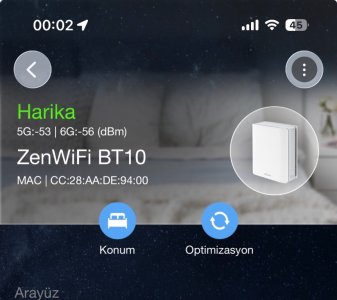
I didnt know that. Disconnected wired backhaul to see dbm between nodes. Here's the result.
 

Attachments

  • IMG_2563.jpeg
    IMG_2563.jpeg
    133.4 KB · Views: 50
They are a bit close to each other, but if it works well for you - don't worry about it. AiMesh doesn't have network tuning options and I guess your wired backhaul is to fixed locations so it is what it is.
 
They are a bit close to each other, but if it works well for you - don't worry about it. AiMesh doesn't have network tuning options and I guess your wired backhaul is to fixed locations so it is what it is.
Thank you so much for all your time and answers. Means a lot for me. Im new to both Asus devices and this forum.
 

Latest threads

Support SNBForums w/ Amazon

If you'd like to support SNBForums, just use this link and buy anything on Amazon. Thanks!

Sign Up For SNBForums Daily Digest

Get an update of what's new every day delivered to your mailbox. Sign up here!
Back
Top