What's new

[ 3006.102.8 alpha Build(s) ] available build(s)

octopus

Part of the Furniture

3006.102.8 (xx-xxx-2026)
- NOTE: There has been important changes to OpenVPN, some
necessary with the update to OpenVPN 2.7. Make
sure you read the details below, especially if
running an OpenVPN server with deprecated features
that have now been removed.

- NEW: Added tls-crypt V2 authentication support to OpenVPN
servers. Don't forget to generate a client key for
each client that will connect to you. The keys can
be generated from the webui, after you have started
the server with TLS control set to "Encrypt Channel
V2". A new button will appear that can generate
a new client key each time you click on it.
- UPDATED: OpenVPN to 2.7.1.
- CHANGED: VPN Status page can now detect running but
non-connected WireGuard client tunnels, and
report them as being in an error state.
- FIXED: Some webui pages may fail to properly show recent
changes after clicking on Apply (an outdated
cached version would be shown instead). Fixed by
disabling ETag support for all .asp files.
- REMOVED: Support for secret static key authentication
from both OpenVPN clients and servers. Deprecated
since 2.7.0, and considered outdated in terms of
security.
- REMOVED: Compression support from OpenVPN server. Update
your client configs if you were using it.
Client support is still available for backward
compatibility with old remote server setups,
but expect it to be removed from OpenVPN 2.8.
If for some reason you absolutely need it for
your server (despite the security implications),
you can still enable it through the Custom settings.
- REMOVED: Some obsolete/non-working OpenVPN settings such
as fast-io (no longer working with 2.7) or data
cipher (were replaced with NCP a few years ago).
 
Last edited:
This build did fix the webui pages may fail to properly show recent changes after clicking on Apply (an outdated cached version would be shown instead). I don't have refresh page or clear browser cache to show changes after hitting apply button. Thanks for fix.
 
No new GPL merge?
RMerlin's response on GPL expectation in the 3006.102.7 release thread.
There are no GPL changes in 3006.102.7 beside the GT-BE19000AI (because my previous release was based on much earlier code for that model) and the RT-BE92U in 102.7_2 (because of the stability issues in the previous GPL for that model). I won't be getting updated GPLs until late April or early May.
 
No noticeable issues so far.
 
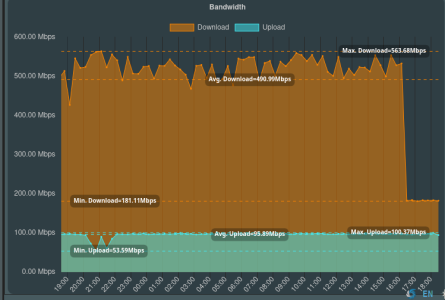
It's not listed in the changelog but I have to ask. Have any changes been made that affect wireguard? My wg speedtests have dropped from >490Mbps to <200Mbps to the same test server.
Selection_034.png
 
I have updated to alpha build and testing tlsv2 on server1.
Is it password on private key? I get password verification failed.

Cannot load private key file server.key
Error: private key password verification failed
Exiting due to fatal error

I'm using self genearted keyset without any password.

EDIT: Self Generated keys on tlsv1 working fine though

@RMerlin
 
Last edited:
I have updated to alpha build and testing tlsv2 on server1.
Is it password on private key? I get password verification failed.


I'm using self genearted keyset without any password.

@RMerlin
The tls-crypt-keys are not password-protected. They must also be generated by OpenVPN --genkey (which is what the router does automatically), not by EasyRSA.
 
The tls-crypt-keys are not password-protected. They must also be generated by OpenVPN --genkey (which is what the router does automatically), not by EasyRSA.
Key is generated with openvpn.
echo "Generating tls-crypt-v2 server key..."
openvpn --genkey tls-crypt-v2-server "$TLS_CRYPT_V2_SERVER"
openvpn --tls-crypt-v2 "$TLS_CRYPT_V2_SERVER" \
--genkey tls-crypt-v2-client "$TLS_CRYPT_V2_CLIENT" "$metadata_b64"

and its complain about: private key password verification failed
 
Your error message complains about server.key. That's your RSA (certificate) Server key, not your tls-crypt-v2 key (which is called secret.key). Your issue is unrelated to tls-crypt.

You cannot use encrypted key/certificates, since you have no way of typing a password to decrypt them as the server starts. Put a decrypted Server key in your key/certificates.
 
Your error message complains about server.key. That's your RSA (certificate) Server key, not your tls-crypt-v2 key (which is called secret.key). Your issue is unrelated to tls-crypt.

You cannot use encrypted key/certificates, since you have no way of typing a password to decrypt them as the server starts. Put a decrypted Server key in your key/certificates.
Sorry with all respect.
I don't say problem is tls-crypt-v2 key I says I'm testing tlsv2.
Problem is private key password verification failed seems password is applyed.
What I remember I haven't set one.
Maby I can decrypted with:
Code:
 openssl rsa -in server_encrypted.key -out server_decrypted.key
 
What I remember I haven't set one.
Maby I can decrypted with:
Code:
 openssl rsa -in server_encrypted.key -out server_decrypted.key
You could do that. After decrypting it, write the decrypted key through the webui in the "Server Key" field. The PEM header should NOT mention "encrypted".
 

Similar threads

Latest threads

Support SNBForums w/ Amazon

If you'd like to support SNBForums, just use this link and buy anything on Amazon. Thanks!

Sign Up For SNBForums Daily Digest

Get an update of what's new every day delivered to your mailbox. Sign up here!
Back
Top